Choosing the right encoder can make or break a corporate livestream. The best options deliver stable video, flexible protocol support, and simple setup for conferences, town halls, and hybrid meetings.
This roundup focuses on streaming encoders for corporate events that balance reliability, input compatibility, and workflow efficiency for real-world business production.
Best 10 Streaming Encoders for Corporate Events Picks for 2026
Compact 4K HDMI Encoder
Magewell Ultra Encode HDMI Plus

- 4K HDMI encoding with loop-through monitoring
- Multi-protocol streaming plus NDI|HX support
- Records while streaming with 128 GB internal storage
Best For: HDMI-based corporate events needing flexible streaming and recording
SDI Streamer
Blackmagic Design Streaming Encoder HD

- 12G-SDI input with loop out
- H.264/H.265 streaming up to 1080p60
- Simple dedicated encoder for SDI workflows
Best For: SDI-based corporate livestreams that need a focused 1080p encoder
4K AV-over-IP Encoder
ToVi X2 Network Video Streamer
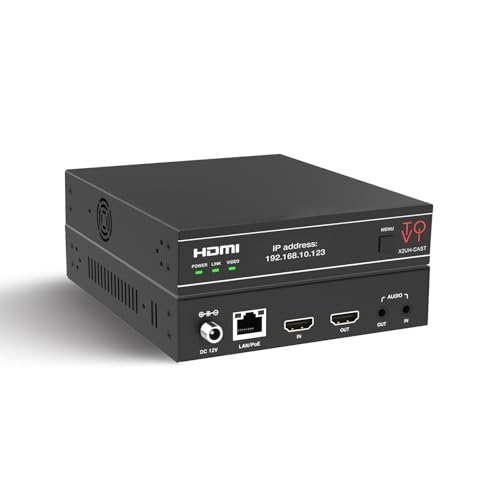
- 4K@60Hz encoding with H.264/H.265
- Triple stream output for multiple destinations
- PoE, rack-mountable, and built for 24/7 use
Best For: Enterprise AV installs needing multi-stream 4K distribution
Dual-Input 4K Encoder

- HDMI and SDI inputs in one device
- Streams to up to six destinations
- Records while streaming with multiple storage options
Best For: Hybrid corporate productions needing flexible input and layout control
4K Multi-Protocol HDMI Encoder
URayCoder 4K HDMI to Ethernet Encoder

- 4K HDMI input with H.265/H.264 encoding
- Up to 4 simultaneous output streams
- Adds text, logos, captions, and timestamps
Best For: Corporate teams streaming branded HDMI-based events to multiple platforms
Broadcast-Grade Backup Encoder
Blackmagic Streaming Encoder 4K

- Streams up to 2160p60 with H.264/H.265
- SDI input with standards conversion and loop out
- Ethernet plus mobile failover for added reliability
Best For: Broadcast-style corporate events that need SDI and redundant connectivity
Compact SDI Dual-Stream Encoder
AVMATRIX SE1117 SDI Streaming Encoder

- Up to 1080p60 encoding with H.264/H.265
- Outputs up to 3 simultaneous video streams
- Adds image/text overlays plus mirror and flip options
Best For: Teams needing an SDI encoder for 1080p corporate live streams
4K Multi-Protocol Flagship
4K HDMI to IP Streaming Encoder

- H.265/H.264 encoding with 4K UHD support
- Multiple protocols and up to 4 simultaneous streams
- Adds text, logos, captions, and timestamps
Best For: Corporate events needing 4K output and branded multi-platform streaming
Compact Browser Setup Pick

- 1080P60 hardware H.265/H.264 encoding
- Browser setup with no software required
- Supports RTMP, RTSP, SRT, HLS, and WebRTC
Best For: Teams that want a compact, easy-to-configure event encoder
Flexible 4K Distribution Option

- 4K UHD input with H.265/H.264 encoding
- Up to 4 simultaneous protocol outputs
- Supports overlays, captions, logos, and timestamps
Best For: Events that need multi-destination streaming and strong protocol coverage
Compact 4K HDMI Encoder – Magewell Ultra Encode HDMI Plus
If you need a versatile option among streaming encoders for corporate events, the Magewell Ultra Encode HDMI Plus is built for HDMI-based production where reliability and format flexibility matter. It supports up to 4K HDMI encoding with loop-through monitoring, multi-protocol streaming, and simultaneous recording, making it a strong fit for presentations, town halls, and hybrid event setups.
Best For: Corporate AV teams that want one compact encoder for HDMI ingest, live streaming, and recording in a single box.
Pros:
- Encodes HDMI up to 4096×2160p30 with HDMI loop-through for local monitoring or pass-through.
- Streams to multiple protocols including RTMP, RTMPS, SRT, NDI|HX, HLS, and TS over UDP/RTP.
- Can stream and record at the same time, with internal 128 GB storage plus USB and network recording options.
- Includes video processing tools like scaling, cropping, de-interlacing, and text/image/clock overlays.
Cons:
- HDMI-focused design may be less suitable if you need native SDI input.
- Mobile connectivity via 4G/5G USB modem is supported but the modem is not supplied.
For event teams that already run HDMI cameras, switchers, or presentation systems, this encoder gives you a lot of flexibility without adding much complexity. Its NDI|HX support and network control options also make it a practical choice for modern IP-based corporate workflows.
SDI Streamer – Blackmagic Design Streaming Encoder HD
For teams comparing streaming encoders for corporate events, the Blackmagic Design Streaming Encoder HD is a focused 1080p solution built around 12G-SDI input and loop out. It supports H.264 and H.265 streaming at up to 1080p60, which makes it a straightforward choice for reliable live delivery from SDI-based production gear.
Best For: Corporate AV setups that already use SDI cameras or switchers and want a simple dedicated streaming encoder.
Pros:
- 12G-SDI input with loop out for clean integration into SDI production chains.
- Supports H.264 and H.265 encoding for 1080p streaming.
- Handles up to 1080p60, which is well suited to standard corporate livestreams.
Cons:
- Limited to 1080p output, so it is not a 4K option.
- Designed around SDI workflows, so HDMI-based setups will need different hardware.
This model keeps the feature set narrow, which can be an advantage if you want a dependable encoder without extra configuration overhead. It is best viewed as a clean, purpose-built tool for SDI-centric event streaming rather than a do-everything platform.
4K AV-over-IP Encoder – ToVi X2 Network Video Streamer
If your priority is distributing video across a corporate venue, the ToVi X2 Network Video Streamer is designed as a professional AV-over-IP encoder with 4K@60Hz support and broad protocol compatibility. Among streaming encoders for corporate events, it stands out for triple stream output, analog audio embed/extract support, and networking features intended for 24/7 operation.
Best For: Enterprise AV teams and control-room installs that need reliable 4K distribution and multi-stream output.
Pros:
- Supports 4K@60Hz encoding with H.264/H.265 compression.
- Can output three streams at once, including 4K@60Hz, 1080p@30, and 720p@5.
- Includes RTSP, RTP, TS, RTMP/RTMPS, plus unicast and multicast support.
- Built for professional deployments with PoE, 24/7 reliability, and rack-mountable hardware.
Cons:
- More specialized for AV-over-IP infrastructure than for simple plug-and-play streaming.
- Its feature set may be more than smaller event teams need for basic webcast use.
For corporate environments with control rooms, large venues, or distributed displays, this unit offers a strong mix of output flexibility and network management features. It is best suited to installations where streaming is part of a broader IP video system, not just a single live broadcast.
Dual-Input 4K Encoder – Magewell Ultra Encode AIO
For buyers evaluating streaming encoders for corporate events, the Magewell Ultra Encode AIO is a flexible choice when you need both HDMI and SDI in one device. It supports 4K encoding, multi-destination streaming, and simultaneous recording, while also offering picture-in-picture or side-by-side layouts for more polished presentations.
Best For: Hybrid corporate productions that need HDMI and SDI inputs, plus advanced layout control.
Pros:
- Accepts HDMI or SDI input, with support for picture-in-picture and side-by-side compositions.
- Encodes up to 4K with H.264 or HEVC compression.
- Streams to up to six destinations using RTMP, RTMPS, SRT, NDI|HX2/HX3, HLS, and TS over UDP/RTP.
- Can stream and record at the same time, with SD card, USB, or network drive storage.
Cons:
- More complex than a basic encoder because of its dual-input and layout features.
- Rack-mount-oriented design may be more than some small portable setups need.
This model is a strong fit if your corporate event workflow changes often and you want one encoder that can handle different source types. The combination of input flexibility, NDI support, and recording options makes it a practical centerpiece for hybrid productions.
4K Multi-Protocol HDMI Encoder – URayCoder 4K HDMI to Ethernet Encoder
If you need a flexible option among streaming encoders for corporate events, this HDMI encoder is built for multi-platform live production with 4K input support and broad protocol compatibility. It can push multiple streams at once, add branding elements like logos and captions, and work without a dedicated encoding PC.
Best For: Corporate teams that want a compact 4K HDMI encoder for branded, multi-platform event streaming.
Pros:
- Supports 4K UHD input up to 30fps and 2K/lower resolutions up to 120fps.
- Compatible with HTTP, RTSP, RTMP(S), SRT, HLS, UDP, WebRTC, TRTC, and more.
- Can output up to 4 streams and push to platforms like YouTube, Facebook, Twitch, and Vimeo.
- Supports static text, scrolling captions, logos, timestamps, and basic image adjustments.
Cons:
- Uses HDMI input, so it is best suited to HDMI-based sources rather than SDI workflows.
- 4K is limited to 30fps, not 60fps.
- Feature depth may be more than needed for simpler one-platform events.
Overall, this is a strong pick if your corporate event needs branding flexibility and simultaneous delivery to multiple destinations. The built-in protocol support and easy setup make it practical for smaller teams that still want a polished stream.
Broadcast-Grade Backup Encoder – Blackmagic Streaming Encoder 4K
For corporate events where reliability matters most, this streaming encoder for corporate events stands out with 12G-SDI input, automatic standards conversion, and built-in network failover. It is designed to stream directly without a separate encoding PC, while also supporting captions, timecode, and remote control features.
Best For: Broadcast-style corporate productions that need SDI workflows, failover internet, and on-device control.
Pros:
- Supports HD and Ultra HD streaming up to 2160p60 in H.264 and H.265.
- 12G-SDI input with loop output and Teranex-powered standards conversion.
- Ethernet plus 5G/4G mobile tethering with automatic failover.
- Includes closed caption support, timecode passthrough, REST API control, and webcam outputs.
Cons:
- Geared toward SDI setups, so it may be less convenient for HDMI-only sources.
- More broadcast-focused than a basic plug-and-stream device.
- Its feature set may be more than small, informal corporate streams require.
This is the most production-ready option here, especially if your team already works with SDI cameras or needs failover for critical live sessions. The added control and accessibility features make it a strong fit for professional event environments.
Compact SDI Dual-Stream Encoder – AVMATRIX SE1117 SDI Streaming Encoder
If you want a practical streaming encoder for corporate events with SDI input and multi-platform delivery, the AVMATRIX SE1117 keeps things straightforward. It supports up to 1080p60 encoding, multiple protocols, and simultaneous output to several destinations, while also offering image and text overlay tools.
Best For: Corporate teams that need a compact SDI encoder for 1080p live streaming and overlays.
Pros:
- Encodes up to 1080p60 with H.264 and H.265 support.
- Supports up to 3 simultaneous video streams for multi-platform delivery.
- Compatible with HTTP, RTSP, RTMP, RTMPS, SRT, UDP, RTP, and multicast.
- Includes HDMI loop-out plus image/text overlay and mirror or upside-down image options.
Cons:
- Limited to 1080p rather than 4K.
- Best suited to SDI workflows, not HDMI-centric setups.
- Fewer advanced production features than higher-end broadcast encoders.
This encoder makes sense when you need dependable SDI streaming without moving into a more complex broadcast system. Its combination of overlays, loop-out, and multi-stream support gives event teams useful flexibility at a manageable scale.
4K Multi-Protocol Flagship – 4K HDMI to IP Streaming Encoder
If you need streaming encoders for corporate events that can handle high-resolution presentations, this 4K HDMI encoder is built for flexible live distribution. It supports H.265/H.264 encoding, multiple output protocols, and branded overlays, making it a strong fit for polished event streams and multi-platform delivery.
Best For: Corporate teams that want 4K streaming with broad protocol support and customizable branding.
Pros:
- Supports 4K UHD input up to 30fps, plus up to 120fps at 2K and lower resolutions
- Outputs multiple protocols including RTSP, RTMP(S), SRT, HLS, HTTP, UDP, WebRTC, and more
- Can add static text, scrolling captions, logos, and timestamps for event branding
- Includes HDMI embedded audio and line-in audio support with adjustable sound quality
Cons:
- Advanced feature set may be more than small teams need for simple one-platform streaming
- Setup is designed to be straightforward, but it still assumes some familiarity with streaming configuration
Overall, this encoder is a strong choice when the event needs professional image quality, multiple delivery options, and on-screen branding. It is especially useful for organizations that want one device to feed several destinations without extra hardware.
Compact Browser Setup Pick – 1080P60 HDMI Live Encoder
For streaming encoders for corporate events where simplicity matters, this 1080P60 unit keeps the setup process approachable. It offers hardware H.265/H.264 encoding, broad protocol support, and browser-based configuration, which is helpful when you want to go live without installing extra software.
Best For: Event teams that want a compact encoder with easy browser setup and dependable 1080P60 streaming.
Pros:
- Hardware encoding supports 1080P60 with H.265/H.264 compression
- Browser-based setup requires no PC software or drivers
- Supports RTMP(S), RTSP, SRT, HLS, WebRTC, UDP, HTTP, and more
- Includes HDMI embedded audio plus external 3.5mm input and OSD overlays
Cons:
- Resolution is limited to 1080P60 rather than 4K
- Basic networking knowledge is recommended for advanced streaming setups
This model makes sense when reliability and ease of deployment matter more than ultra-high resolution. Its compact size and straightforward browser access make it practical for corporate meetings, signage, and recurring event setups.
Flexible 4K Distribution Option – 4K HDMI to IP Network Encoder
If your priority is flexible distribution, this encoder fits the streaming encoders for corporate events category well. It combines 4K HDMI support, H.265/H.264 encoding, and a wide list of IP streaming protocols so one box can feed live platforms, internal systems, and monitoring workflows.
Best For: Corporate live events that need broad protocol compatibility, 4K support, and easy stream branding.
Pros:
- Supports 4K UHD input with H.265/H.264 dual encoding
- Compatible with RTSP, RTMP(S), SRT, HLS, HTTP, WebRTC, UDP, ONVIF, and more
- Can output up to 4 streams with different protocols at the same time
- Supports text, scrolling captions, logos, timestamps, and video adjustments
Cons:
- Feature depth may be more than needed for simple single-destination streaming
- Like other pro encoders, it is best suited to users who can manage network-based streaming settings
As a corporate-event encoder, this model stands out for versatility rather than minimalism. It is a good fit when the same presentation needs to reach multiple platforms or internal viewers with consistent branding.
How We Picked the Best Streaming Encoders for Corporate Events
We looked for encoders that are practical for business livestreaming, with an emphasis on dependable operation, broad protocol support, and input options that fit common corporate AV setups. Priority went to models that support live streaming, recording, and network-friendly output formats such as RTMP, SRT, HLS, and WebRTC where applicable.
We also favored products with professional features like HDMI or SDI inputs, loop-through outputs, dual-input or mixed-source workflows, NDI|HX support, and PoE or Ethernet-based deployment for cleaner installations.
Quick Comparison
For straightforward single-camera streaming, compact HDMI units are usually the easiest choice. If your venue already uses broadcast-style cameras or switchers, SDI-based models tend to integrate better. For more advanced streaming setups, dual-input and multi-protocol encoders offer greater flexibility for switching between platforms, backup delivery, and higher-production corporate events.
Key Buying Factors for Streaming Encoders for Corporate Events
Input Type and Signal Compatibility
Match the encoder to your source gear first. HDMI works well for cameras, laptops, and presentation systems, while SDI is better for longer cable runs and professional video workflows. If your event team moves between venues, a model with multiple input options can reduce setup issues.
Protocol Support
Protocol support determines where and how you can stream. RTMP is still common for platforms and CDNs, while SRT is valuable for reliability over less predictable networks. HLS, RTSP, UDP, and WebRTC can be useful for internal distribution, low-latency viewing, or specialized corporate applications.
Resolution, Codec, and Latency
For executive meetings and large events, 1080p is often sufficient, but 4K support can be useful for future-proofing and high-detail presentations. H.264 remains widely compatible, while H.265 can reduce bandwidth use when supported. If audience interaction matters, pay attention to low-latency performance rather than resolution alone.
Installation and Workflow Features
Features like PoE, loop-through, recording, NDI|HX, and mobile/network connectivity can simplify deployment. These extras matter most when you need fast setup, backup recording, or a clean integration into a corporate AV network.
Who Should Buy Which Streaming Encoders for Corporate Events?
If you need a simple, dependable setup for presentations or town halls, choose a compact HDMI encoder with strong platform support. If your environment is more professional or venue-based, SDI or dual-input models are better for flexibility and signal stability. Teams that run recurring hybrid events should prioritize Streaming Encoders for Corporate Events with multi-protocol output, recording, and network features that reduce troubleshooting and speed up production.
In short, the best choice depends less on raw specs and more on how your team captures video, delivers streams, and manages reliability on event day.