Wireless video receivers can simplify live production by sending camera or computer video to a capture device, monitor, switcher, or multiple displays without relying on long HDMI cables.
Our 2026 roundup covers ten systems with different strengths, from UVC-ready kits for streaming workflows to long-range HDMI extenders for studios, events, classrooms, and multi-room setups.
Best 10 Wireless Video Receivers for Live Streaming Picks for 2026
Best for Low-Latency Streaming
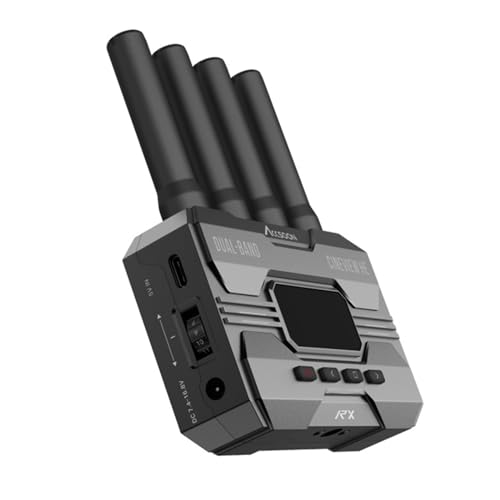
- Dual-band 2.4/5GHz transmission
- Up to 1,200-foot stated range
- UVC output for OBS and YouTube
Best For: Long-range camera monitoring and direct computer streaming
Best for Multi-TV Expansion

- One transmitter with two receivers
- 1080p at 60Hz output
- Pre-paired plug-and-play setup
Best For: Presentations and events using two simultaneous displays
Best for Manual Channel Control

- 20 manually adjustable channels
- UVC output and HDMI loop-out
- Up to five receivers supported
Best For: Full HD live production in interference-prone environments
Best for Simple Screen Mirroring

- Plug-and-play wireless mirroring
- 1080p at 60Hz support
- Adapters for HDMI and USB-C devices
Best For: Portable presentations, home entertainment, and basic screen sharing
Best Silent Monitoring Pick
SYNCO XVision Wireless HD System

- Fanless 2W operation for quiet sets
- 300m 1080p/60fps transmission
- Supports up to nine monitoring endpoints
Best For: Silent productions and collaborative camera monitoring
Best Multi-Receiver System
BovBox WL-900S Wireless HDMI Kit

- One transmitter supports up to four receivers
- 1080p/60Hz output with under 0.06s latency
- Loop-out, IR remote, and flexible power options
Best For: Events and productions sharing one feed across multiple screens
Best Long-Range Value
Vrriis WL081 Wireless HDMI Extender

- Claimed 1300-foot open-field range
- 1080p/60Hz output with 0.05s latency
- Loop-out and IR remote control included
Best For: Long point-to-point links in clear or lightly obstructed spaces
Long-Range Pro Pick
Synco Xvision 300m Wireless HDMI System

- 1080p/60fps transmission up to 300m
- 40ms latency for responsive monitoring
- HDMI loop-out and SYNCO Link App support
Best For: Professional live streams, events, and film production
Compact Plug-and-Play Pick
ZOCIBIHI Wireless HDMI Streaming Kit

- Automatic pairing without an app
- 1080p output with 4K source compatibility
- Compact design with included adapters
Best For: Portable presentations and simple streaming setups
Multi-Display Range Pick
Vrriis 1300ft Wireless HDMI System

- Up to 1300ft open-field transmission claim
- 1080p/60Hz with 0.05-second latency
- Loop-out, dual HDMI output, and IR support
Best For: Large venues and multi-screen monitoring
Best for Low-Latency Streaming – CineView HE Receiver
For creators comparing wireless video receivers for live streaming, the Accsoon CineView HE stands out for its dual-band 2.4GHz and 5GHz transmission, low latency, and built-in UVC output. It can send received footage directly to a computer for platforms such as OBS or YouTube without requiring a separate capture device.
Best For: Camera operators and small production teams that need long-range 1080p monitoring and direct computer streaming.
Pros:
- Dual-band transmission is designed to improve stability and reduce interference.
- Up to 1,200 feet of stated transmission distance with latency below 0.06 seconds.
- UVC output supports computer-based streaming without an additional capture device.
- One transmitter can connect with up to four receivers or mobile devices.
Cons:
- This listing is for the receiver only.
- A USB-C cable for UVC connection is user-provided.
- Its stated video capability is Full HD 1080p at 60fps rather than 4K output.
The CineView HE is a strong fit when streaming workflow simplicity and responsive monitoring matter more than ultra-high-resolution output. Confirm that you already have a compatible transmitter and USB-C cable before ordering.
Best for Multi-TV Expansion – G9R Pro Wireless HDMI Kit
Among wireless video receivers for live streaming and presentation setups, the G9R Pro is designed for sending one HDMI source to two displays at the same time. Its pre-paired transmitter and receivers offer a straightforward, app-free setup for laptops, TV boxes, monitors, and other HDMI output devices.
Best For: Meetings, church services, sports events, and presentations that need simultaneous output to two screens.
Pros:
- Includes one transmitter and two receivers for dual-screen expansion.
- Supports 1080p at 60Hz with stated latency of about 0.1 seconds.
- Pre-paired, plug-and-play operation requires no app, driver, software, Wi-Fi, or Bluetooth.
- Includes a USB-C-to-HDMI adapter for newer laptops.
Cons:
- The transmitter must connect to an HDMI output device, not directly to a TV.
- The transmitter supports 1080p output only, despite 4K decoding support on the receiver.
- The stated 165-foot range applies to open areas; walls or ceilings can reduce it to about 50 feet.
This kit is better suited to multi-display distribution than camera-focused production. Check your source device’s output resolution and plan for an external 5V/1A power supply for stable operation.
Best for Manual Channel Control – Vrriis Wireless Video System
The Vrriis system is a practical option for shoppers seeking wireless video receivers for live streaming with more control over interference. It combines 20 manually selectable channels, UVC output for computer streaming, HDMI loop-out monitoring, and support for multiple power options.
Best For: Live productions that need channel selection, local camera monitoring, and flexible battery or USB-C power.
Pros:
- Offers 20 adjustable channels with a display for signal strength and interference.
- UVC output works with computer streaming platforms such as OBS without a separate capture device.
- Supports up to 1,500 feet line-of-sight range and approximately 0.05-second latency in stated conditions.
- Can use NP-F batteries, USB-C power, or adapters.
Cons:
- Walls, metal, brick, and glass can significantly reduce coverage.
- Batteries are not included.
- Adding more receivers can reduce the transmission distance.
With its channel controls and loop-out connection, this system is particularly useful where wireless congestion or on-camera monitoring is a concern. Its 1080p ceiling makes it a Full HD solution rather than a 4K workflow.
Best for Simple Screen Mirroring – Wireless HDMI 4K Kit
For basic presentations, home entertainment, and casual streaming, this wireless HDMI kit provides a simple way to mirror video and audio from a laptop, camera, phone, or other HDMI source to a display. It supports 1080p at 60Hz and includes adapters for several compact devices.
Best For: Users who want an easy, portable connection from common HDMI or USB-C devices to a TV, monitor, or projector.
Pros:
- Plug-and-play setup requires no app or driver.
- Supports 1080p at 60Hz and 3D content.
- Includes mini HDMI and USB-C-to-HDMI adapter accessories.
- A receiver can match up to eight transmitters for switching between source devices.
Cons:
- The stated 165-foot range can fall to about 3–5 meters through cement walls.
- The included package does not include a 5V/2A charger.
- Despite the product title, the supplied notes specify 1080p at 60Hz output.
This is a convenient general-purpose mirroring kit, but it is less specialized for professional live production than systems with UVC streaming output or dedicated channel management. Verify your device’s connector and arrange suitable power before setup.
Best Silent Monitoring Pick – SYNCO XVision Wireless HD System
For creators comparing wireless video receivers for live streaming, the SYNCO XVision emphasizes quiet operation, low delay, and long-range 1080p monitoring. Its fanless design and compact build make it especially practical for interviews, weddings, live music, and mobile camera rigs.
Best For: Silent live productions, multi-camera monitoring, and mobile crews that need responsive 1080p video transmission.
Pros:
- Fanless 2W design helps avoid adding unwanted operating noise to recordings.
- Up to 300m transmission at 1080p/60fps is suited to large events and outdoor shoots.
- Approximately 40ms latency supports responsive monitoring for moving subjects and manual focus work.
- Receiver supports real-time monitoring for up to nine endpoints, while the transmitter offers HDMI loop-out.
Cons:
- NP-F battery is not included.
- The system is intended for monitoring endpoints rather than full remote production control.
The SYNCO is a strong choice when silent operation and collaborative monitoring matter more than an all-in-one streaming workflow. USB-C power, auto-memory pairing, and a color display also help simplify setup in the field.
Best Multi-Receiver System – BovBox WL-900S Wireless HDMI Kit
The BovBox WL-900S is a practical option for shoppers seeking wireless video receivers for live streaming across multiple displays. It supports 1080p/60Hz output, offers a local loop-out connection, and can distribute one source to as many as four receivers for events, churches, presentations, or production teams.
Best For: Live events, church presentations, outdoor shoots, and teams that need the same camera feed on multiple screens.
Pros:
- Plug-and-play operation requires no apps, Bluetooth, Wi-Fi, or drivers.
- Supports one transmitter with up to four receivers for shared monitoring.
- Provides 1080p/60Hz output with under 0.06 seconds of stated latency.
- NP-F battery and USB-C power options support extended event use.
Cons:
- Range decreases from 820 feet with one receiver to 623 feet with four receivers.
- The supplied notes list an audio input, but do not specify the connector beyond the product description.
- At approximately 1 kg, it is less lightweight than compact single-link systems.
Choose the WL-900S when distribution to several viewers is central to your setup. Its loop-out and IR remote add useful local and remote-control flexibility, while the 250m single-receiver range covers many venue layouts.
Best Long-Range Value – Vrriis WL081 Wireless HDMI Extender
For buyers evaluating wireless video receivers for live streaming, the Vrriis WL081 focuses on simple Full HD transmission over long distances. It combines 1080p/60Hz support, loop-out monitoring, IR remote control, and a claimed 1300-foot open-field range for cameras, laptops, projectors, and other HDMI sources.
Best For: Point-to-point streaming, church projection, conferences, and setups needing a long open-field connection.
Pros:
- Plug-and-play design requires no software installation.
- Supports 1080p/60Hz video with a stated 0.05-second latency.
- Transmitter loop-out allows an additional local monitor.
- IR cable and remote control can help operate the HDMI source from the display location.
Cons:
- The 1300-foot maximum range is specified for open fields; walls, metal, brick, and glass can reduce coverage.
- Transmission distance decreases as additional receivers are added.
- The supplied details describe support for up to five receivers but also list a maximum supported-device count of two, so multi-receiver compatibility should be confirmed before purchase.
The WL081 is appealing when maximum stated range and straightforward installation are priorities. Its performance is likely most predictable in a clear point-to-point path, while indoor or obstructed venues may require more conservative expectations.
Long-Range Pro Pick – Synco Xvision 300m Wireless HDMI System
For demanding wireless video receivers for live streaming, the Synco Xvision emphasizes long-range 1080p video, low latency, and professional monitoring features. It supports 1080p at 60fps across up to 300 meters, with HDMI input, output, and loop-out options for flexible production setups.
Best For: Live streams, large events, film production, and multi-camera or remote-camera monitoring where long range and real-time feedback matter.
Pros:
- Transmits 1080p/60fps up to 300 meters under suitable conditions.
- 40ms latency supports responsive real-time monitoring.
- HDMI dual input/output and loop-out support flexible signal routing.
- Low-power, fanless design helps minimize heat and operating noise.
Cons:
- Its professional feature set may be more than casual users need.
- The stated range depends on the shooting environment and signal conditions.
- App-based monitoring and image tools add setup complexity compared with basic kits.
The large status display, automatic pairing memory, and SYNCO Link App make this a strong choice for creators who need more than simple cable replacement. Its combination of range, latency, and production controls is especially useful for organized live-streaming workflows.
Compact Plug-and-Play Pick – ZOCIBIHI Wireless HDMI Streaming Kit
This compact kit is a practical option among wireless video receivers for live streaming when portability and simple installation are priorities. Its transmitter and receiver automatically pair, support 1080p output, and use a built-in dual-band 5G Wi-Fi design for wireless video and audio transmission.
Best For: Portable presentations, classroom setups, home entertainment, and straightforward laptop, camera, TV, or projector connections.
Pros:
- Automatic pairing provides a no-app, plug-and-play setup.
- Supports smooth 1080p transmission and 4K source-device decoding with 1080p output.
- Compact design and included adapters improve portability and compatibility.
- Can reach up to 165 feet in open conditions.
Cons:
- Walls and obstacles can reduce the effective range to about 50 feet.
- Requires a 5V/2A power connection for operation.
- It is designed for basic point-to-point use rather than advanced production routing.
With HDMI-to-USB-C and Mini HDMI adapters included, this kit is convenient for users moving between common devices. It is best viewed as an easy wireless display link rather than a full-featured professional live-production system.
Multi-Display Range Pick – Vrriis 1300ft Wireless HDMI System
The Vrriis system stands out among wireless video receivers for live streaming with its claimed 1300-foot open-field range, loop-out, and multi-display support. It delivers 1080p at 60Hz with approximately 0.05-second latency and includes IR support for controlling the source device remotely.
Best For: Large venues, sports viewing, event monitoring, and setups that need local and remote screens at the same time.
Pros:
- Claims up to 1300 feet of 1080p transmission in an unobstructed field.
- 0.05-second latency is suitable for real-time games and sports programs.
- Transmitter loop-out and receiver dual HDMI outputs support multiple screens.
- Supports NP-F batteries, USB-C power, adapters, and portable power banks.
Cons:
- Walls, metal, brick, and glass can significantly reduce signal coverage.
- NP-F batteries are not included.
- Adding receivers can reduce the available transmission distance.
IR extension adds useful remote-control flexibility, while the range of power options helps adapt the system to field work. Its strongest advantage is routing one HDMI source to local and remote displays, provided the installation has a clear signal path.
How We Picked the Best Wireless Video Receivers for Live Streaming
We compared these systems by examining their stated resolution, refresh rate, transmission distance, latency, connectivity, receiver count, and streaming compatibility. We also considered practical features such as UVC output, HDMI loop-out, manual channel selection, audio support, dual-band operation, and plug-and-play setup.
Wireless specifications are typically measured in open or ideal conditions. Walls, crowded Wi-Fi networks, metal equipment, and other 2.4GHz or 5GHz devices can reduce range and stability, so real-world performance may be lower than the advertised maximum.
Quick Comparison
- Best for direct streaming: Choose a receiver with UVC output if you want a computer to recognize the video feed like a webcam or capture source.
- Best for long distances: Long-range HDMI kits suit venues, classrooms, stages, and production spaces where cabling is difficult.
- Best for multiple displays: Systems supporting one transmitter and several receivers can distribute a source to multiple TVs or monitors.
- Best for flexible installations: Look for HDMI loop-out, manual channel selection, dual-band support, and separate audio connections.
Key Buying Factors for Wireless Video Receivers for Live Streaming
Resolution, Frame Rate, and Latency
Confirm that the transmitter and receiver support the resolution and frame rate your camera, laptop, or switcher actually outputs. Full HD at 60Hz is often the practical sweet spot for live streaming. Low latency matters for interviews, monitoring, gaming, and camera operation; a small delay may be acceptable for a remote display but distracting when talent must react to on-screen action.
Streaming and Connection Compatibility
UVC output is valuable when connecting directly to streaming software on a computer, while standard HDMI output is better for monitors, televisions, switchers, and capture cards. Check whether the kit requires a separate capture device, supports your camera’s HDMI format, and includes the appropriate cables and power supplies.
Range, Interference, and Reliability
Advertised range should not be treated as a guaranteed indoor distance. For dependable production, prioritize clear line of sight, selectable channels, dual-band operation, and stable power. A shorter-range system with consistent performance can be more useful than a high-range model that struggles in a busy venue.
Audio and Expansion Options
If your workflow includes microphones, mixers, or embedded camera audio, verify how audio is carried and whether an audio input is available. For multi-screen use, confirm the supported number of receivers and whether all displays must use the same source.
Who Should Buy Which Wireless Video Receivers for Live Streaming?
Streamers and small creators should prioritize UVC output, low latency, straightforward setup, and 1080p60 support. Photographers and camera operators may prefer a compact HDMI transmission system with reliable monitoring and minimal delay. Event, classroom, and corporate users should focus on range, channel management, loop-out, and receiver expansion. Home entertainment and presentation users can usually choose a plug-and-play HDMI kit, provided its resolution, distance, and display compatibility match the installation.
Before buying, check the exact port types, power requirements, supported HDMI signal formats, and regional product documentation. Those details often determine whether a wireless video system works smoothly with the rest of your live-streaming setup.