Reliable drive duplication helps small businesses deploy systems, replace failing storage, and sanitize retired drives without tying up a workstation. The right standalone duplicator can also make repeat jobs faster and more consistent.
We selected 10 models spanning compact dual-bay docks, high-capacity tower duplicators, SATA and NVMe support, and built-in erasing features. Use the guide below to match capacity, speed, compatibility, and security features to your workflow.
Best 10 Hard Drive Duplicators for Small Businesses Picks for 2026
Best Multi-Drive Sanitizer
StarTech 4-Bay HDD/SSD Duplicator

- 1:3 standalone cloning
- NIST-aligned secure erase
- Four-bay USB/eSATA dock
Best For: IT teams handling multiple SATA drives and secure drive disposal
Best Fast Two-Bay Dock
StarTech Dual-Bay SATA Duplicator

- Up to 28 GB/min cloning
- 2.5/3.5-inch SATA support
- Tool-less standalone operation
Best For: Fast 1:1 SATA cloning and drive access
Best Portable Recovery Tool
Vinpower 1:3 HDD/SSD Duplicator

- Compact standalone design
- Read Error Skip for bad sectors
- Smart and raw copy modes
Best For: Field cloning and recovery work involving 2.5/3.5-inch drives
Best Mixed-Interface Cloner

- M.2 NVMe, M.2 SATA, and SATA support
- Configurable cloning modes
- Five erase modes with NIST option
Best For: Mixed-interface SSD migrations and drive sanitization
High-Volume Standalone Pick
Systor SYS307DP 1:7 HDD/SSD Duplicator

- Duplicates up to seven drives simultaneously
- Supports 2.5-inch and 3.5-inch SATA drives
- Includes DoD-compliant sanitization modes
Best For: Businesses handling recurring multi-drive duplication and erasure
Compact Docking Choice
SABRENT EC-HD2B Dual-Bay Cloner

- Clones two SATA drives offline
- Works with 2.5-inch and 3.5-inch drives
- Doubles as a USB 3.0 hard drive dock
Best For: Small offices needing occasional cloning and drive access
Large-Batch Copying Pick
EZ DUPE H11HSATB 1:11 Duplicator
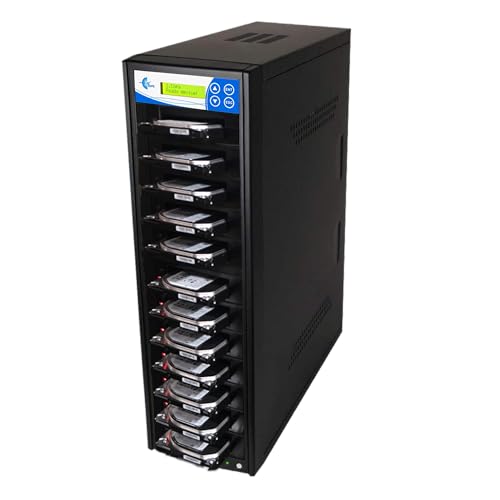
- Copies up to 11 SATA drives at once
- Provides four duplication modes
- Includes seven drive-erasure modes
Best For: Businesses processing large batches of drives with varied copy needs
Best Versatile Pick
Rosewill Triple-Bay Drive Cloner Dock

- Offline cloning without a computer
- Supports M.2, SATA, 2.5-inch, and 3.5-inch drives
- USB 3.2 Gen 2x1 speeds up to 10Gbps
Best For: Small offices needing flexible drive-format support and portable operation
Best High-Volume Option
Systor 1:11 HDD/SSD Duplicator
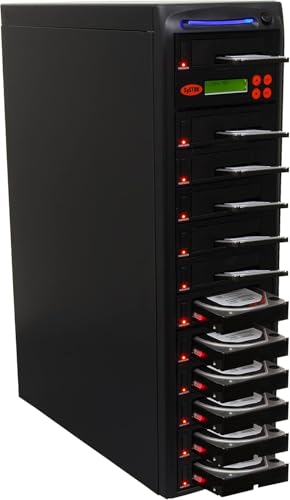
- Duplicates up to 11 SATA drives simultaneously
- Standalone operation with no computer or software
- Includes data-only, whole-drive, and sanitization modes
Best For: Businesses handling recurring batch-copying and drive-erasure tasks
Best Sanitization Features
DupliM 1:5 SATA Drive Duplicator

- Duplicates one drive to five targets standalone
- Provides multiple secure-erasure and DoD seven-pass options
- Metal enclosure supports 3.5-inch SATA drives
Best For: Offices prioritizing drive sanitization alongside routine duplication
Best Multi-Drive Sanitizer – StarTech 4-Bay HDD/SSD Duplicator
For small businesses that need hard drive duplicators for small businesses with added wiping capability, this four-bay StarTech dock combines standalone 1:3 cloning, drive erasure, and USB or eSATA access. It supports 2.5- and 3.5-inch SATA drives, with included adapters for certain IDE drives.
Best For: IT teams that regularly clone, erase, access, or prepare several SATA drives.
Pros:
- Clones up to three target drives without a computer.
- Supports Quick Erase and Secure Erase aligned with NIST SP 800-88 Rev. 1 Purge.
- Four bays also function as a USB or eSATA drive dock.
- Includes IDE adapters, cables, and a universal power adapter.
Cons:
- Target drives must be equal to or larger than the source.
- Sector-by-sector duplication can copy empty sectors and take longer.
- Its larger four-bay format may be more than a very small office needs.
This is a versatile choice when cloning and secure disposal belong in the same workflow. Its four bays and drive-access modes make it especially useful for businesses supporting multiple systems or managing retired storage.
Best Fast Two-Bay Dock – StarTech Dual-Bay SATA Duplicator
Small businesses looking for hard drive duplicators for small businesses may prefer this compact two-bay StarTech dock when straightforward SATA cloning is the priority. It duplicates drives without a PC and can also provide USB-connected access to 2.5- or 3.5-inch SATA HDDs and SSDs.
Best For: Offices and repair desks that need fast, occasional 1:1 SATA drive cloning.
Pros:
- Standalone sector-by-sector copying reaches up to 28 GB/min.
- Supports 2.5- and 3.5-inch SATA drives of any capacity, plus 4Kn drives.
- Tool-less, tray-less design includes drive doors and eject buttons.
- USB 3.2 Gen 2 connectivity supports use as a SATA docking station.
Cons:
- Only supports one source and one target at a time.
- Target disk must be equal to or larger than the source.
- IDE adapters are sold separately.
With its high stated duplication speed and simple two-bay design, this model fits businesses that want a focused SATA cloning tool without a larger multi-drive chassis. It is less suited to mixed-interface workflows or simultaneous multi-target production.
Best Portable Recovery Tool – Vinpower 1:3 HDD/SSD Duplicator
For mobile technicians and small businesses needing hard drive duplicators for small businesses, the Vinpower HDDMINI offers standalone 1:3 duplication in a compact, lightweight enclosure. It supports both 2.5- and 3.5-inch HDDs and SSDs and includes modes designed for accessible-data copying and recovery-oriented work.
Best For: Field technicians who need portable cloning, bad-sector skipping, and drive erasure.
Pros:
- Operates without a PC.
- Smart Copy transfers accessible data, while Raw Mode performs bit-by-bit duplication.
- Read Error Skip can continue copying when bad sectors are encountered.
- Supports 1:3 duplication and a DoD 5220.22-M-style secure erase process.
Cons:
- The supplied specifications list a 90 MB/s media speed.
- It requires access to electrical power in the field.
- Optional CompactFlash support requires an additional interface module.
This model stands out for portability and recovery-focused features rather than maximum throughput. Read-error handling can be valuable when attempting to salvage data from problematic drives, while its three-target design helps streamline small batches.
Best Mixed-Interface Cloner – StarTech M.2/SATA Duplicator
Businesses choosing hard drive duplicators for small businesses with mixed storage types should consider this StarTech dual-bay unit. It clones between M.2 NVMe, M.2 SATA, and 2.5- or 3.5-inch SATA drives without a PC, while also providing configurable duplication and erasure modes.
Best For: IT departments migrating between modern M.2 SSDs and conventional SATA drives.
Pros:
- Supports M.2 NVMe, M.2 SATA, and 2.5/3.5-inch SATA drives.
- Offers System/File, All Partitions, Whole Drive, and percentage duplication modes.
- Includes five erase modes, including Secure Erase aligned with NIST SP 800-88 Rev. 1.
- On-screen display provides drive information, error reporting, and status feedback.
Cons:
- It is a 1:1 duplicator, so it handles only one target at a time.
- Some IDE and mSATA use requires separately sold adapters.
- Its broad feature set may be unnecessary for SATA-only workflows.
This is the most flexible option in the group for businesses supporting newer M.2 systems alongside legacy SATA hardware. Configurable copy and erase modes add control, though the dual-bay 1:1 layout is better for controlled migrations than high-volume duplication.
High-Volume Standalone Pick – Systor SYS307DP 1:7 HDD/SSD Duplicator
For small businesses that need reliable hard drive duplicators for small businesses, the Systor SYS307DP is a standalone option built for simultaneous copying and sanitization. It supports up to seven drives, handles both 2.5-inch and 3.5-inch SATA HDDs and SSDs without adapters, and maintains speeds of up to 300MB per second.
Best For: Small businesses that regularly duplicate multiple SATA drives or need built-in drive erasure.
Pros:
- Copies multiple HDDs or SSDs simultaneously at up to 18GB per minute.
- Works with 2.5-inch and 3.5-inch drives without an adapter.
- Provides standalone operation with no computer or software required.
- Includes data-only or whole-drive duplication plus DoD 5220.22-M-compliant sanitization.
Cons:
- Designed for SATA drives rather than a broad range of storage interfaces.
- Its specialized multi-drive design may be more than occasional users need.
The SYS307DP is a strong fit for businesses processing several drives at once. Its consistent transfer rate, standalone workflow, and included support coverage make it a practical choice for repeat duplication and sanitization tasks.
Compact Docking Choice – SABRENT EC-HD2B Dual-Bay Cloner
The SABRENT EC-HD2B is a straightforward choice for small businesses seeking hard drive duplicators for small businesses without a large tower unit. Its two bays accept standard 2.5-inch or 3.5-inch SATA HDDs and SSDs, while offline cloning lets you copy drives without installing drivers or connecting to a computer.
Best For: Small offices that need occasional two-drive cloning and a USB 3.0 storage dock.
Pros:
- Supports standard 2.5-inch and 3.5-inch SATA hard drives and SSDs.
- Offers offline cloning without drivers.
- Functions as both a duplicator and a hard drive reader through USB 3.0.
- Supports drives up to 10TB and USB 3.0 transfer speeds up to 5Gbps.
Cons:
- Only supports two drives at a time.
- Offline cloning is rated at up to 60Mbps, below its USB 3.0 transfer specification.
- Its compatibility is limited to SATA-based drives.
The EC-HD2B favors flexibility and simplicity over high-volume throughput. It is a sensible fit when a business wants a compact dock for drive access and occasional offline cloning rather than a dedicated multi-target duplicator.
Large-Batch Copying Pick – EZ DUPE H11HSATB 1:11 Duplicator
For teams that need to process many drives in one run, the EZ DUPE H11HSATB is one of the more scalable hard drive duplicators for small businesses in this lineup. It copies up to 11 SATA HDDs or SSDs at 150MB per second per slot and operates independently of a computer or host connection.
Best For: Small businesses with batch duplication, partition-copying, or multi-drive erasure requirements.
Pros:
- Copies up to 11 SATA drives simultaneously at 9GB per minute.
- Supports 2.5-inch and 3.5-inch drives without an adapter.
- Offers four duplication modes, including system, whole-drive, partitioned-area, and percentage copying.
- Includes seven erase modes, including DoD 3-pass and DoD 7-pass options.
Cons:
- Its 150MB-per-second speed is lower than the Systor model’s listed rate.
- It is a standalone duplicator and will not connect to other devices.
- The large 11-target format may be excessive for low-volume workflows.
The H11HSATB is best suited to repeatable, high-volume workflows where multiple targets and flexible copy modes matter. Its broad erase selection also makes it useful when businesses need more than basic drive-to-drive cloning.
Best Versatile Pick – Rosewill Triple-Bay Drive Cloner Dock
For small businesses needing flexible hard drive duplicators for small businesses, the Rosewill RS-N2S-CL combines offline cloning with docking-station functionality. It supports M.2 NVMe and SATA SSDs plus 2.5-inch and 3.5-inch HDDs, and connects over USB 3.2 Gen 2×1 at up to 10Gbps.
Best For: Small offices that need a compact, tool-free duplicator and reader for several drive formats.
Pros:
- Performs offline HDD and SSD cloning without a host computer.
- Supports up to three devices and multiple M.2, SATA, 2.5-inch, and 3.5-inch drive types.
- Offers USB transfer speeds up to 10Gbps in a compact, portable design.
Cons:
- The plastic enclosure may be less rugged than a metal duplicator.
- Its broad compatibility may be more than needed for businesses using only one drive format.
The Rosewill is a practical choice when versatility and portability matter more than high-volume, multi-drive production. Its tool-free design also simplifies routine drive swaps.
Best High-Volume Option – Systor 1:11 HDD/SSD Duplicator
The Systor 1:11 is designed for businesses that need to copy multiple SATA hard drives or SSDs simultaneously. This standalone unit requires no computer or software and maintains speeds of up to 150MB per second, even as the number of loaded drives increases.
Best For: Small businesses with recurring batch-copying or drive-sanitization workloads.
Pros:
- Copies up to 11 SATA HDDs or SSDs simultaneously as a standalone unit.
- Supports whole-drive or data-only duplication at up to 9GB per minute.
- Includes DoD 5220.22-M-compliant data sanitization and hot-swappable functionality.
- Includes one year of parts coverage, three years of labor, and lifetime technical support.
Cons:
- Its SATA-focused design is less versatile than duplicators supporting M.2 drives.
- The listed 3.5-inch form factor may require additional consideration for other physical drive sizes.
With 11 duplication bays and consistent stated transfer performance, the Systor is the strongest fit here for repeatable batch processing. It is best suited to a dedicated work area rather than occasional portable use.
Best Sanitization Features – DupliM 1:5 SATA Drive Duplicator
DupliM 1:5 SSD HDD SATA Duplicator and Hard Drive Sanitizer Stand-Alone Cloner Copier Burner
Check Price On AmazonThe DupliM 1:5 is a standalone SATA duplicator and sanitizer for small businesses that need both drive copying and documented erasure options. It supports five target drives, capacities over 8TB, and transfer rates up to 120MB per second.
Best For: Offices that need a metal, standalone SATA duplicator with multiple secure-erasure options.
Pros:
- Copies one source drive to five targets without a computer.
- Supports 3.5-inch SATA HDDs and SSDs, with 2.5-inch drives possible using optional adapters.
- Offers Secure Erase, one-pass, three-pass, verified three-pass, and DoD seven-pass sanitization.
- Supports FAT16/32, Linux ext2/3/4, and NTFS, with HPA copy support.
Cons:
- 2.5-inch drive adapters are not included.
- At 19 pounds, it is substantially less portable than a compact docking-style duplicator.
- Its transfer rate is listed at up to 120MB per second, below the Systor’s stated 150MB per second.
The DupliM offers a useful balance of five-drive duplication and extensive sanitization controls. Its metal enclosure and standalone design make it better suited to a permanent office workstation than mobile deployment.
How We Picked the Best Hard Drive Duplicators for Small Businesses
We focused on standalone duplicators and cloning docks that can copy drives without relying on a computer. The selection includes compact tools for occasional IT work and higher-capacity systems for managed service providers, repair shops, offices, and organizations handling multiple upgrades at once.
Our comparison considers drive compatibility, source-to-target capacity, rated transfer speed, number of simultaneous targets, offline operation, erasure functions, and connection options. Because real-world performance varies with drive health, interface limits, and data volume, published speeds should be treated as maximum or rated figures rather than guaranteed results.
Quick Comparison
- For occasional upgrades: Dual-bay docks are compact and generally easier to store and operate.
- For repeated cloning: Three-, four-, five-, or seven-target units can reduce hands-on time.
- For larger batches: Eleven-target tower duplicators are better suited to repair centers and deployment work.
- For mixed storage: Choose a model that explicitly supports both SATA and M.2 NVMe drives.
- For compliance workflows: Look for dedicated erasing or sanitizing modes, including selectable overwrite standards where required.
Key Buying Factors for Hard Drive Duplicators for Small Businesses
Drive and Interface Compatibility
Confirm whether the duplicator supports 2.5-inch and 3.5-inch SATA drives, SATA SSDs, M.2 SATA modules, M.2 NVMe drives, or a combination. M.2 SATA and NVMe are different interfaces, so an M.2 slot alone does not guarantee compatibility with both.
Copy Capacity and Workflow Speed
A 1:1 dock may be enough for a single replacement, while a 1:3, 1:7, or 1:11 unit is more efficient for batch deployment. Check whether all target drives must be equal to or larger than the source and whether the system copies the entire disk or only used sectors.
Erasing and Data Handling
If retired drives may contain customer or company information, choose a duplicator with a documented wipe process. Verify the available erase modes and whether the device provides completion confirmation or reporting required by your records policy.
Physical Design and Support
Consider drive access, cooling, power requirements, desk space, included cables, display controls, and warranty coverage. A larger tower may improve throughput but can be excessive for an office that clones only a few drives per month.
Who Should Buy Which Hard Drive Duplicators for Small Businesses?
Small offices and freelancers should favor a dual-bay SATA dock for straightforward one-drive migrations. Internal IT teams handling recurring deployments should consider a multi-target duplicator with clear controls and erasure support. Repair shops and managed service providers will benefit most from seven- or eleven-target systems that reduce queue time. Businesses moving to modern SSDs should select a model with native NVMe support rather than relying on adapters. Finally, organizations with retention or disposal requirements should prioritize sanitizing features and maintain a documented drive-handling process.