Dim rooms, window backlighting, and evening calls can make ordinary webcams look noisy, soft, or washed out. The best webcams for low light use stronger sensors, exposure correction, infrared features, or built-in lighting to preserve usable detail.
This roundup covers practical options for work calls, streaming, classrooms, machine vision, and specialized USB camera builds, with choices ranging from simple plug-and-play models to manual-focus cameras.
Best 10 Webcams for Low Light Picks for 2026
Best Balanced Low-Light Webcam
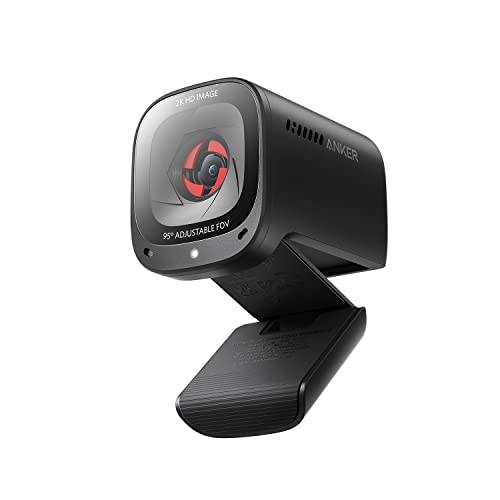
- 2K video with low-light correction
- Adjustable 65°–95° viewing angles
- Dual AI noise-canceling mics and privacy cover
Best For: Home offices and video calls in dim rooms
Best Established 1080p Pick

- 1080p video at 30 fps
- Automatic lighting adjustment and autofocus
- Dual stereo mics plus XSplit VCam license
Best For: Video calls, streaming, and recording
Best With Built-In Lighting

- Large 1/2-inch sensor for low-light detail
- Integrated ring light with four modes
- 4K/30 fps and 1080p/60 fps capture
Best For: Streaming and content creation in variable lighting
Best Night-Vision Specialist
Arducam 1080P Day & Night Camera

- Automatic IR-cut day/night switching
- 850 nm IR LEDs for nighttime imaging
- UVC plug-and-play support across major platforms
Best For: Surveillance, wildlife, and embedded camera projects
Best Ring-Light Versatility
4K Webcam with Adjustable Fill Light

- 4K/30fps and 1080p/60fps video
- Three color temperatures with adjustable brightness
- TOF autofocus, noise-canceling mics, and privacy cover
Best For: Streamers and remote workers needing adjustable low-light illumination
Best Extreme Low-Light Capture
SVPRO 1080P Starlight USB Camera

- 1/1.8-inch sensor with 0.0001-lux minimum illumination
- Manual 3.6–10mm optical zoom lens
- 1080p/30fps UVC plug-and-play connectivity
Best For: Technical and fixed-camera setups in exceptionally dim environments
Best High-Speed Low-Light Detail

- Back-illuminated IMX462 sensor
- Up to 80 fps at 720p
- 98° view with manual focus
Best For: Low-light monitoring and smooth-motion capture
Best Adjustable Zoom
ELP 1.3MP Varifocal Low-Light Webcam

- 2.8–12mm manual varifocal lens
- 0.01-lux low-light rating
- 4x optical zoom and 3m cable
Best For: Close-ups and variable-distance monitoring
Best H.264 Low-Light Option
- Sony IMX323 low-light sensor
- 0.01-lux minimum illumination
- H.264 and MJPEG support
Best For: Surveillance, Raspberry Pi, and embedded video projects
Best Balanced Low-Light Webcam – Anker PowerConf C200 2K
The Anker PowerConf C200 is a practical choice among webcams for low light when you want sharper-than-1080p video without adding a separate lamp. Its low-light correction, autofocus, adjustable field of view, and integrated privacy cover make it well suited to everyday meetings and home-office calls.
Best For: Home-office users who want clear 2K video and flexible framing in dim rooms.
Pros:
- 2K resolution provides detailed video for meetings and recordings.
- Low-light correction helps produce crisp images without extra lighting.
- Choose a 65°, 78°, or 95° viewing angle through software.
- Dual microphones include AI noise cancellation, and the lens has a built-in cover.
Cons:
- It does not include a dedicated light for very dark spaces.
- Compatibility is listed for Windows 7 or later and macOS 10.11 or later.
The C200 is a strong all-around option if low-light correction matters but you also want 2K detail, useful audio features, and privacy protection in a compact USB webcam.
Best Established 1080p Pick – Logitech C920x HD Pro
The Logitech C920x HD Pro remains a straightforward option among webcams for low light, combining Full HD video with automatic lighting adjustment and autofocus. It is designed for calls, streaming, and recording, though it does not include a physical privacy shutter.
Best For: Users who want dependable 1080p video with automatic lighting adjustment and stereo audio.
Pros:
- Full HD 1080p video records and streams at 30 fps.
- Automatic lighting adjustment helps brighten images in low-light settings.
- Autofocus and dual stereo microphones support clear calls and recordings.
- Includes a three-month XSplit VCam license for background effects without a green screen.
Cons:
- No physical privacy shutter is included.
- It offers 1080p rather than 2K or 4K resolution.
Choose the C920x when consistent Full HD performance is enough and you value automatic exposure adjustment, autofocus, and stereo sound more than maximum resolution or a built-in cover.
Best With Built-In Lighting – EMEET S600L 4K Webcam
The EMEET S600L stands out among webcams for low light because it pairs a large 1/2-inch Samsung sensor with an integrated ring light. Its four lighting modes, true 4K capture, and exposure coordination are aimed at creators and streamers who want more control than basic low-light correction provides.
Best For: Streamers and creators who need high-resolution video plus adjustable built-in illumination.
Pros:
- The 1/2-inch sensor is designed to capture more light and detail.
- Supports 4K at 30 fps and 1080p at 60 fps.
- Four light modes and adjustable brightness help manage shadows and color.
- Includes a privacy cover, 360° horizontal rotation, ±15° tilt, and landscape or portrait capture.
Cons:
- The ring light and creator controls may be more than casual callers need.
- Connectivity is USB 2.0, despite the camera’s 4K capability.
The S600L is the most complete low-light setup here for users who want the camera and fill light in one device, along with creator-focused framing and software controls.
Best Night-Vision Specialist – Arducam 1080P Day & Night Camera
The Arducam 1080P Day & Night Vision camera takes a different approach to webcams for low light by using automatic IR-cut switching and 850 nm IR LEDs. Rather than focusing on polished video-call features, this compact USB camera is built for all-day imaging, surveillance, wildlife projects, and other installations where nighttime visibility matters.
Best For: DIY surveillance, Raspberry Pi projects, wildlife monitoring, and narrow installation spaces.
Pros:
- Automatically switches between visible-light and infrared sensitivity.
- 850 nm IR LEDs support imaging in nighttime conditions.
- 2MP sensor delivers up to 1920×1080 video at up to 30 fps in supported modes.
- UVC plug-and-play operation works with Windows, Linux, macOS, Android, and Raspberry Pi setups.
Cons:
- Its board-style design is less suitable for conventional desktop video calls.
- High-resolution 1920×1080 operation is listed at a lower frame rate in the supplied specifications.
- It does not emphasize built-in microphone, privacy, or conferencing features.
The Arducam is the specialized choice for genuine day/night monitoring and embedded projects. Pick it for IR capability and installation flexibility rather than a polished plug-and-play office webcam experience.
Best Ring-Light Versatility – 4K Webcam with Adjustable Fill Light
For shoppers comparing webcams for low light, this 4K model combines an adjustable built-in ring light with autofocus and high-resolution video. Its three color temperatures and rotary brightness control make it practical for video calls, classes, and streaming in changing room conditions.
Best For: Streamers, remote workers, and students who want adjustable lighting and 4K video from one plug-and-play webcam.
Pros:
- Supports 4K at 30fps and 1080p at 60fps.
- Built-in light offers white, natural, and warm color settings with adjustable brightness.
- TOF autofocus and dual noise-canceling microphones support clear video and voice.
- Includes a built-in sliding privacy cover and works with Windows, Mac, and Linux.
Cons:
- The supplied notes do not specify software controls for advanced image adjustment.
- Its 78-degree viewing angle may be less suitable for wide group framing.
This is a flexible choice when low-light performance, flattering built-in illumination, and detailed video matter more than specialized optical zoom. The privacy cover and simple USB setup add convenience for everyday computer use.
Best Extreme Low-Light Capture – SVPRO 1080P Starlight USB Camera
Among webcams for low light, the SVPRO stands out for its starlight-oriented sensor and stated minimum illumination of 0.0001 lux. It records 1080p video at 30fps and uses a manual 3.6–10mm zoom lens, making it better suited to controlled setups than casual plug-and-play video calls.
Best For: Industrial, machine-vision, laser, 3D-printing, security, and other setups where very dim scenes and adjustable framing are priorities.
Pros:
- 1/1.8-inch sensor and 0.0001-lux minimum illumination are designed for challenging low-light conditions.
- Supports 1080p at 30fps with MJPEG and H.264.
- Manual 3.6–10mm optical zoom provides flexible framing.
- UVC plug-and-play compatibility includes Windows, Linux, Mac OS, and Android, with OTG support for USB-C devices.
Cons:
- Manual focus requires adjustment rather than automatic subject tracking.
- It records at 1080p rather than 4K.
- No built-in microphone or lighting feature is listed in the supplied details.
This camera is the specialist option in the group. Its low-light specification and zoom lens favor technical or fixed-camera applications, while users seeking effortless calls may prefer a webcam with autofocus and integrated lighting.
Best Easy 4K Low-Light Setup – Angetube Webcam with Ring Light
The Angetube is a straightforward pick for webcams for low light when you want built-in illumination without giving up 4K resolution. Its three-level ring light, PDAF autofocus, and USB plug-and-play design suit home offices, calls, online classes, and late-night streaming.
Best For: Home-office users and streamers who want quick setup, 4K video, autofocus, and simple front-facing lighting.
Pros:
- Supports 4K at 30fps and 1080p at 60fps.
- Three-level ring light provides soft, even illumination for dim environments.
- PDAF autofocus and dual microphones support clear video and conversations.
- Includes a privacy shutter, USB-A connection, and USB-C adapter.
Cons:
- The ring light has three brightness levels rather than continuously adjustable brightness.
- The supplied notes do not list a manual zoom or wider lens specification.
This model balances image detail and convenience well: the ring light addresses common desk-lighting problems, while PDAF autofocus helps keep the subject sharp. It is a practical all-around choice for users who do not need the SVPRO’s specialized manual zoom setup.
Best High-Speed Low-Light Detail – Arducam IMX462 USB 3.0 Webcam
If you need webcams for low light that also support smooth motion, this Arducam model combines a back-illuminated Sony IMX462 sensor with USB 3.0 connectivity. It records up to 1080p and can reach 80 fps at 720p, while its 98-degree field of view suits conferencing, monitoring, and general video capture.
Best For: Low-light monitoring, conferences, 3D-printer observation, and users who want high frame rates.
Pros:
- Back-illuminated IMX462 sensor is designed for sharper low-light imaging.
- Supports up to 80 fps at 720p for smoother motion.
- Wide 98-degree viewing angle and manual M12 focus provide flexible framing.
- Plug-and-play compatibility with Windows and Linux.
Cons:
- Manual focus requires adjustment rather than automatic focusing.
- Warranty coverage is listed as six months.
Choose this Arducam when low-light clarity and fast video matter more than an all-in-one consumer webcam design. Its compact format and onboard image processing make it a versatile option for PC capture and monitoring.
Best Adjustable Zoom – ELP 1.3MP Varifocal Low-Light Webcam
Among webcams for low light, this ELP camera stands out for its adjustable 2.8–12mm lens and stated 0.01-lux low-light performance. The manual varifocal design provides up to 4x optical zoom, making it useful when you need to frame close-up subjects or vary the camera-to-subject distance.
Best For: Close-up demonstrations, industrial or medical viewing, electronics work, and adjustable-distance monitoring.
Pros:
- 2.8–12mm varifocal lens allows manual zoom and focus adjustment.
- Rated for 0.01-lux low-light illumination.
- Includes a 3-meter USB cable and UVC plug-and-play support.
- Works with Windows, Linux, Mac, Android, and Raspberry Pi systems listed by the manufacturer.
Cons:
- Maximum resolution is 1280×960, below the 1080p models in this roundup.
- Manual zoom and focus take more setup than a fixed-focus webcam.
- Uses USB 2.0 rather than USB 3.0.
This is a practical choice when lens flexibility is more important than compact simplicity or maximum resolution. Its long cable and optical zoom are particularly useful for specialized setups and close-up video.
Best H.264 Low-Light Option – ELP Sony IMX323 USB Webcam
This ELP model is one of the more specialized webcams for low light, pairing a Sony IMX323 sensor with a stated minimum illumination of 0.01 lux. Its 2.8–12mm varifocal lens, H.264 support, and UVC USB 2.0 connection make it suited to surveillance, streaming, robotics, and other embedded video applications.
Best For: Low-light surveillance, Raspberry Pi projects, video conferencing systems, and applications needing H.264 output.
Pros:
- Sony IMX323 sensor and 0.01-lux minimum illumination support low-light use.
- Adjustable 2.8–12mm lens accommodates different working distances.
- Supports H.264 and MJPEG video formats.
- Includes a 3-meter USB cable and supports UVC/USB OTG devices.
Cons:
- Manual focus and exposure require user adjustment.
- USB 2.0 limits connectivity speed compared with USB 3.0 cameras.
- Its specialized design may be less convenient for casual plug-and-play video calls.
Consider this ELP when low-light capability, an adjustable lens, and compressed H.264 video are central requirements. It offers useful flexibility for surveillance and hobbyist hardware projects, though its manual controls favor hands-on setups.
How We Picked These Webcams for Low Light
We focused on cameras that specifically address limited illumination through low-light correction, larger or more sensitive image sensors, infrared night vision, adjustable lenses, or integrated lighting. We also considered connection type, operating-system compatibility, field of view, focus controls, microphone availability, and the intended use case.
Resolution matters, but it is not the only measure of image quality. A well-tuned 1080p camera can look better in a dim room than a poorly exposed 4K model. The strongest choice depends on whether you need a polished conference-call experience, streaming controls, or a specialized camera module.
Quick Comparison
| Best For | Look For | Most Suitable Options |
|---|---|---|
| Work and video calls | Automatic exposure, autofocus, microphone, plug-and-play setup | Anker PowerConf C200, Logitech C920x |
| Streaming | 4K output, built-in light, wide framing, stable USB connection | EMEET S600L, 4K Ring Light Webcam, Angetube 4K |
| Very dark environments | High-sensitivity sensor, IR illumination, or starlight performance | Arducam Day & Night, SVPRO Starlight, Arducam IMX462 |
| Specialized framing | Manual focus and adjustable zoom lens | ELP 1.3MP, ELP Sony IMX323 |
Key Buying Factors for Webcams for Low Light
Sensor Sensitivity and Exposure
Look for larger sensors, low-light sensor designs, or clearly stated low-lux performance. These features can improve brightness and reduce noise, although results still depend on room lighting and camera processing.
Built-In Lighting
A ring light is useful when you want predictable results without adding a separate lamp. Check whether brightness or color temperature is adjustable, and remember that front lighting generally improves faces more effectively than relying on digital correction alone.
Night Vision and Infrared
IR LEDs and automatic IR-cut switching are better suited to surveillance, monitoring, and all-day imaging than natural-looking video calls. Confirm that your software and environment support the intended day/night behavior.
Focus, Lens, and Field of View
Autofocus is convenient for calls, while manual focus and zoom lenses help fixed installations, close-ups, product demonstrations, and machine-vision projects. A wide-angle lens fits more people but may make faces appear smaller.
Resolution and Connectivity
Choose 1080p for efficient everyday conferencing and 4K when you need cropping, detailed demonstrations, or high-resolution recording. Verify USB compatibility, frame-rate requirements, mounting options, and whether the camera works with your preferred conferencing or streaming software.
Who Should Buy Which Webcams for Low Light?
Choose the Anker PowerConf C200 or Logitech C920x for straightforward work calls and general home-office use. They are the most practical category for buyers who value easy setup over specialized controls.
Choose a ring-light 4K model or the EMEET S600L if you stream, teach, record content, or frequently work in rooms where lighting changes. Integrated illumination can provide a more consistent face image.
Choose the Arducam, SVPRO, or ELP models for monitoring, low-light experiments, fixed installations, machine vision, or projects that benefit from manual lenses and sensor-specific behavior. These cameras may require more setup and are less universally polished for ordinary meetings.