Standing presentations demand more than readable text. The right teleprompter keeps your script at eye level, supports natural movement, and helps you maintain audience connection without constantly looking down.
These 10 options cover full-size speech teleprompters, tablet and smartphone rigs, built-in-screen models, and portable setups. Use the guide below to match screen size, stability, compatibility, and portability to your presentation style.
Best 10 Teleprompters for Standing Presentations Picks for 2026
Extended-Range Pick
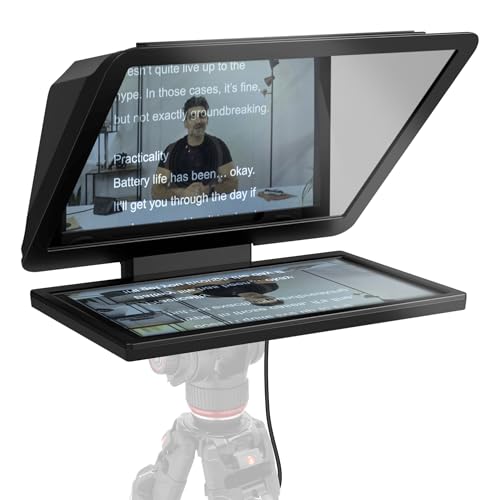
- 15.6-inch Full HD display
- Removable spare-monitor screen
- Works with DSLR, mirrorless, and studio cameras
Best For: Long-distance reading in studio or presentation setups
Professional Stand Pick

- Supports displays up to 17 inches
- Telescopic stand included
- 60/40 beam splitter glass
Best For: Conferences, speeches, broadcasts, and corporate events
Built-In Display Pick

- Built-in 9-inch display
- Shows scripts, chat, or other windows
- Works with cameras, webcams, and smartphones
Best For: Computer-controlled presenting, streaming, and video calls
Portable Tablet Pick

- Reads from up to 10 feet away
- Remote control and iOS/Android app
- Folding aluminum design with case
Best For: Mobile presentations, teaching, vlogging, and live streaming
Best All-in-One Monitor
NEEWER X11 11-Inch Teleprompter
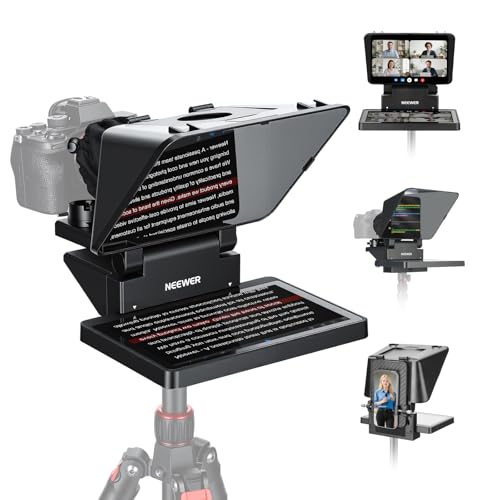
- Built-in 9-inch LCD monitor
- Supports computer display and screen mirroring
- Readable prompting up to 2.5 meters
Best For: Presenters seeking an integrated monitor for livestreams, calls, and standing presentations
Best for Tablet-Based Setups
SMALLRIG 3646 iPad Teleprompter

- Fits tablets up to 11 inches
- Works with 49–95 mm lenses
- Requires a separate 15mm rail system
Best For: Tablet users building a DSLR, mirrorless, or camcorder presentation rig
Best Budget Smartphone Option
A10II Portable Smartphone Teleprompter

- Supports smartphone and DSLR recording
- Includes Bluetooth scrolling remote
- Adds microphones or lights via dual cold shoes
Best For: Phone-based speeches, interviews, livestreams, and video recording
Best for Mobile Walk-and-Talk
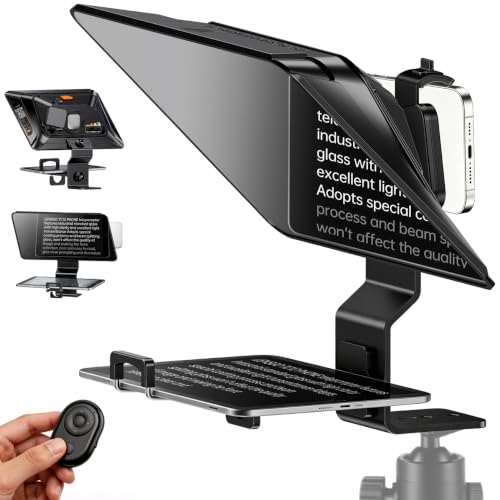
- 14.5-inch HD beam-splitter glass
- Works with phones, iPads, and tablets
- Bluetooth remote with app controls
Best For: Mobile standing presentations and walk-and-talk videos
Best All-in-One Camera Support

- Supports phones, tablets, and DSLRs
- Includes 49–82mm adapter rings
- App imports TXT and DOCX scripts
Best For: Flexible presentation setups using mobile devices or DSLR cameras
Best Compact Foldable Option

- Folds in one second
- Supports phones, tablets, and cameras
- TCQI app with remote scrolling controls
Best For: Portable teaching, interviews, and standing presentations
Extended-Range Pick – Elgato Prompter XL
For standing presentations where you need to read from several feet away, the Elgato Prompter XL combines a full-sized 15.6-inch Full HD display with an extended reading range. Its removable screen can also serve as a spare monitor for conferencing or multitasking.
Best For: Presenters who need comfortable long-distance script reading and a large, versatile display.
Pros:
- 15.6-inch Full HD display is designed for comfortable reading at a distance.
- Removable screen can be used for video conferencing and multitasking.
- Compatible with DSLR, mirrorless, and studio camera setups.
- Voice Sync can scroll scripts at a natural pace with compatible hardware.
Cons:
- At 7.43 pounds, it is less portable than compact teleprompters.
- Voice Sync requires an NVIDIA RTX GPU or Apple M1-or-newer device.
The Prompter XL is a strong choice for standing presentations in studios, classrooms, or other setups where viewing distance matters. Its larger footprint and weight are trade-offs for the readable screen and spare-monitor flexibility.
Professional Stand Pick – Proaim Speech Teleprompter
The Proaim Professional Speech Teleprompter is built for standing presentations, conferences, and broadcasts. Its telescopic stand supports comfortable height positioning, while the 60/40 beam splitter glass helps keep scripts visible without sacrificing a natural line of sight.
Best For: Conference speakers, corporate presenters, and production teams using tablets, laptops, or monitors up to 17 inches.
Pros:
- Supports tablets, laptops, and monitors up to 17 inches.
- Included telescopic stand allows adjustable height positioning.
- 60/40 beam splitter glass provides clear script visibility.
- Designed for conferences, speeches, training, streaming, and broadcast use.
Cons:
- Its 18.5-pound weight makes it relatively demanding to transport.
- Large dimensions may require substantial setup space.
- It is a dedicated professional-style unit rather than a compact travel option.
For presenters who need a freestanding teleprompter at a controlled height, the Proaim offers a suitably professional configuration. The substantial size and weight make it better suited to installed or carefully planned event setups.
Built-In Display Pick – Elgato Prompter
The Elgato Prompter simplifies teleprompting for standing presentations by including its own display, so you do not need a separate tablet or phone screen. It connects to a computer and can also show other windows, making it useful for scripts, calls, and on-camera workflows.
Best For: Presenters, streamers, and video-call users who want a compact computer-controlled teleprompter with a built-in 9-inch display.
Pros:
- Built-in display eliminates the need for a separate tablet or smartphone screen.
- Supports drag-and-drop windows for scripts, chat, and other applications.
- Compatible with DSLR cameras, webcams, smartphones, PCs, and laptops.
- Supports a wide range of cameras and includes Camera Hub customization.
Cons:
- Mac users need free DisplayLink software, and Android users need DisplayLink Presenter.
- The 9-inch screen is smaller than the Prompter XL’s display.
- It requires connection to a PC or Mac for desktop-controlled use.
This is a practical choice when you want a streamlined desk or presentation setup with no extra prompting device. Its built-in screen and multipurpose monitor behavior add convenience, while software requirements should be checked before setup.
Portable Tablet Pick – NEEWER X12 Teleprompter
The NEEWER X12 is a portable option for teleprompters for standing presentations, using an iPad, compatible tablet, or smartphone as the script source. Its adjustable hood, remote control, and app support help presenters control pacing while reading from up to 10 feet away.
Best For: Mobile presenters, online teachers, vloggers, and creators using compatible tablets or phones.
Pros:
- Beam splitter glass offers 75% light transmittance and reading up to 10 feet away.
- Includes an RT-110 remote for pausing, page turns, and speed adjustments.
- Supports smartphones and tablets up to 9.84 by 8.68 inches.
- Collapsible aluminum-alloy design includes a carrying case.
Cons:
- Not compatible with wide-angle lenses; camera lens focal length must exceed 28mm.
- Not compatible with the 12-inch iPad Pro.
- Requires a compatible phone or tablet to display scripts.
The X12 suits presenters who value portability and already own a compatible mobile device. Its lens restrictions and tablet-size limits are important checks, but the remote and folding design make it convenient for mobile presentation work.
Best All-in-One Monitor – NEEWER X11 11-Inch Teleprompter
For teleprompters for standing presentations, the NEEWER X11 is a versatile choice when you want a built-in display rather than a separate tablet. Its 11-inch beam-splitter glass, integrated LCD monitor, and camera, webcam, and cellphone compatibility support presentations, livestreams, and video conferences.
Best For: Presenters who want screen mirroring or a built-in monitor for standing presentations, livestreaming, and video calls.
Pros:
- Built-in 9-inch, 1024 x 768 LCD monitor can display prompts without a separate phone or tablet.
- Supports USB-C computer connection and can function as an external monitor for Windows and macOS.
- 75% light-transmission glass keeps text readable up to 2.5 meters while reducing ghosting.
- Adjustable Arca-type holder and camera support for lenses with threads up to 72 mm.
Cons:
- Voice sync is not supported.
- Some connection methods require driver installation, and screen mirroring is limited to phones with DP protocol.
- Tripod, table stand, and microphone arm accessories are sold separately.
The X11 stands out for its integrated display and broad connection options, but buyers should confirm their computer ports, phone protocol, and support accessories before choosing it.
Best for Tablet-Based Setups – SMALLRIG 3646 iPad Teleprompter
For teleprompters for standing presentations, the SMALLRIG 3646 is designed around an iPad or tablet up to 11 inches. It offers a larger reading surface for camera-based presentations, livestreams, and conferences, provided you already have the required 15mm rail support system.
Best For: Presenters who prefer using an iPad or tablet with a DSLR, mirrorless camera, or camcorder.
Pros:
- Accommodates iPads and tablets up to 11 inches for a spacious prompting display.
- Supports lenses from 49 mm to 95 mm and avoids vignetting at focal lengths of 22 mm or greater.
- SmallGoGo app can extract editable text from PDFs, pictures, Word documents, and TXT files.
- Top flag helps reduce glare and ghosting, while the modular lens hood releases for cleaning.
Cons:
- It is not compatible with smartphones.
- A separately available 15mm LWS baseplate or rail support system is required.
- Recommended reading distance is within 5 meters, or 16.4 feet.
The SMALLRIG is a strong tablet-centered option for longer scripts and professional camera rigs, but its separate rail requirement adds setup cost and complexity.
Best Budget Smartphone Option – A10II Portable Smartphone Teleprompter
For teleprompters for standing presentations, the A10II offers a portable setup centered on a smartphone or tablet app. Its reflective mirror, flexible lens pocket, cold-shoe mounts, and included Bluetooth remote make it useful for speeches, interviews, recording, and live streaming.
Best For: Presenters and creators who want a compact phone-based prompter with remote text controls.
Pros:
- Works with DSLR cameras and smartphones while prompting from a smartphone or tablet app.
- High-reflective, high-transmittance mirror is designed for clearer prompting.
- Included Bluetooth remote controls playback, scrolling speed, and line movement.
- Dual cold-shoe mounts support accessories such as microphones and LED fill lights.
Cons:
- The supplied notes do not specify a maximum reading distance or detailed lens diameter range.
- Prompting depends on a compatible smartphone or tablet app rather than an integrated monitor.
- Its 1.98-pound weight may be less convenient for highly portable setups.
The A10II is appealing when wireless scrolling and phone-based prompting matter most. It is a practical accessory platform, though buyers wanting a built-in display should consider a different design.
Best for Mobile Walk-and-Talk – LENSGO TC12P
For creators comparing teleprompters for standing presentations, the LENSGO TC12P is a practical mobile-first option. Its 14.5-inch HD beam-splitter glass, adjustable holder, and horizontal or vertical shooting support make it suitable for presenters who need to move naturally while maintaining eye contact.
Best For: Smartphone- and tablet-based standing presentations, walk-and-talk videos, Zoom sessions, TikTok content, and vlogging.
Pros:
- Large 14.5-inch glass surface helps make scripts easier to read during longer recordings.
- Supports smartphones, iPads, and tablets up to 7.3 inches in landscape orientation.
- Includes a Bluetooth remote and app support for scrolling, speed control, and mirror mode.
- Quick assembly, adjustable front panel, and anti-glare foam light sealing support flexible setups.
Cons:
- Designed for smartphone and tablet shooting rather than DSLR camera use.
- Not water resistant.
The TC12P stands out when portability and a broad reading area matter more than a studio-style camera setup. Its remote-controlled scrolling can help keep standing presentations hands-free.
Best All-in-One Camera Support – Desview T5
The Desview T5 is a versatile choice for teleprompters for standing presentations when your equipment may change from one shoot to the next. It supports phones, tablets under 11 inches, and DSLR cameras, while its coated glass and adjustable panel help maintain readable scripts across different shooting angles.
Best For: Presenters who alternate between smartphone and DSLR setups for live streams, vlogs, interviews, and recorded presentations.
Pros:
- Compatible with smartphones, tablets under 11 inches, and DSLR cameras.
- Includes adapter rings from 49mm through 82mm for broad camera compatibility.
- Desview app supports TXT and DOCX imports, formatting controls, mirroring, rotation, and countdowns.
- Bluetooth remote provides wireless play, pause, speed, and page-turn control.
Cons:
- Its 0.52 kg weight may be less convenient than a smaller mobile-only model.
- Tablet compatibility is limited to devices under 11 inches.
Choose the T5 if flexibility is a priority. The camera rings, phone/tablet holder, and real-time self-check feature make it well suited to presenters managing varied production workflows.
Best Compact Foldable Option – LENSGO TC7
For buyers seeking compact teleprompters for standing presentations, the LENSGO TC7 combines a foldable design with support for phones, tablets, and cameras. Its coated beam-splitter glass, 45-degree viewing angle, and remote-controlled app make it useful for reading while looking directly toward the camera.
Best For: Portable presentations, online teaching, interviews, live streaming, and creators who need a quickly stowed teleprompter.
Pros:
- Folds in one second for easier carrying and storage.
- Supports smartphones, tablets below 9.7 inches, and camera shooting with adapter rings.
- Works with iOS and Android through the TCQI app for script and scroll controls.
- Supports wide-angle lenses down to 17mm and includes multiple cold shoes for accessories.
Cons:
- The smaller 9.7-inch class screen may show less text than larger models.
- Image-based scripts cannot be resized in the app, according to the supplied notes.
- It is not water resistant.
The TC7 is a strong fit when portability is more important than maximum screen size. Its rapid folding design and accessory mounts make it especially practical for presenters who regularly change locations.
How We Picked the Best Teleprompters for Standing Presentations
We focused on the features that matter most when presenting while standing: viewing height, text readability, beam-splitter clarity, camera and device compatibility, stability, setup time, and portability. The selection includes full-sized speech teleprompters for stages and formal presentations, as well as compact camera-mounted models for classrooms, offices, interviews, and live streaming.
Because standing setups vary widely, no single design is best for everyone. A larger hood and glass generally provide a more comfortable reading area, while compact smartphone and tablet models are easier to transport and position.
Quick Comparison
| Type | Best For | Main Advantage | Potential Trade-Off |
|---|---|---|---|
| Full-size speech teleprompter | Stages and formal presentations | Large viewing area and professional stability | Heavier and less portable |
| Monitor-based teleprompter | Studios and frequent presenters | Bright, consistent on-screen text | Requires more equipment and power |
| Tablet teleprompter | Training, teaching, and office use | Flexible apps and simple script control | Tablet fit and brightness vary |
| Smartphone teleprompter | Travel and mobile video | Compact and quick to deploy | Smaller text area and shorter viewing distance |
Key Buying Factors for Teleprompters for Standing Presentations
Screen Size and Reading Distance
Choose a larger screen when you will stand several feet away or need to scan longer lines quickly. A smaller phone-based unit can work close to the camera, but it may force more eye movement and make long scripts harder to follow.
Height, Stability, and Positioning
The glass should sit close to eye level so you can read naturally without bending your neck. Check whether the unit includes a stand, tripod mount, or compatible support system. For a standing presentation, a stable base is more important than saving a small amount of weight.
Device and Camera Compatibility
Confirm the supported tablet dimensions, smartphone orientation, monitor size, and camera-lens clearance. Adapter rings and adjustable mounts are useful when switching between DSLR, mirrorless, webcam, and phone cameras.
Glass Quality and Text Visibility
Beam-splitter glass affects both readability and image quality. Look for clear, coated glass and enough hood depth to reduce reflections. Your device should also be bright enough to remain legible under presentation lighting.
Remote Control and App Support
Remote controls can adjust scrolling speed, pause scripts, and move backward without requiring you to touch the screen. Check compatibility with your preferred iOS, Android, desktop, or browser-based teleprompter app before buying.
Who Should Buy Which Teleprompters for Standing Presentations?
Choose a full-size speech model if you present on a stage, use a lectern-style setup, or need comfortable reading from a distance. Choose a monitor-based model for a permanent studio or high-frequency professional use. Choose a tablet teleprompter if you want a versatile balance of readable text, app flexibility, and moderate portability. Choose a smartphone model for travel, quick recording, interviews, or live streams where a compact setup matters most.
Before ordering, measure your device, camera, and intended reading distance. The best teleprompter for standing presentations is the one that keeps text readable at eye level while remaining stable and simple enough to set up consistently.