Digitizing a large photo collection is much easier when a scanner can process multiple prints in one session. The right model can reduce manual handling while preserving useful detail, accurate color, and organized digital files.
We selected 10 photo and document scanners with different strengths, from dedicated high-volume photo feeders to flatbed units for delicate originals, film, and maximum image quality.
Best 10 Photo Scanners with Batch Scanning Picks for 2026
Best Overall

- Batch-scans up to 36 photos
- Duplex-captures backs and handwritten notes
- Wi-Fi, enhancement, OCR, and cloud features
Best For: Large mixed photo collections and document scanning
Best Document-Focused Option

- 25 ppm color scanning
- Two-sided scanning
- 50-sheet standard capacity
Best For: Batch document scanning with occasional image work
Best Dedicated Photo Feeder
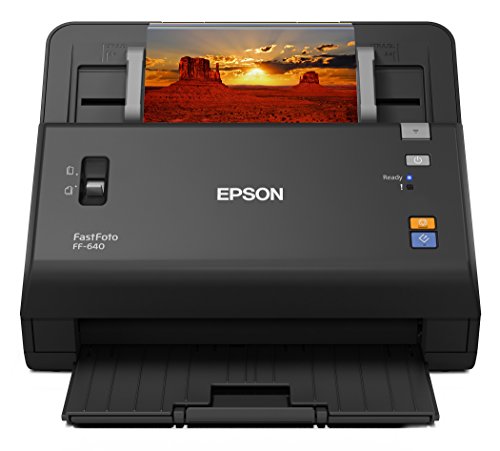
- 30-photo auto-feed tray
- Up to one photo per second at 300 dpi
- Scans up to 600 dpi
Best For: Fast digitization of standard and panoramic photos
Best Compact Value Pick

- 4 x 6 scan in about two seconds
- Supports photos up to 8 x 10
- One-at-a-time feed-through design
Best For: Simple home photo digitizing on a budget
Compact Batch Workhorse

- 30 ppm duplex scanning with a 50-sheet ADF
- Handles documents, cards, and plastic cards
- Compact design with TWAIN compatibility
Best For: High-volume office document and card scanning
High-Detail Flatbed Specialist

- 6400 dpi resolution for detailed photo scans
- 48-bit color and 4.0 Dmax for tonal range
- Dual-lens system supports photos and slides
Best For: High-quality photo and slide digitization
Connected Multi-Page Scanner

- Up to 40 ppm duplex scanning
- Continuous mode combines unlimited pages
- Wireless and cloud scanning with mixed-media support
Best For: Networked offices processing varied multi-page batches
Professional Detail
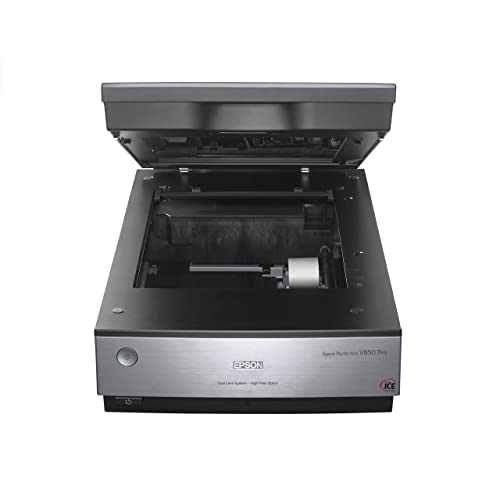
- 6400 dpi scanning with 4.0 Dmax
- Dual-lens CCD photo scanning system
- 10-sheet capacity and USB connection
Best For: High-detail photo scanning and restoration work
Connected High Volume

- Scans up to 100 photos per minute
- Feeds up to 36 photos or 100 documents
- Wi-Fi 6, USB-C, and cloud support
Best For: Large photo collections and organized wireless workflows
Best Overall – Epson FastFoto FF-680W
For shoppers seeking photo scanners with batch scanning, the Epson FastFoto FF-680W is a versatile choice. It can batch-scan up to 36 photos, scan at up to one photo per second at 300 dpi, and capture both sides of a photo in one pass.
Best For: Digitizing large mixed photo collections while preserving handwritten notes and scanning documents.
Pros:
- Batch-scans up to 36 photos at a time.
- Duplex scanning captures notes on the back of photos.
- Supports photos up to 8 x 10 inches, panoramas, postcards, and Polaroids.
- Includes wireless connectivity, image enhancement, OCR, and cloud backup options.
Cons:
- Its broad feature set may be more than needed for occasional photo scanning.
- The supplied notes do not specify an included batch capacity for documents.
The FF-680W stands out when you want one scanner for high-volume photo preservation, basic restoration, and everyday document work, with both USB and Wi-Fi connectivity.
Best Document-Focused Option – Fujitsu ScanSnap iX500
The Fujitsu ScanSnap iX500 is a document-oriented option among photo scanners with batch scanning. It offers 25-page-per-minute color scanning, two-sided scanning, a 50-sheet standard capacity, and USB or Wi-Fi connectivity to a computer.
Best For: Home offices and users who prioritize batch document scanning with occasional image work.
Pros:
- Scans color documents at up to 25 pages per minute.
- Two-sided scanning helps process documents efficiently.
- 50-sheet standard capacity supports batch workflows.
- Works with PC and Mac systems and supports USB or Wi-Fi connections.
Cons:
- It is listed as a document scanner rather than a dedicated photo scanner.
- Windows and Mac versions do not support TWAIN/ISIS according to the supplied compatibility note.
- The supplied notes do not provide photo-specific enhancement features.
This model makes more sense for paperwork-heavy scanning than for a photo-archiving project, especially if a generous sheet capacity and duplex document handling matter most.
Best Dedicated Photo Feeder – Epson FastFoto FF-640
The Epson FastFoto FF-640 is built for shoppers comparing photo scanners with batch scanning. Its auto-feed tray holds up to 30 photos, and it can scan at up to one photo per second at 300 dpi, with resolutions up to 600 dpi.
Best For: Quickly digitizing sizeable collections of standard and panoramic photos.
Pros:
- Auto-feed tray accommodates up to 30 photos.
- Scans at up to one photo per second under the stated conditions.
- Handles photo sizes from wallet prints through panoramic images.
- Includes a carrier sheet and cleaning cloth.
Cons:
- Connection is USB rather than wireless.
- The supplied notes list Windows 7 as the minimum system requirement.
- Its stated photo-focused features do not include the broader document and cloud functions listed for the FF-680W.
The FF-640 is a straightforward high-speed photo digitizing system for users who want an automatic feeder and high throughput without needing the FF-680W’s expanded connectivity and document features.
Best Compact Value Pick – Plustek ePhoto Z300
The Plustek ePhoto Z300 is a compact, straightforward choice for photo scanners with batch scanning needs. It scans a 4 x 6 photo in about two seconds at 300 dpi, supports several common photo sizes, and uses a feed-through design instead of a flatbed.
Best For: Budget-conscious users who want simple, one-at-a-time photo feeding for a home digitizing project.
Pros:
- Scans 4 x 6 photos in about two seconds at 300 dpi.
- Supports 3 x 5, 4 x 6, 5 x 7, and 8 x 10 photos plus letter and A4 paper.
- Offers optical resolution up to 600 dpi.
- Includes image enhancement tools for faded photos.
Cons:
- The standard sheet capacity is one, so it does not offer automatic batch feeding.
- USB is the listed connection type.
- The supplied notes list Windows 7 as the minimum system requirement.
The Z300 can process a large collection efficiently when you feed photos individually, but shoppers specifically needing automatic batch scanning should consider the Epson models instead.
Compact Batch Workhorse – Ambir ImageScan Pro 830ix-AS
If you need photo scanners with batch scanning capabilities for mixed office media, the Ambir ImageScan Pro 830ix-AS is built around fast, unattended feeding. Its 50-sheet automatic document feeder scans both sides in one pass and handles documents, business cards, ID cards, insurance cards, and plastic cards.
Best For: Offices and busy workstations that need compact, high-volume scanning of documents and cards.
Pros:
- 30 ppm duplex scanning captures both sides in a single pass.
- 50-sheet feeder supports bulk scanning tasks.
- Compact 5.19 x 10.36 x 5.83-inch footprint.
- Included TWAIN driver supports broad software compatibility.
Cons:
- Designed as a document scanner rather than a dedicated photo and slide scanner.
- USB connection does not offer wireless scanning.
Choose this model when speed, feeder capacity, and space efficiency matter more than specialized film scanning or flatbed versatility. Its duplex ADF and durable design make it a practical choice for recurring batch jobs.
High-Detail Flatbed Specialist – Epson Perfection V800 Photo
The Epson Perfection V800 Photo prioritizes image quality for photo scanners with batch scanning needs, but its standard sheet capacity is one. Its 6400 dpi resolution, 48-bit color depth, CCD sensor, and dual-lens system are aimed at detailed photo and slide work rather than unattended multi-page feeding.
Best For: Photographers and archivists who value fine detail, tonal range, and high-quality scans of photos and slides.
Pros:
- 6400 dpi resolution captures fine image detail.
- 48-bit color depth and 4.0 Dmax support smooth tonal gradations.
- Dual-lens system selects an appropriate lens for the scan.
- Supports photos and slides with a CCD optical sensor.
Cons:
- One-sheet standard capacity is not suited to unattended document batches.
- At 20.9 pounds, it is substantially heavier than the feeder-based options.
- USB connectivity does not provide wireless scanning.
This is the strongest fit when “batch” means processing a collection of photos or slides with careful quality control, not rapidly feeding stacks of documents. Expect slower, hands-on workflows in exchange for higher optical detail and tonal performance.
Connected Multi-Page Scanner – Brother ImageCenter ADS-2800W
The Brother ImageCenter ADS-2800W is a practical choice among photo scanners with batch scanning features, combining a 50-sheet feeder with continuous scan mode. It scans single- and double-sided materials at up to 40 ppm and accepts photos, receipts, business cards, documents, and embossed plastic cards.
Best For: Connected offices that need fast multi-page scanning, mixed media handling, and direct wireless or cloud workflows.
Pros:
- Up to 40 ppm scanning with single-pass duplex capture.
- Continuous scan mode can combine unlimited pages into one file.
- 50-sheet capacity supports multi-page batch jobs.
- Wireless networking and Web Connect enable direct cloud scanning.
Cons:
- 300 dpi resolution is lower than the Epson V800’s listed resolution.
- At 10 pounds, it is less compact than the Ambir model.
- Supplied compatibility details list specific older operating-system versions.
For offices scanning varied stacks rather than only photographs, this Brother offers the most flexible workflow of the three. Its continuous mode, duplex speed, and wireless cloud support are especially useful when batches need to move directly into shared applications.
Professional Detail – Epson Perfection V850 Pro
The Epson Perfection V850 Pro is a strong choice for photographers and archivists who prioritize image quality in photo scanners with batch scanning. Its 6400 dpi resolution, dual-lens system, 4.0 Dmax, CCD sensor, and Digital ICE support are designed for detailed scans with smooth tonal transitions and fine shadow detail. A 10-sheet standard capacity supports small batch jobs.
Best For: Photo enthusiasts, restoration work, and users who value maximum color and detail over high-volume throughput.
Pros:
- 6400 dpi resolution and 4.0 Dmax for detailed images and smooth gradations
- Dual-lens system selects the appropriate lens for scanning results
- CCD sensor and Digital ICE support photo-focused workflows
- Compatible with Windows and Mac operating systems listed by Epson
Cons:
- 10-sheet capacity is smaller than the capacities of the feeder-based models here
- At 20.9 pounds, it is relatively heavy for a desktop scanner
- Uses a USB connection rather than wireless connectivity
The V850 Pro is best when scan quality is the deciding factor. It can handle small batches, but users scanning large stacks regularly may prefer a faster automatic feeder.
Fast Photo Feeder – Canon imageFORMULA RS40
The Canon imageFORMULA RS40 is built for practical photo scanners with batch scanning, combining a 60-sheet automatic feeder with two-sided scanning. It can scan up to 40 items per minute and accepts varied media, including photos, Polaroids, receipts, cards, and documents, making it useful for mixed household digitization projects.
Best For: Families and home users scanning batches of different-size photos alongside everyday documents.
Pros:
- Automatic feeder holds up to 60 sheets
- Scans both sides of photos and documents simultaneously
- Rated for up to 40 items per minute
- Includes photo enhancement features, red-eye correction, and face smoothing software
Cons:
- Uses a CIS sensor rather than the V850 Pro’s CCD sensor
- Maximum listed optical resolution is lower than the V850 Pro’s 6400 dpi
- USB connectivity only; no wireless option is listed
The RS40 is a balanced pick for speed and convenience. Its feeder and bundled software make it more suitable than a flatbed for recurring mixed-media batches, while Windows and Mac support broaden its appeal.
Connected High Volume – ScanSnap iX2500 Photo Edition
The ScanSnap iX2500 Photo Edition is designed for high-volume photo scanners with batch scanning, with an automatic feeder that holds up to 36 photos or 100 documents. It can scan up to 100 photos per minute and adds Wi-Fi 6, USB-C, automatic optimization, touchscreen profiles, and cloud-service support for a streamlined workflow.
Best For: Users digitizing large photo collections who want wireless connectivity, automated organization, and flexible destination options.
Pros:
- Scans up to 100 photos per minute
- Automatic feeder holds up to 36 photos or 100 documents
- Includes three photo carrier sheets for delicate prints
- Supports Wi-Fi 6, USB-C, touchscreen profiles, and cloud services
Cons:
- 600 dpi resolution is lower than the listed resolution of the Epson V850 Pro
- Photo feeder capacity is smaller than its 100-document capacity
- Listed operating-system requirements are newer and more specific
The iX2500 is the most workflow-focused option of the three. Its speed, wireless connectivity, carrier sheets, and automatic file organization are particularly useful when convenience and collection-wide throughput matter more than maximum flatbed detail.
How We Picked the Best Photo Scanners with Batch Scanning
We focused on scanners that can handle multiple photos or documents with less hands-on work than a basic single-photo flatbed. Our comparisons consider feeder design, scanning speed, image quality, software, connectivity, operating-system support, and the types of originals each scanner handles best.
Because “batch scanning” can mean different things, we included both automatic document feeder models and photo-focused systems designed to process stacks of prints. Flatbed scanners are also included where their higher optical quality, film support, or careful handling makes them useful for archival projects.
Quick Comparison
- Best for large print collections: Choose a dedicated photo feeder with automatic batch handling.
- Best for mixed home paperwork and photos: Look for a duplex ADF scanner with document-management software.
- Best for fragile, oversized, or mounted originals: A flatbed scanner provides more control than a feeder.
- Best for negatives and slides: Choose a model with dedicated film holders and appropriate transparency scanning hardware.
- Best for flexible placement: Wireless connectivity makes it easier to scan from multiple computers or mobile devices.
Key Buying Factors for Photo Scanners with Batch Scanning
Feeder Capacity and Photo Handling
Check how many prints the feeder accepts, which sizes it supports, and whether photos must be sorted by size. A photo-specific feeder is generally safer and more convenient for common snapshot prints than a standard document ADF. For valuable, curled, torn, or delicate photos, a flatbed may be the better choice.
Speed and Duplex Scanning
Manufacturers typically list pages or photos per minute under specific conditions. Duplex scanning captures both sides of a document in one pass, but it may not matter for single-sided prints. Consider real workflow speed, including loading, file naming, previewing, and correcting misfeeds.
Resolution and Image Quality
Optical resolution matters more than an inflated interpolated figure. For routine photo archiving, moderate optical resolution is often sufficient; higher-resolution flatbeds are more useful for cropping, enlargements, film, and restoration work. Color depth, dust reduction, and image-correction software can also affect results.
Software and File Management
Batch scanning is most useful when software can automatically rotate images, detect paper size, separate scans, create searchable documents, and apply sensible file names. Confirm that the included apps support your computer and preferred file formats before buying.
Connectivity and Long-Term Maintenance
USB is dependable, while Wi-Fi enables shared household use. For frequent scanning, check replacement roller and separation-pad availability, cleaning requirements, warranty coverage, and the scanner’s rated daily duty cycle.
Who Should Buy Which Photo Scanners with Batch Scanning?
Choose a dedicated photo feeder if your priority is digitizing hundreds or thousands of loose prints quickly. Choose a duplex document scanner if photos are only part of a broader home-office workflow. Choose a premium flatbed if quality, film scanning, or delicate originals matter more than throughput. Choose a compact photo scanner for occasional family archiving when simplicity and desk space are more important than maximum capacity.
Before ordering, verify supported photo sizes, feeder limitations, software compatibility, and whether the advertised speed matches your intended resolution and file format. Those details will have a bigger effect on the finished archive than headline speed alone.