A laptop can be easy to grab from a home office, especially when it sits near a doorway, shared workspace, or easily accessible window. A locking cable adds a visible layer of physical security without requiring a bulky safe or permanent enclosure.
This roundup compares 10 laptop locking cables for home offices, covering common T-Bar and Nano security slots, keyed and combination locks, universal designs, and adhesive anchor solutions for devices without a built-in slot.
Best 10 Laptop Locking Cables for Home Offices Picks for 2026
Best Combination Lock
Kensington T-Bar Standard Cable Lock

- Resettable four-digit combination
- Six-foot carbon-steel cable
- Push-button, keyless operation
Best For: Home-office devices with a standard Kensington security slot
Best Desktop Security Kit
Kensington Desktop & Peripherals Locking Kit 2.0
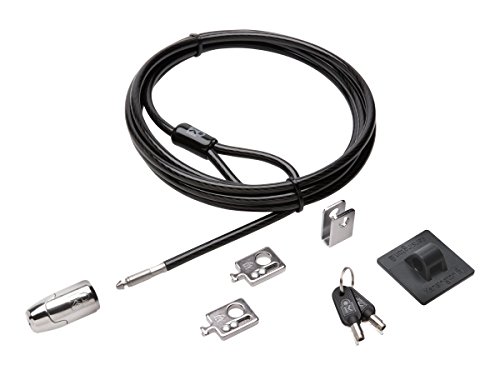
- Eight-foot carbon-steel cable
- Includes adapters and cable trap
- Anchor plate supports non-slot devices
Best For: Desktop setups with multiple peripherals
Best for Non-Slot Devices
Laptop and Tablet Security Cable Kit

- Includes two adhesive anchor plates
- Fits 3 x 7 mm security slots
- Six-foot-six-inch, 5 mm steel cable
Best For: Mixed home-office devices, including tablets and phones
Best Keyed Laptop Lock
Kensington T-Bar Standard Keyed Lock
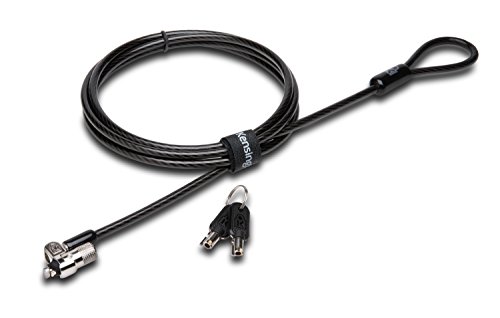
- Six-foot carbon-steel cable
- Pivoting 10 mm lock head
- Hidden Pin anti-pick technology
Best For: Compatible laptops where keyed security is preferred
Best Nano-Slot Combination Lock

- 5-foot carbon steel cable
- Resettable four-digit combination
- Slim head for Nano security slots
Best For: Thin laptops with compatible Nano slots
Best Universal-Style Kit
Laptop Cable Lock with Adhesive Plate

- Works with built-in slots or adhesive plate
- 6.23-foot braided cable
- Four-digit keyless combination
Best For: Devices with or without built-in security holes
Best Keyed K-Slot Option
Manhattan 4.6-Foot Laptop Lock

- Key-operated K-slot design
- Includes two keys
- PVC-jacketed steel cable
Best For: K-slot devices and users who prefer keys
Best Universal Fit
Kensington 3-in-1 Combination Laptop Lock

- Supports standard, nano, and wedge-shaped slots
- Resettable four-number dial with 10,000 combinations
- Six-foot carbon steel cable
Best For: Shared home offices and mixed-device households
Best With Anchor Hardware
QWORK Universal Laptop Cable Lock
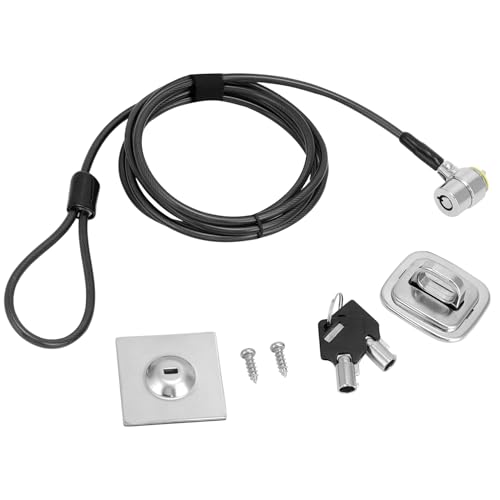
- Includes desk mount and adhesive anchor options
- Six-and-a-half-foot cut-resistant steel cable
- Key lock with two included keys
Best For: Devices without built-in security slots
Best for Recent MacBook Pro Models

- Designed for 2021–2024 14-inch and 16-inch MacBook Pro
- Six-and-a-half-foot cut-resistant steel cable
- Rotatable keyed housing with two keys
Best For: Compatible MacBook Pro owners
Best Combination Lock – Kensington T-Bar Standard Cable Lock
For laptop locking cables for home offices, the Kensington K64673AM is a practical combination-lock option when your computer has a standard Kensington security slot. Its resettable four-digit code and six-foot carbon-steel cable provide convenient everyday security without requiring a key.
Best For: Home-office laptops and peripherals with a standard Kensington slot, especially when keyless access is preferred.
Pros:
- Resettable four-wheel combination offers 10,000 possible codes.
- Push-button design supports one-handed engagement.
- Six-foot cut-resistant carbon-steel cable anchors to desks, tables, or other fixed structures.
- Works with compatible laptops, monitors, desktops, docking stations, projectors, and other devices.
Cons:
- Not compatible with Dell and Alienware devices using Noble or wedge-style slots.
- Requires a compatible Kensington standard security slot.
This is a convenient choice for a shared home workspace, but check your laptop’s lock-slot type before buying—particularly with newer Dell models.
Best Desktop Security Kit – Kensington Desktop & Peripherals Locking Kit 2.0
Among laptop locking cables for home offices, the Kensington Desktop & Peripherals Locking Kit 2.0 stands out for securing a desktop setup rather than just one laptop. Its eight-foot cable, adapters, cable trap, and anchor plate help protect computers and connected accessories together.
Best For: Home offices with desktop PCs, monitors, and peripherals that need a coordinated keyed locking setup.
Pros:
- Eight-foot cut-resistant carbon-steel cable offers flexible routing around fixed objects.
- Includes two K-Slot adapters and a cable trap for securing peripheral accessories.
- Anchor plate helps lock devices that lack a Kensington security slot.
- Patented Hidden Pin Technology is designed to resist picking.
Cons:
- Uses keys rather than a combination, so keys must be kept accessible.
- Designed primarily for desktop computers and peripherals rather than a minimalist laptop-only setup.
Choose this kit when your home office includes several valuable components. The included adapters and anchor plate make it more versatile than a basic single-device cable lock.
Best for Non-Slot Devices – Laptop and Tablet Security Cable Kit
This flexible option for laptop locking cables for home offices includes both a standard lock head and adhesive anchor plates. That makes it useful for compatible laptops and monitors as well as tablets, phones, POS devices, and other electronics without a built-in security slot.
Best For: Home offices using a mix of slot-equipped laptops and smooth-surface devices such as tablets or phones.
Pros:
- Includes one cable lock, two keys, and two self-adhesive anchor plates.
- Works with standard 3 x 7 mm security slots and selected non-slot devices.
- Six-foot-six-inch, 5 mm steel cable reaches desks, table legs, shelves, and monitor arms.
- Adhesive plates can be used on clean, dry, smooth, flat metal, glass, or hard-plastic surfaces.
Cons:
- Adhesive anchors require installation time, including 24 hours before locking and up to 72 hours for full bonding strength.
- Adhesive mounting is surface-dependent and may not suit every device or finish.
This kit offers the broadest device compatibility of the group, provided you follow the anchor-plate preparation and curing instructions carefully.
Best Keyed Laptop Lock – Kensington T-Bar Standard Keyed Lock
For shoppers seeking laptop locking cables for home offices, the Kensington K65035AM provides a keyed T-Bar connection and a six-foot carbon-steel cable. Its pivoting lock head is designed to improve access on thin devices with a compatible Kensington security slot.
Best For: Home-office laptops and electronics with a standard Kensington slot when a keyed lock is preferred.
Pros:
- Six-foot carbon-steel cable with a plastic sheath helps resist cutting attempts.
- 10 mm pivoting lock head is designed for thin laptops and easier access.
- Hidden Pin Technology supports the anti-pick tubular lock design.
- Special hinge helps reduce awkward locking and unlocking angles.
Cons:
- Does not work with newer Dell devices using a wedge lock slot.
- Some HP models and Chromebooks use a NanoSaver slot instead.
- Requires a key and a compatible standard Kensington security slot.
This is a solid keyed choice for compatible laptops, especially if you value the pivoting head. Confirm your device’s slot specification before purchase because Dell and some HP models require different lock formats.
Best Nano-Slot Combination Lock – Kensington K60214WW
For laptop locking cables for home offices, the Kensington K60214WW is a streamlined choice for thin laptops with a compatible Nano security slot. Its 5-foot carbon steel cable, resettable combination, and pivoting design support practical desk-side security without requiring keys.
Best For: Thin laptops with Nano-sized security slots that stay on a desk or table in a home office.
Pros:
- Resettable four-digit code offers 10,000 possible combinations.
- Five-foot carbon steel cable provides useful reach for desks and tables.
- Slim lock head helps compatible thin laptops lie flat and stable.
- Pivoting head and rotating anchor can improve access to nearby ports.
Cons:
- Works with Nano-sized lock slots, so compatibility must be checked before purchase.
- Combination lock may be less convenient for shoppers who prefer keyed access.
This Kensington model is a focused pick when your laptop has the right Nano slot and you want keyless, low-profile security. Confirm the slot dimensions and type before ordering.
Best Universal-Style Kit – Laptop Cable Lock with Adhesive Plate
Among laptop locking cables for home offices, this kit stands out for supporting both devices with built-in security holes and devices without them. It combines a 6.23-foot cable, four-digit combination, and adhesive lock-slot plate for broader setup flexibility.
Best For: Home-office users securing laptops or other digital devices that may not have a built-in security slot.
Pros:
- Includes an adhesive lock-slot plate for devices without security holes.
- Also connects directly to compatible built-in security slots.
- Long 6.23-foot, 5 mm braided cable allows more positioning flexibility.
- Four-digit combination avoids the need to carry keys.
Cons:
- Adhesive plate installation adds an extra setup step for devices without slots.
- Compatibility and adhesion should be considered before attaching the plate to a device.
This is the most adaptable option of the three for a mixed-device home office. Its included plate broadens compatibility, while the longer cable can make anchoring around a desk more convenient.
Best Keyed K-Slot Option – Manhattan 4.6-Foot Laptop Lock
For shoppers comparing laptop locking cables for home offices, the Manhattan Laptop Lock offers a straightforward keyed solution for devices with a built-in K-slot. Its 4.6-foot steel cable, two included keys, and PVC jacket suit desks, tables, and other fixed anchors.
Best For: K-slot-equipped laptops and electronics in home offices where a traditional key lock is preferred.
Pros:
- Keyed lock includes two keys for access and backup.
- 4.6-foot steel cable reaches many desk or table anchors.
- PVC jacket helps protect devices, furniture, and nearby surfaces from scratches.
- Fits compatible K-slot devices including computers, displays, projectors, and cameras.
Cons:
- Requires a compatible built-in K-slot.
- Shorter cable than the 6.23-foot option in this roundup.
- Keys can be misplaced and must be stored for convenient access.
The Manhattan is a practical choice when your laptop has a standard K-slot and you prefer a conventional key mechanism. Its coated cable and all-metal body provide a simple desk-security setup.
Best Universal Fit – Kensington 3-in-1 Combination Laptop Lock
For home offices with laptops from different brands or generations, the Kensington 3-in-1 is a flexible choice among laptop locking cables for home offices. Its interchangeable lock tips support standard, nano, and wedge-shaped security slots, while the resettable combination avoids the need to manage a key.
Best For: Households or shared home offices with multiple laptops and changing equipment.
Pros:
- Fits standard, nano, and wedge-shaped laptop security slots.
- Resettable four-number dial provides 10,000 possible combinations.
- Six-foot carbon steel cable offers cut and theft resistance.
- Register & Retrieve can help recover a forgotten combination.
Cons:
- Combination locks require you to remember or securely store the code.
- Compatibility depends on the device having one of the supported slot types.
This is a strong all-around option when compatibility and code flexibility matter more than using a keyed lock. The included interchangeable tips also make it easier to keep one security solution available as devices change.
Best With Anchor Hardware – QWORK Universal Laptop Cable Lock
The QWORK Universal Laptop Cable Lock is a practical option among laptop locking cables for home offices when a device lacks a built-in security slot. It includes a desk mount anchor and adhesive anchor plate, plus a key-operated lock and two keys.
Best For: Home-office laptops, monitors, tablets, and other devices that may need an adhesive or desk-mounted anchor.
Pros:
- Works with Kensington-slot laptops and compatible devices using the included anchor plate.
- Six-and-a-half-foot cut-resistant twisted steel cable has a PVC coating.
- Includes a steel desk mount anchor, adhesive anchor plate, and two keys.
- Rotatable stainless steel lock head supports flexible positioning.
Cons:
- Device and anchor dimensions should be checked before purchase.
- Adhesive installation may not suit every surface or device.
- Keyed operation means keeping track of the included keys.
Choose this model when installation flexibility is a priority, particularly for devices without a Kensington slot. Its included anchor components broaden compatibility, but careful size and surface checks are important before setup.
Best for Recent MacBook Pro Models – AboveTEK Keyed Laptop Lock
Designed specifically for the 14- and 16-inch MacBook Pro models from 2021–2024, the AboveTEK is a focused choice among laptop locking cables for home offices. Its lock attaches to the MacBook Pro bottom-side vent slot without blocking ports or speakers.
Best For: Owners of compatible 2021–2024 14-inch or 16-inch MacBook Pro laptops.
Pros:
- Purpose-built for 2021–2024 14-inch and 16-inch MacBook Pro models.
- Keyed design avoids remembering a combination and includes two keys.
- Six-and-a-half-foot cut-resistant steel cable supports flexible placement.
- Rotatable housing and silicone contact point help with positioning and finish protection.
Cons:
- Compatibility is limited to the specified MacBook Pro models.
- Keyed operation requires keeping track of the keys.
- It attaches to the MacBook Pro vent slot rather than offering universal slot compatibility.
This model makes the most sense when you have the specified MacBook Pro generation and want a simple keyed setup. Its rotatable design and portable size are useful for a home office that also serves as a temporary or shared workstation.
How We Picked the Best Laptop Locking Cables for Home Offices
We focused on practical security, compatibility, and everyday usability rather than cable length alone. The selection includes established Kensington designs alongside versatile alternatives with keyed or resettable combination locks. We also considered whether each option supports common laptop security slots, includes an anchor plate, or is designed for particular MacBook and tablet configurations.
For home-office use, the most important traits are a dependable locking mechanism, a cable that resists casual cutting, straightforward installation, and a secure attachment point. A strong cable cannot protect a device if the lock does not fit its slot or the anchor is attached to a weak surface.
Quick Comparison
| Lock type | Best for | Main consideration |
|---|---|---|
| Combination | Shared homes and frequent access | Choose and remember a unique code |
| Keyed | Simple, dependable locking | Keep the keys available and secure |
| Universal or 3-in-1 | Mixed device collections | Confirm connector compatibility |
| Anchor-plate kit | Devices without a security slot | Allow adhesive time to bond fully |
Key Buying Factors for Laptop Locking Cables for Home Offices
Check the Security Slot First
Standard T-Bar slots are common on many business laptops, while Nano slots appear on select newer models. These formats are not interchangeable in every case, so check the computer manufacturer’s specifications before ordering. A universal lock may offer multiple heads, but compatibility still needs to be verified.
Choose Keyed or Combination Access
Keyed locks are convenient when you want a quick, familiar mechanism and can store a spare key. Combination locks avoid lost keys and work well in households where more than one person may need access. Resettable combinations are preferable to fixed codes, provided you record the code securely.
Match the Cable and Anchor to the Workspace
A longer cable offers more positioning freedom, but excess slack can make the setup less tidy. Look for cut-resistant steel construction and attach the cable to a substantial desk frame or another immovable object. For adhesive anchor plates, clean the surface carefully and follow the required curing time before relying on the connection.
Consider Device Coverage
If you need to secure a laptop, tablet, monitor, and accessories, a peripheral locking kit may be more useful than a single-device cable. For a MacBook or another model-specific computer, a purpose-built lock can provide a better fit than a generic design.
Who Should Buy Which Laptop Locking Cables for Home Offices?
Choose a combination lock if you want keyless access or share the workspace with family members. Pick a keyed lock if simplicity and quick daily operation matter most. A universal or 3-in-1 model suits households with several device types, while an anchor-plate option is the practical choice for hardware without a built-in security slot.
For a complete home-office setup, consider a desktop and peripherals kit. Whichever design you choose, verify fit before purchase, use a rigid attachment point, and treat the cable as a theft deterrent rather than a substitute for locking the room or securing sensitive data.