Choosing an interactive whiteboard for conference training rooms is about more than getting a big touch display. The right model should make presenting, annotating, and collaborating easy for both in-person and hybrid teams.
In this roundup, we focus on display size, software compatibility, touch responsiveness, and setup flexibility so you can match the board to your room, workflow, and budget.
Best 10 Interactive Whiteboard for Conference Training Rooms Picks for 2026
Premium Hybrid Collaboration Pick
JAV 55-Inch 4K EDLA Smart Board

- 4K 55-inch touchscreen with anti-glare glass
- Built-in camera for remote collaboration
- Android 14 with 8GB RAM and 128GB storage
Best For: Hybrid meetings, classroom training, and secure wireless collaboration
Most Flexible Dual-OS Option
JYXOIHUB 55-Inch Dual-System Smartboard

- Android 11 plus Windows 10 OPS computer
- 20-point multi-touch for team collaboration
- Supports Zoom, Teams, Meet, and cloud drives
Best For: Conference and training rooms that need dual-OS flexibility
Easiest-to-Use Large Panel
Promethean ActivPanel LE 65-inch
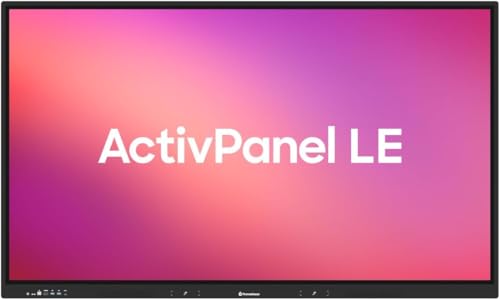
- 65-inch 4K UHD interactive display
- EDLA certified with Google app access
- Runs standalone on Android or with OPS
Best For: Teams wanting a large, simple-to-operate meeting and training display
Portable Room-Friendly Option
Design-Pie F35L Portable Interactive Whiteboard

- Turns projector surfaces into interactive workspaces
- USB connection with automatic calibration
- Supports Windows 7 through Windows 11
Best For: Portable training rooms and projector-based meeting spaces
Compact Android Smart Board

- 55-inch 4K display with touch annotation
- Android 14 with 8GB RAM and 128GB storage
- Screen sharing from Mac, Windows, iOS, and Android
Best For: Smaller training rooms and wall-mounted office meetings
Video-Ready Dual-System Board
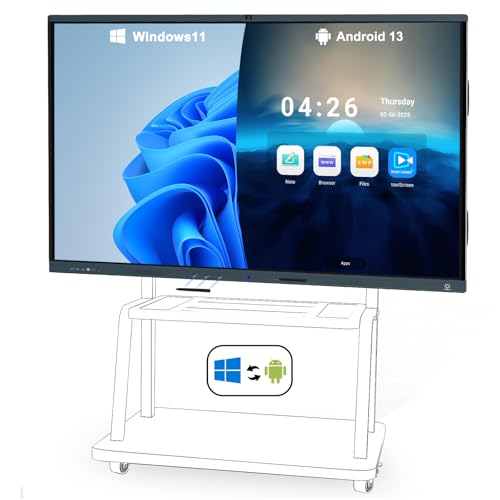
- Windows 11 Pro plus Android 13 dual system
- Built-in AI camera and 8-array microphones
- 20-point touch with wired and wireless sharing
Best For: Large hybrid training rooms and conference meetings
All-in-One Collaboration Board

- All-in-one setup with 4K display and Android 14
- 13MP camera, 8 mics, and dual 20W speakers
- 20-point touch plus wired and wireless sharing
Best For: Large rooms needing an integrated meeting and training hub
Enterprise Collaboration Board
Shiarffe R9 65" EDLA Smart Board
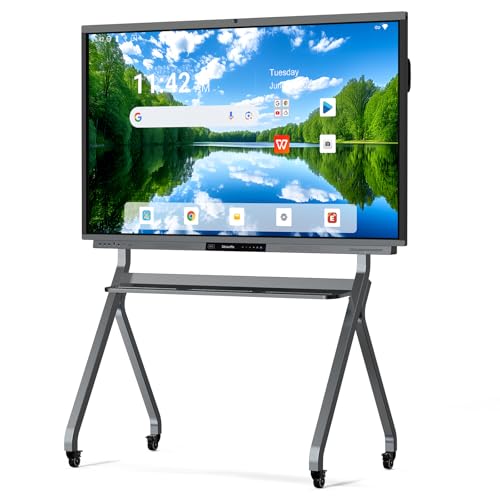
- Google EDLA-certified with no subscription fees
- 20-point 4K touch for shared writing and annotation
- Wireless mirroring, HDMI, and optional meeting camera
Best For: Conference and training rooms needing simple IT management and built-in collaboration tools
Dual-OS Meeting Display
75" 4K Interactive Smart Whiteboard

- 75-inch 4K touchscreen for writing and presenting
- Android + Windows dual system for flexibility
- Wireless sharing plus built-in speakers and microphones
Best For: Rooms that need a large, flexible board for meetings, teaching, and hybrid collaboration
Google Workspace Meeting Board
JAV 75" Android 14 Smart Board
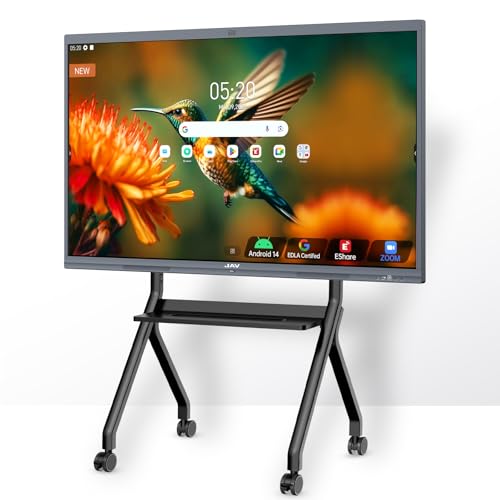
- Google EDLA-certified with Google Play and Workspace access
- 8-array microphones with AI noise reduction
- 4K touch with annotation, split-screen, and sharing tools
Best For: Training rooms and conference spaces centered on Google apps and hybrid meetings
Premium Hybrid Collaboration Pick – JAV 55-Inch 4K EDLA Smart Board
If you want an interactive whiteboard for conference training rooms that can handle presenting, annotating, and hybrid collaboration in one unit, the JAV Smart Board is built for that kind of workflow. Its 55-inch 4K touchscreen, Android 14 platform, and built-in camera make it a practical all-in-one option for meetings, lessons, and remote sessions.
Best For: Conference teams, trainers, and hybrid presenters who want a secure, app-friendly smart board with strong connectivity.
Pros:
- 4K UHD 55-inch touchscreen with anti-glare tempered glass for clearer viewing in bright rooms
- Built-in camera supports remote conferencing and video collaboration
- Works with Mac, Windows, iOS, and Android for wireless screen sharing and file access
- EDLA certification plus screen lock and USB password protection add security for shared environments
Cons:
- 55-inch size may be small for very large training rooms
- Detailed camera specs are not provided in the notes
- Best app experience will depend on the open ecosystem and your chosen tools
Overall, this model stands out for teams that want a modern smartboard with strong wireless collaboration, secure sharing, and flexible app support. It is especially appealing if your conference room needs both presentation and remote meeting capabilities in the same display.
Most Flexible Dual-OS Option – JYXOIHUB 55-Inch Dual-System Smartboard
For buyers comparing an interactive whiteboard for conference training rooms, this JYXOIHUB model focuses on flexibility and presentation features. The dual Android and Windows setup, 20-point multi-touch, and support for cloud storage and major video meeting platforms make it a strong fit for structured training and team collaboration.
Best For: Training rooms and conference spaces that need both Android convenience and Windows compatibility.
Pros:
- Dual system design with Android 11 and Windows 10 OPS computer
- 20-point multi-touch supports collaborative editing and multi-user use
- Works with Zoom, Google Meet, Microsoft Teams, and Webex
- Open app support plus export to Google Drive, OneDrive, Dropbox, and Box
Cons:
- Android RAM and storage are modest at 4GB and 32GB
- Windows side also uses 4GB RAM, which may limit heavier workloads
- Requires additional camera and microphone for best video conferencing setup
This is a practical choice if your room needs a board that can move between content sharing, annotation, and standard business meeting platforms. The dual-OS design gives it a useful edge for organizations that rely on both Android-style simplicity and Windows-based workflows.
Easiest-to-Use Large Panel – Promethean ActivPanel LE 65-inch
The Promethean ActivPanel LE is a strong choice if you need an interactive whiteboard for conference training rooms that is easy to start using right away. With a 65-inch 4K UHD display, Android OS, EDLA certification, and quick access to Google tools and Promethean apps, it is designed for smooth everyday meeting and training use.
Best For: Teams that want a straightforward 65-inch interactive display with familiar Google integration and low setup friction.
Pros:
- 65-inch 4K UHD panel offers a large workspace for presentations and lessons
- EDLA certified with quick access to Google Docs, Slides, Drive, Meet, and YouTube
- Includes Promethean Essential apps like Annotate, Screen Share, Spinner, and Timer
- Can run independently on Android or connect to a computer or OPS module
Cons:
- Only one HDMI port is listed in the specs
- It is a wall-mountable display, so it is less portable than trolley-style options
- Best value depends on whether your team uses Google and Promethean tools regularly
This panel is a good fit for organizations that want a dependable, easy-to-use board without a steep learning curve. The larger 65-inch screen and familiar app access make it especially useful for training sessions and recurring meetings.
Portable Room-Friendly Option – Design-Pie F35L Portable Interactive Whiteboard
If you need an interactive whiteboard for conference training rooms but want a more portable setup, this Design-Pie system turns a projector surface into a touch-enabled workspace. It connects through USB and works with Windows PCs, making it a flexible option for presentations, teaching, and meetings where a fixed smart panel is not practical.
Best For: Portable training, presentations, and meeting spaces that already use a projector.
Pros:
- Works with Windows XP through Windows 11 for wide compatibility
- USB and HDMI/VGA connections let it pair with a computer and projector
- Automatic calibration simplifies setup
- Portable design can support surfaces up to 90 inches
Cons:
- Depends on a projector and projection surface, so it is not a standalone display
- Resolution is listed at 1080p rather than 4K
- Best use is tied to Windows-based computer setups
For teams that need flexibility and fast setup rather than a full panel replacement, this is a practical option. It is especially useful in multipurpose rooms where portability matters and the room already has projection hardware in place.
Compact Android Smart Board – 55" 4K Smart Whiteboard
If you need an interactive whiteboard for conference training rooms that balances size, simplicity, and enterprise-friendly features, this 55-inch smart board is built for exactly that kind of everyday use. It combines Android 14, screen sharing, annotation tools, and a 4K display in a wall-mountable format that can work for meetings, presentations, and classroom-style sessions.
Best For: Smaller conference training rooms, office meeting spaces, and teams that want a wall-mounted all-in-one board.
Pros:
- 4K UHD display with touch writing and annotation support.
- Built-in screen casting for Mac, Windows, iOS, and Android devices.
- Android 14 system with 8GB RAM and 128GB storage for smooth everyday use.
- Fleet management and security features aimed at business IT needs.
Cons:
- 55-inch size may feel small in larger training rooms.
- Wall-mount setup is less flexible than movable stand options.
- No built-in camera or microphone array mentioned for video calls.
This model makes sense when you want a straightforward smart board that covers presentation, annotation, and content sharing without adding extra systems. It is a practical fit for teams prioritizing reliability and easier room integration over maximum screen size.
Video-Ready Dual-System Board – 86" 4K Smart Board
For a larger interactive whiteboard for conference training rooms, this 86-inch smart board stands out because it bundles a dual-system setup with built-in conferencing hardware. It is designed to support meetings, training sessions, and collaborative work with Windows 11 Pro, Android 13, screen sharing, and integrated audio-video tools in one floor-standing package.
Best For: Large conference training rooms, hybrid meetings, and teams that want built-in camera and microphone support.
Pros:
- Dual system support with Windows 11 Pro and Android 13.
- Built-in AI auto-framing camera and 8-array microphones for remote meetings.
- 20-point touch writing with shortcut tools and easy erasing.
- Wireless and wired screen sharing plus support for popular conferencing apps.
Cons:
- Floor-standing setup may take more room than a wall-mounted board.
- Feature set may be more than needed for simple presentation use.
- Larger 86-inch format can be overkill for smaller rooms.
This board is a strong pick when remote participation matters as much as in-room collaboration. If your training room doubles as a video conference space, the integrated camera, mics, and dual operating systems make it especially versatile.
All-in-One Collaboration Board – 86" Android 14 Smart Board
This 86-inch interactive whiteboard for conference training rooms is built as an all-in-one collaboration hub, combining a 4K display, Android 14, touch writing, and conferencing tools in a single unit. It is aimed at teams that want a clean setup with strong presentation features, screen sharing, and support for both in-room and remote collaboration.
Best For: Training rooms and meeting spaces that need a large all-in-one board with strong screen sharing and collaboration tools.
Pros:
- All-in-one design reduces the need for separate PCs, projectors, or conference hardware.
- 4K UHD display with 20-point infrared touch for multi-user collaboration.
- 13MP auto-focus camera, 8-array microphone, and dual 20W speakers for remote meetings.
- Android 14 with app ecosystem access, whiteboard software, and cloud storage support.
Cons:
- Larger 86-inch footprint may be more than smaller rooms require.
- Wall-mount format may not suit every room layout.
- Advanced feature set may be unnecessary for basic whiteboarding needs.
This model is a practical choice when you want one board to handle lessons, meetings, casting, and archived collaboration notes. It delivers a lot of capability in a single package, especially for spaces that need a polished, low-clutter setup.
Enterprise Collaboration Board – Shiarffe R9 65" EDLA Smart Board
For an interactive whiteboard for conference training rooms, the Shiarffe R9 is built around real-time collaboration, clear 4K visuals, and low-friction IT management. Its 65-inch touchscreen supports multi-user annotation, wireless casting, and wired HDMI input, so teams can switch smoothly between brainstorming, presentations, and video meetings.
Best For: Conference and training rooms that need a Google EDLA-certified board with built-in meeting features and minimal software overhead.
Pros:
- Google EDLA certification with no monthly licenses or hidden software fees
- 20-point multi-touch with 4K UHD anti-glare display for shared writing and presenting
- Wireless mirroring plus HDMI for flexible meeting-room connectivity
- Selected sizes include a conference AI camera and microphone array for native video calls
Cons:
- Conference camera and mic array are only included on selected sizes
- Mobile cart is sold separately if you want a movable setup
This is a strong fit when the room needs a dependable all-in-one board that can handle collaboration, training, and hybrid meetings without adding subscription complexity. The included wall mount and easy-to-use Android interface also help speed up deployment and adoption.
Dual-OS Meeting Display – 75" 4K Interactive Smart Whiteboard
This interactive whiteboard for conference training rooms combines a large 75-inch 4K touchscreen with whiteboard tools, wireless sharing, and built-in conferencing features. It is designed to replace older projector setups with a single screen that supports writing, casting, and hybrid collaboration from one device.
Best For: Teams and instructors who want a roomy all-in-one board with Android and Windows flexibility.
Pros:
- 75-inch 4K touchscreen with responsive writing, drawing, and annotation
- Dual OS support with Android and Windows for broader app and workflow compatibility
- Wireless screen sharing plus HDMI and USB inputs for easy device connections
- Built-in stereo speakers and microphones help support meetings and teaching sessions
Cons:
- It is a large 75-inch unit, so it needs enough wall space and viewing distance
- Feature set may be more than needed for simpler presentation-only rooms
The biggest advantage here is flexibility: you can use the platform for meetings, teaching, demos, and collaboration without being locked into one operating system. If your training room needs a big screen that handles multiple users and multiple source types, this model is a practical option.
Google Workspace Meeting Board – JAV 75" Android 14 Smart Board
The JAV 75-inch board is a strong interactive whiteboard for conference training rooms when you want Google ecosystem access, meeting-room audio, and teaching tools in one display. With 4K UHD touch, Android 14, wireless sharing, and built-in cameras, it is aimed at teams that need both presentation and collaboration features.
Best For: Training rooms and conference spaces that rely on Google services, video meetings, and shared whiteboarding.
Pros:
- Google EDLA certification with access to Google Play, Workspace, and Education Suite
- 4K UHD 75-inch display with 20-point touch, palm erase, and multi-finger zoom
- Built-in eight-array microphones with noise reduction and echo cancellation
- Video meeting support for Zoom, Google Meet, Microsoft Teams, and E-Share
Cons:
- Best feature value leans toward Google-centered workflows
- Many collaboration tools may be more than needed for basic display use
This model stands out for rooms that need a polished blend of teaching aids and meeting-room communications. The combination of wireless sharing, annotation tools, and conferencing audio makes it especially useful when remote participants are part of the workflow.
How We Picked the Best Interactive Whiteboard for Conference Training Rooms
We looked for boards that fit real training-room use: clear 4K panels, reliable multi-touch input, modern Android or dual-OS support, and enough connectivity for laptops, conferencing gear, and wireless casting. We also favored models with stronger storage, better stylus/touch performance, and practical features like screen sharing and built-in cameras or microphones where relevant.
Quick Comparison
The best Interactive Whiteboard for Conference Training Rooms depends on room size and meeting style. 55-inch models work well for smaller huddle rooms and compact training spaces, while 65-inch and 75-inch screens are a better fit for most conference rooms. 86-inch boards are the strongest choice for larger spaces, wider sightlines, and groups spread across a long table.
Key Buying Factors for Interactive Whiteboard for Conference Training Rooms
Screen Size and Viewing Distance
Match the display to how far attendees sit from the front wall. If people will be viewing from several rows back, prioritize 75-inch or 86-inch options. Smaller rooms can save money and wall space with 55-inch or 65-inch boards without sacrificing usefulness.
Operating System and App Compatibility
For business training, dual-system boards or Google EDLA-certified Android models are often the most flexible. They make it easier to use meeting apps, cloud tools, and common collaboration software without relying on a separate PC for every session.
Touch Performance and Collaboration
Look for accurate multi-point touch, fast response, and good palm rejection. These details matter when multiple presenters annotate slides, brainstorm, or move content during live sessions.
Connectivity and Sharing
Wireless casting, HDMI, USB, Bluetooth, and Wi-Fi should be standard considerations. An Interactive Whiteboard for Conference Training Rooms should let presenters connect quickly from laptops, tablets, and mobile devices with minimal setup.
Room Integration
If your training room supports hybrid meetings, features like integrated cameras, microphones, and speakers can reduce extra hardware. For simpler rooms, prioritize display quality, mounting needs, and ease of setup instead.
Who Should Buy Which Interactive Whiteboard for Conference Training Rooms?
Small teams and compact rooms should start with 55-inch boards. Mid-size conference and training rooms usually benefit most from 65-inch or 75-inch models. Large rooms, executive training spaces, and hybrid presentation environments are better served by 86-inch displays with stronger collaboration and visibility. If portability matters more than permanent installation, a portable interactive whiteboard can be the right fit for flexible use across rooms.
For most buyers, the best choice is the board that balances room size, software needs, and ease of use. When those three line up, the display becomes a true training tool instead of just a large screen.