Choosing a wireless presentation system for huddle rooms should feel simple: fast connection, reliable sharing, and minimal setup. The best options help small teams present without cable clutter or IT headaches.
Below, we focus on systems that fit real meeting-room workflows, from dedicated collaboration hubs to lightweight presenter kits and remotes.
Best 10 Wireless Presentation System for Huddle Rooms Picks for 2026
Renewed ClickShare Basics
Barco ClickShare CS-100 Huddle

- Standalone wireless sharing for small teams
- Works with laptop, tablet, or smartphone
- Optional ClickShare Button improves the meeting flow
Best For: Small huddle rooms that need simple BYOD content sharing
HDMI-Aware Share Hub

- Supports HDMI inputs and dedicated computers
- Connects via WiFi or Ethernet
- Can add wireless keyboard and mouse control
Best For: Huddle rooms mixing wireless sharing with HDMI sources
4K Wireless Presenter Kit

- 4K wireless sharing with 5.1 audio support
- Works with Windows, Mac, Android, and iOS
- Shows up to 4 screens at once
Best For: Teams wanting 4K wireless sharing in small rooms
Enterprise Collaboration Pick

- One-click wireless sharing from PC, Mac, or mobile
- Works with Teams, Zoom, and Webex rooms
- Adds security features and remote management
Best For: IT-managed small rooms and hybrid collaboration setups
Classroom Collaboration Pick
WePresent WiPG-1600 Wireless Collaboration Gateway

- Supports Windows, Mac, Android, and iOS
- Works with SMARTboards and annotation tools
- Designed for classrooms and huddle spaces
Best For: Teams using interactive displays and mixed devices
4K Plug-and-Play Pick
RGBlink Ask Nano 4K Wireless Presentation Kit

- Plug-and-play USB-C transmitter and HDMI receiver
- Supports 4K@30Hz with up to 30m range
- Mirror and extend modes for flexible sharing
Best For: Small meeting rooms that want fast, cable-free 4K casting
Meeting Control Pick
Microsoft Presenter+ Wireless Clicker

- Certified for Microsoft Teams and popular meeting apps
- Bluetooth clicker with slide and pointer control
- Includes mute button and Teams shortcut
Best For: Presenters who mainly need slide navigation and meeting controls
Wireless HDMI Meeting Room Pick
RGBlink 4K Wireless HDMI Transmitter & Receiver
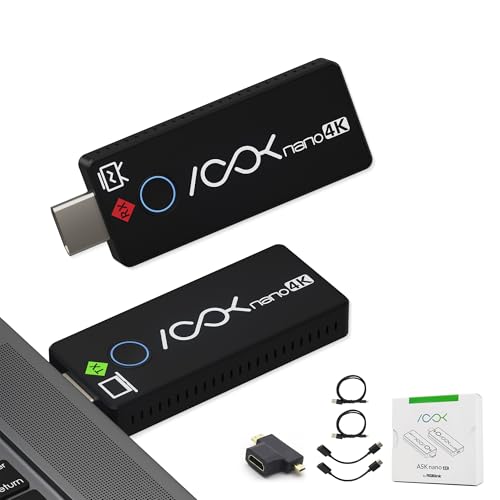
- Plug-and-play wireless HDMI extender
- Up to 4K with low-latency output
- Up to 131ft range in suitable environments
Best For: Small meeting rooms needing simple HDMI mirroring from laptops and PCs
Premium Presenter Remote
Logitech Spotlight Wireless Presentation Remote

- Digital highlighting and mouse-like cursor control
- Dual connectivity with USB-A receiver or Bluetooth
- 30 m range with smart timing alerts
Best For: Speakers who want polished control in hybrid or in-person presentations
Value Presentation Clicker
Wireless Presentation Clicker with Case

- USB-A and USB-C receivers included
- Rechargeable battery with carry case
- Up to 100 ft wireless control range
Best For: Budget-conscious presenters who need portable slide control across newer and older laptops
Renewed ClickShare Basics – Barco ClickShare CS-100 Huddle
Barco ClickShare CS-100 Huddle| Small Meeting Room Standalone Wireless Presentation System (Renewed)
Check Price On AmazonIf you need a wireless presentation system for huddle rooms, the Barco ClickShare CS-100 Huddle is built for quick BYOD sharing in small teams. It lets users share from a laptop, tablet, or smartphone with a simple, standalone setup, and you can add a ClickShare Button for an easier meeting flow.
Best For: Small huddle rooms that need straightforward wireless sharing from personal devices.
Pros:
- Supports sharing from laptop, tablet, or smartphone
- Designed for small-team huddle spaces
- Standalone system with optional ClickShare Button support
Cons:
- Renewed product, which may matter to some buyers
- Feature set is focused on basic collaboration rather than advanced extras
For teams that want a simple wireless presentation system for huddle rooms, this model keeps the experience centered on fast content sharing and ease of use. It is a practical fit when you want minimal friction and a familiar ClickShare workflow.
HDMI-Aware Share Hub – HuddleCamHD HuddleShare
The HuddleCamHD HuddleShare is a wireless presentation system for huddle rooms that also supports in-room dedicated computers and HDMI video inputs. It connects to a TV over HDMI with embedded audio support, and it can join your network through WiFi or Ethernet for flexible deployment.
Best For: Rooms that need wireless content sharing plus support for HDMI sources and a dedicated in-room computer.
Pros:
- Supports dedicated computers and HDMI video inputs
- Connects to displays through HDMI with embedded audio
- Offers WiFi or Ethernet network connectivity
- Can support wireless keyboard and mouse control
Cons:
- Product details suggest a more utility-focused setup than a polished collaboration appliance
- No warranty is listed in the supplied notes
This is a good fit when your wireless presentation system for huddle rooms needs to coexist with wired sources and local control. It adds flexibility without giving up traditional HDMI-based workflows.
4K Wireless Presenter Kit – TRENDnet TWP-100R1K
If you want a wireless presentation system for huddle rooms with higher-resolution output, the TRENDnet TWP-100R1K supports 4K content sharing and 5.1 audio over HDMI. It works with Windows, Mac, Android, and iOS devices, and its push-button design keeps sharing simple.
Best For: Small meeting spaces that need 4K wireless screen sharing with broad device support.
Pros:
- Supports 4K resolution and 5.1 audio over HDMI
- Compatible with Windows, Mac, Android, and iOS
- Plug-and-play, button-based sharing
- Can display up to 4 screens concurrently
Cons:
- May be more capability than very basic huddle-room use cases require
- Only the supplied notes should be used to confirm installation fit and workflow needs
For teams that want more resolution headroom in a wireless presentation system for huddle rooms, this TRENDnet kit is a strong practical option. The combination of 4K, multi-platform support, and split-screen sharing makes it flexible for mixed-device environments.
Enterprise Collaboration Pick – Barco ClickShare C-5
The Barco ClickShare C-5 is a wireless presentation system for huddle rooms and small meeting spaces that also supports hybrid collaboration. It lets users share content wirelessly in full HD from laptops or mobile devices, and it works with existing Microsoft Teams, Zoom, or Webex rooms.
Best For: Small to medium meeting rooms that need secure wireless sharing and hybrid meeting integration.
Pros:
- One-click wireless screen sharing from PC, Mac, or mobile devices
- Supports hybrid meeting rooms built around Teams, Zoom, or Webex
- Full HD sharing with BYOD support on a 4K canvas
- Includes enhanced security features and remote management support
Cons:
- Enterprise-oriented features may be more than a basic huddle room needs
- Advanced integration is a better fit for structured IT deployments than casual use
This model is a strong choice when you want a wireless presentation system for huddle rooms that can scale into more formal collaboration environments. Its security, remote management, and platform support make it especially appealing for IT-managed rollouts.
Classroom Collaboration Pick – WePresent WiPG-1600 Wireless Collaboration Gateway
If you need a wireless presentation system for huddle rooms that also plays nicely with interactive displays, the WePresent WiPG-1600 is built for that kind of shared-workspace use. It supports Windows, Mac, Android, and iOS devices, and it’s designed to work with SMARTboards and SMART annotation tools as well as many other touch displays.
Best For: Teams, classrooms, and huddle spaces that want broad device support and touch-display compatibility.
Pros:
- Compatible with a wide range of Windows, Mac, Android, and iOS devices
- Works with SMARTboards and SMART annotation tools
- Built for classrooms and huddle spaces
- Uses 5 GHz 802.11ag wireless connectivity
Cons:
- Does not advertise 4K output or other high-resolution specs in the supplied notes
- Best fit is collaboration environments rather than simple plug-and-play casting
Overall, the WiPG-1600 looks strongest in rooms where interactive teaching or whiteboarding matters as much as basic screen sharing. If your huddle room uses touch displays or SMART hardware, this is a practical fit.
4K Plug-and-Play Pick – RGBlink Ask Nano 4K Wireless Presentation Kit
For a wireless presentation system for huddle rooms that needs fast setup and sharp output, the RGBlink Ask Nano 4K is a straightforward option. It uses a USB-C transmitter and HDMI receiver, supports 4K@30Hz, and is designed for cable-free sharing in conference rooms, classrooms, and portable BYOD setups.
Best For: Small meeting spaces that want simple plug-and-play casting with 4K support.
Pros:
- Plug-and-play USB-C transmission with no app, driver, or network setup required
- Supports 4K UHD output at 3840×2160
- Wireless range up to 30 meters
- Mirror and extend modes for flexible presentations
Cons:
- Requires the laptop to support DisplayPort Alternate Mode for USB-C transmission
- Works through a dedicated transmitter/receiver setup, not app-based casting
This kit is a strong match for teams that want quick, low-friction sharing in a huddle room without managing software installs or network access. Its 4K support and dual-mode workflow make it especially useful for polished presentations.
Meeting Control Pick – Microsoft Presenter+ Wireless Clicker
The Microsoft Presenter+ is more of a presentation control tool than a full wireless presentation system for huddle rooms, but it can still be useful when you mainly need reliable slide control. It works with Microsoft Teams and popular meeting apps, offers Bluetooth connectivity, and adds built-in mute control plus a Teams button for fast meeting actions.
Best For: Presenters who want a compact clicker for slide control and meeting management.
Pros:
- Certified for Microsoft Teams and works with popular presentation and meeting apps
- Lets you advance slides, go back, and point onscreen with PowerPoint Live
- Integrated mute control with status light
- Bluetooth connectivity with up to 10 meters range
Cons:
- Supports only one device
- Does not include screen-sharing or receiver hardware
- Best suited to control, not full-room presentation casting
If your priority is presentation navigation and meeting control rather than content mirroring, Presenter+ is a polished, work-focused accessory. It fits best when someone in the room already has a separate display sharing setup.
Wireless HDMI Meeting Room Pick – RGBlink 4K Wireless HDMI Transmitter & Receiver
If you need a wireless presentation system for huddle rooms that keeps setup simple, this RGBlink kit is built for cable-free HDMI mirroring and extension. It supports up to 4K output, low-latency performance, and a portable 1TX/1RX design for temporary AV use in meeting rooms, classrooms, and training spaces.
Best For: Teams that want a plug-and-play wireless HDMI option for laptops, PCs, TVs, monitors, and projectors in small meeting spaces.
Pros:
- Plug-and-play wireless HDMI transmitter and receiver with no complex configuration
- Supports up to 4K resolution with low-latency performance for presentations
- Works with PCs, laptops, TVs, monitors, projectors, and RGBlink mini series switchers
- Portable design with up to 131ft wireless range depending on environment
Cons:
- Not compatible with phones, iPads, or tablets
- 4K use requires both source and display to support 4K
- Receiver and transmitter need 5V/1A adapter power for 4K performance
For a straightforward room-to-screen connection, this is a practical pick when your priority is reliable HDMI sharing rather than broader device support. It fits best in controlled meeting environments where a simple wireless link is enough.
Premium Presenter Remote – Logitech Spotlight Wireless Presentation Remote
For a wireless presentation system for huddle rooms that focuses on the presenter rather than the display hardware, the Logitech Spotlight is a polished remote with digital highlighting, cursor control, and a 30 m wireless range. It is designed for in-person, virtual, and hybrid presentations and works with major presentation software on Windows and Mac.
Best For: Presenters who want advanced slide control and on-screen highlighting in compact meeting spaces.
Pros:
- Advanced digital highlighting goes beyond a traditional laser pointer
- Mouse-like cursor control lets you interact with links and videos
- Dual connectivity via USB-A receiver or Bluetooth Smart
- Compatible with PowerPoint, Keynote, PDF, Google Slides, and Prezi
Cons:
- Supports only one device at a time
- More presentation-focused than room-AV focused
- Requires the Logi Options+ app for some features
This is a strong choice if your huddle room presentations are driven by a single speaker who wants more control and a more professional on-screen pointing experience. It is less about connecting displays and more about improving the presentation itself.
Value Presentation Clicker – Wireless Presentation Clicker with Case
If you want a simple wireless presentation system for huddle rooms, this rechargeable clicker keeps slide control easy while adding a red laser pointer for clear emphasis. With both USB-A and USB-C receivers, it is designed to work across older laptops and modern devices without much fuss.
Best For: Teachers, trainers, and business presenters who need affordable, portable slide control with broad device compatibility.
Pros:
- Includes both USB-A and USB-C receivers for flexible compatibility
- Rechargeable battery eliminates the need to replace batteries
- Wireless range up to 100 ft for room movement
- Comes with a protective carrying case for travel and storage
Cons:
- Uses a red laser pointer instead of advanced digital highlighting
- Less feature-rich than premium presentation remotes
- Best suited to slide control, not display connectivity
This model is a practical, budget-friendly option when you mainly need reliable slide advancement and a portable kit for everyday meetings. It covers the essentials well, especially if you present on both USB-A and USB-C machines.
How We Picked the Best Wireless Presentation System for Huddle Rooms
We prioritized systems that are easy to deploy in compact rooms, support quick content sharing, and reduce friction for guests and hybrid meetings. We also looked for strong compatibility, dependable wireless performance, and features that match common huddle-room use cases.
Quick Comparison
For teams that want a set-it-and-forget-it room solution, dedicated presentation gateways and collaboration systems are usually the best fit. If you need flexible control for occasional presenters, a wireless clicker or presenter remote may be enough. Higher-end kits stand out when 4K output, low latency, or audio support matters.
Key Buying Factors for a Wireless Presentation System for Huddle Rooms
Connection Method and Guest Access
Look for systems that support fast pairing from laptops and mobile devices, plus simple guest access for visitors. In huddle rooms, the best systems reduce setup time to seconds, not minutes.
Video Quality and Latency
If you share detailed charts, design mockups, or video, prioritize 4K support and low-latency transmission. For basic slide sharing, 1080p may be sufficient, but smoother performance still improves the meeting experience.
Compatibility and Room Fit
Check support for Windows, macOS, ChromeOS, and common conferencing tools before buying. Also confirm that the hardware suits the room size, display setup, and available ports.
Audio, Collaboration, and Control
Some systems focus purely on screen sharing, while others add audio passthrough, collaboration tools, or presenter controls. Choose based on whether the room is mainly used for content display or interactive meetings.
Who Should Buy Which Wireless Presentation System for Huddle Rooms?
Choose a dedicated wireless presentation system if you manage a shared huddle room and want the cleanest user experience. Pick a wireless HDMI kit if your priority is low-latency display sharing with minimal software dependence. Go with a presenter remote or clicker if you mainly need room-to-room control for slides rather than full-screen sharing.
If your team values simplicity, start with a system that matches your most common meeting type instead of buying for every possible scenario. That approach usually delivers the best mix of ease, reliability, and value.