Professional livestreams depend on clean video, dependable connections, and minimal delay. The right capture card can turn a camera, presentation system, or second computer into a reliable source for webinars, demos, interviews, and virtual events.
We selected 10 capture cards for business livestreaming across USB, USB-C, and internal PCIe designs, with options for 1080p production, 4K workflows, high-refresh passthrough, and flexible conferencing setups.
Best 10 Capture Cards for Business Livestreaming Picks for 2026
Best Camera-to-Webcam Pick

- 1080p60 and 4K capture support
- Ultra-low latency for synced broadcasts
- Works with cameras, PC, Mac, and iPad
Best For: Professional camera-based livestreaming and video conferencing
Best PCIe Gaming Capture Card
AVerMedia Live Streamer Ultra HD
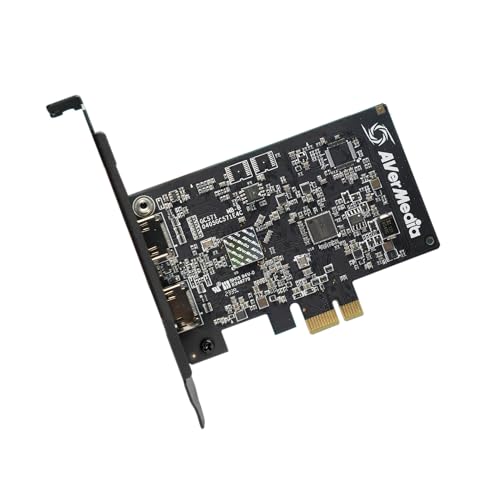
- 4K60 pass-through with 4K30 capture
- VRR and 1080p120 support
- Compatible with multiple PCIe slot sizes
Best For: Windows desktop gaming and HDMI broadcast setups
Best Premium Internal Capture Card

- 4K60 HDR10 capture and 8K60 pass-through
- HDMI 2.1 with up to 1080p240 recording
- Supports VRR and dual-PC setups
Best For: High-end Windows production studios and dual-PC streaming
Best Plug-and-Play Camera Capture

- 4K60 USB-C capture with low latency
- No drivers or extra power required
- Compatible with Windows, Mac, iPad, and Android
Best For: Flexible camera streaming, webinars, and mobile productions
Best All-Around Pick
AVerMedia StreamLine MINI+ GC311G2

- 1080p60 capture with 4K60 HDR pass-through
- High-refresh pass-through up to 1440p144
- Driver-free support for common streaming software
Best For: Business creators needing versatile Full HD capture
Best Budget-Friendly Option
Guermok 1080p60 USB 3.0 Capture Card

- 1080p60 output with up to 4K30 input
- No external power or extra drivers required
- Portable design with broad software compatibility
Best For: Portable, entry-level Full HD business streams
Best for 4K Workflows
AVerMedia Live Gamer Ultra S GC553Pro

- 4K60 capture with RGB24 full-color on Windows
- 4K60 HDR and VRR pass-through
- Supports ultrawide inputs and 5.1 audio on Windows
Best For: Professional teams building advanced 4K livestreaming setups
Flexible 4K Pass-Through Pick

- 4K 60Hz input and loop-out
- Up to 1080p60 or 2K30 capture
- Mic-in and USB-A/USB-C support
Best For: Flexible business livestreaming, interviews, and presentations
Simple Plug-and-Play Choice

- Up to 4K30 HDMI input
- 1080p30 USB output with stereo sound
- No drivers or external power needed
Best For: Standard business broadcasts, conferences, and training
Premium High-Refresh Option
PORTTA DX20R HDMI Capture Card

- 4K60 capture with high-refresh pass-through
- HDR and VRR support
- CapHub software for video and audio control
Best For: Advanced livestreaming setups and high-refresh sources
Best Camera-to-Webcam Pick – Elgato Cam Link 4K
For business livestreaming, the Elgato Cam Link 4K is a compact way to connect a DSLR, mirrorless camera, camcorder, action camera, or iPhone to a computer. Its USB 3.0 connection supports 1080p60 and up to 4K capture, making it useful for webinars, presentations, and polished live broadcasts.
Best For: Businesses and creators turning a compatible camera into a high-quality webcam for OBS, Zoom, Discord, or similar applications.
Pros:
- Supports 1080p60 and 4K60 capture with compatible equipment.
- Ultra-low latency helps keep video and audio synchronized.
- Works with PC, Mac, and iPad, and supports multiple HDMI camera sources.
Cons:
- Requires a compatible camera and HDMI output.
- 4K performance depends on the specific Cam Link model and system setup.
The Cam Link 4K is a strong choice when presentation quality matters more than a basic webcam setup. Its compact design and broad device compatibility make it practical for professional business livestreaming.
Best PCIe Gaming Capture Card – AVerMedia Live Streamer Ultra HD
The AVerMedia GC571 is an internal PCIe option for business livestreaming teams that also broadcast gameplay, demonstrations, or HDMI-based presentations. It offers 4K60 pass-through, 4K30 capture, VRR support, and 1080p120 capture for smooth, high-frame-rate video.
Best For: Windows users building a desktop streaming system for console broadcasts, gaming content, or high-frame-rate HDMI capture.
Pros:
- Provides 4K60 pass-through and 4K30 capture.
- Supports VRR and 1080p120 high-frame-rate capture.
- Fits PCIe x1, x4, x8, or x16 slots and uses a drive-free plug-and-play setup.
Cons:
- Requires a compatible desktop PC and open PCIe slot.
- Listed operating-system support is Windows 10 64-bit or Windows 11 64-bit and later.
Choose the GC571 if your business livestreaming setup is centered on a Windows desktop and HDMI sources. Its pass-through and high-frame-rate features are especially useful when smooth local gameplay or demonstrations must remain visible while capturing.
Best Premium Internal Capture Card – Elgato 4K Pro
The Elgato 4K Pro is designed for demanding business livestreaming systems that need internal HDMI 2.1 connectivity and high-resolution pass-through. It can capture in 4K60, pass through up to 8K60, record up to 1080p240, and support VRR for smooth, responsive broadcasts.
Best For: Windows desktop studios, dual-PC workflows, and professional broadcasts using high-resolution or high-frame-rate HDMI sources.
Pros:
- Supports 4K60 HDR10 capture and up to 8K60 pass-through.
- HDMI 2.1 enables high frame rates up to 1080p240 recording.
- Works with OBS, Streamlabs, Zoom, Teams, Twitch, YouTube, and other platforms.
Cons:
- Requires Windows 10 and an available PCIe slot.
- Its advanced capabilities may exceed the needs of basic webcam or presentation streaming.
The 4K Pro is the most capable internal option in this lineup for teams that need room to scale. It makes the most sense for a dedicated Windows production PC, particularly when 4K capture, VRR, HDR10, or dual-PC streaming is part of the plan.
Best Plug-and-Play Camera Capture – AVerMedia CamStream 4K
The AVerMedia CamStream 4K is a flexible USB-C capture card for business livestreaming, webinars, video conferences, and live events. It connects DSLR, mirrorless, camcorder, or action cameras without extra power or drivers and supports 4K60 capture with Windows, Mac, iPad, and compatible Android devices.
Best For: Mobile or mixed-device streaming setups that need simple camera connectivity for OBS, Streamlabs, Zoom, Twitch, or similar platforms.
Pros:
- Supports 4K60 capture with RGB24 color and low-latency performance.
- Plug-and-play operation requires no additional drivers or power.
- Works with Windows, Mac, iPad, Android, laptops, smartphones, and tablets.
- Includes a 1/4-inch cold/hot shoe mount adapter.
Cons:
- Requires a compatible USB-C port and HDMI camera output.
- Operating-system compatibility depends on the specified newer Windows, macOS, iPadOS, or Android versions.
CamStream 4K is a practical pick for teams that move between offices, events, and mobile production locations. Its broad compatibility and driver-free setup reduce configuration work while preserving the benefits of a dedicated camera.
Best All-Around Pick – AVerMedia StreamLine MINI+ GC311G2
For business livestreaming, the AVerMedia GC311G2 offers a practical balance of dependable capture, smooth pass-through, and broad device compatibility. It captures up to 1080p60 while allowing compatible displays to run at up to 4K60 HDR, and its driver-free setup works with common streaming software on Windows and macOS.
Best For: Business creators who need reliable 1080p60 capture for presentations, product demos, webinars, or console and camera sources.
Pros:
- Captures Full HD 1080p video at 60 frames per second.
- Supports 4K60 HDR pass-through, plus high-refresh modes up to 1440p144 or 1080p240 HDR.
- Works with consoles, PCs, DSLR cameras, camcorders, compatible Macs, Windows computers, and USB-C iPads.
- Driver-free operation supports OBS, Camo Studio, and AVerMedia Streaming Center.
Cons:
- Captured video is limited to 1080p60 SDR; HDR applies to pass-through.
- Requires compatible hardware and operating systems for the listed high-resolution modes.
The GC311G2 is a strong general-purpose choice when a business livestreaming setup values straightforward operation and smooth local display performance more than 4K recording.
Best Budget-Friendly Option – Guermok 1080p60 USB 3.0 Capture Card
The Guermok capture card is a compact option for business livestreaming setups that need basic HDMI-to-computer capture without external power or additional drivers. It supports up to 1080p60 output and works with common platforms and software, although capture software is required and it is not designed for direct monitor or TV casting.
Best For: Portable meetings, online teaching, product demonstrations, and entry-level livestreaming with HDMI cameras, consoles, or other sources.
Pros:
- Supports up to 1920×1080 at 60Hz output, with input up to 4K30.
- Plug-and-play design requires no external power or additional drivers.
- Compact aluminum-alloy housing is designed for portability and heat dissipation.
- Compatible with Windows, macOS, Linux, Android, OBS, Zoom, and major streaming platforms.
Cons:
- Requires capture software and cannot directly cast to a monitor or TV.
- USB 2.0 adapters can limit bandwidth and resolution; USB 3.0 is recommended.
- Audio setup in OBS may require restarting the software.
Choose the Guermok when portability and low-complexity setup matter most. It is a sensible starting point for standard Full HD business streams, provided the host computer has a reliable USB 3.0 connection.
Best for 4K Workflows – AVerMedia Live Gamer Ultra S GC553Pro
For business livestreaming teams working with high-resolution video, the AVerMedia Live Gamer Ultra S GC553Pro provides 4K60 capture alongside HDR and VRR pass-through. It also supports ultrawide inputs, 5.1-channel audio on Windows, and workflows built around OBS Studio and Streamlabs.
Best For: Professional production teams, gaming-focused businesses, and creators who need 4K capture, high-refresh pass-through, or ultrawide source support.
Pros:
- Captures video at up to 4K60 and supports RGB24 full-color on Windows.
- Passes through 4K60 HDR and VRR, with support for 1440p144 or 1080p240 modes.
- Supports VRR recording, 21:9 ultrawide inputs, and 5.1-channel audio on Windows.
- Works with PS5, Xbox, Nintendo Switch, PC, Mac, and compatible iPad setups.
Cons:
- Some advanced features depend on Windows, Streaming Center, or Streaming Center Plug for OBS.
- Requires compatible displays, sources, and systems for 4K, VRR, and high-refresh modes.
- Its feature set may be more than needed for standard 1080p business broadcasts.
The GC553Pro is the premium choice in this group for teams that want room to grow into 4K, HDR, VRR, ultrawide, and multichannel-audio production rather than limiting a setup to basic Full HD capture.
Flexible 4K Pass-Through Pick – USB 3.0 HDMI Capture Card
For business livestreaming, the XIIXMASK USB 3.0 HDMI capture card combines 4K 60Hz input and loop-out with up to 1080p at 60fps or 2K at 30fps capture. Its USB-A/USB-C connectivity, microphone input, and broad software support make it practical for meetings, interviews, presentations, and live video.
Best For: Businesses that need flexible camera or console capture with smooth 1080p streaming and 4K pass-through.
Pros:
- Supports 4K 60Hz HDMI input and loop-out.
- Captures up to 1080p at 60fps or 2K at 30fps through USB 3.0.
- Includes 3.5mm mic-in for commentary, interviews, or external voice audio.
- Works with Windows, macOS, Linux, Android, iPadOS 17+, OBS, Zoom, and major streaming platforms.
Cons:
- USB 3.0 is recommended for the listed high-frame-rate capture modes.
- The mic input does not record party chats.
- OBS may require a restart after audio setup.
This is a versatile choice when a business livestreaming setup needs both high-quality pass-through and direct USB capture. The included USB-A/USB-C cable also helps it fit a variety of computers.
Simple Plug-and-Play Choice – AXHDCAP 4K HDMI Capture Card
The Audio Express AXHDCAP is a straightforward option for capture cards for business livestreaming, teaching, video conferences, and camera-based broadcasts. It accepts HDMI input up to 4K at 30Hz and outputs up to 1080p at 30Hz over USB, with stereo sound and no driver or external power requirement.
Best For: Businesses prioritizing simple setup for 1080p meetings, presentations, training sessions, and live broadcasts.
Pros:
- Plug-and-play design requires no drivers or external power.
- Supports HDMI input up to 3840×2160 at 30Hz.
- Provides up to 1080p at 30Hz USB video output with stereo sound.
- Compatible with Windows, macOS, Linux, OBS, Zoom, YouTube, Twitch, and common media software.
Cons:
- Uses USB 2.0 and is not compatible with USB 3.0 recording speeds.
- Maximum video output is 1080p at 30Hz.
- It cannot add HDMI output to a laptop or computer that lacks HDMI out.
The AXHDCAP suits organizations that want an uncomplicated capture workflow rather than high-frame-rate production. Its USB 2.0 limitation makes it better for standard business video than demanding gaming or high-motion content.
Premium High-Refresh Option – PORTTA DX20R HDMI Capture Card
The PORTTA DX20R is aimed at advanced capture cards for business livestreaming and other production setups where high refresh rates, HDR, and control features matter. It captures 4K at 60Hz, supports high-refresh pass-through up to 1080p at 240Hz, and connects to Windows, macOS, or Linux through USB 3.0.
Best For: Professional or hybrid teams that need high-refresh pass-through, HDR/VRR support, and adjustable capture settings.
Pros:
- Captures 4K at 60Hz, 2K at 144Hz, and 1080p at 240Hz.
- Supports HDR and VRR for smoother, enhanced visuals.
- Offers ultra-low latency and plug-and-play compatibility with major streaming software.
- CapHub utility enables video, audio mixing, firmware, EDID, and VRR adjustments.
Cons:
- Advanced settings may require downloading the CapHub utility.
- The supplied details list Windows and macOS for the utility, while the device itself also supports Linux.
- Its high-refresh features may exceed the needs of basic conference streaming.
For teams producing visually demanding streams or combining presentations with high-refresh sources, the DX20R provides the strongest technical headroom of these options. Its control software is useful when a standard plug-and-play setup is not enough.
How We Picked the Best Capture Cards for Business Livestreaming
We focused on features that matter in real business production rather than gaming specifications alone. Our comparison considers supported input and output resolutions, passthrough refresh rates, latency, connection type, compatibility with common software, audio handling, portability, and setup requirements. We also included products at different price and performance levels so small teams, mobile presenters, and dedicated production systems can find a suitable match.
Before buying, confirm that your camera or video source outputs a compatible HDMI signal. Some cameras require a clean HDMI setting, continuous power, or a separate microphone and audio interface.
Quick Comparison
| Type | Best for | Main advantage | Potential limitation |
|---|---|---|---|
| Compact USB or USB-C | Traveling presenters and small teams | Fast installation and portability | May have fewer controls or lower capture limits |
| 4K HDMI capture | Premium cameras and detailed demos | Higher-resolution production and passthrough | Needs compatible USB bandwidth and hardware |
| Internal PCIe | Permanent studio or control-room systems | Low-latency performance and tidy cabling | Requires a compatible desktop installation |
| High-refresh passthrough | Live demonstrations and interactive sources | Keeps the local display smooth while capturing | Often costs more than basic 1080p models |
Key Buying Factors for Capture Cards for Business Livestreaming
Resolution and Frame Rate
1080p at 60 frames per second is sufficient for most webinars, interviews, and presentations. Choose 4K capture when you need sharper product demonstrations, cropping flexibility, or a future-ready studio. Check capture and passthrough specifications separately; a card may pass through 4K while recording at a lower resolution.
Latency and Passthrough
Low latency helps presenters monitor sources naturally and keeps demonstrations responsive. Passthrough is especially useful when a camera or computer must feed both the streaming system and a local display. Verify the supported refresh rate if your workflow uses 120Hz or 240Hz signals.
Connection and Compatibility
USB 3.0 and USB-C models are convenient, but the host computer must provide the required port speed. Internal cards can offer consistent performance but are limited to desktop systems with an available PCIe slot. Confirm compatibility with OBS, Zoom, Teams, your operating system, and any required drivers.
Audio and Reliability
For business events, stable operation matters more than flashy extras. Check whether embedded HDMI audio meets your needs or whether you should use a separate microphone or mixer. Use reliable HDMI cables, provide adequate cooling, and test the complete setup before going live.
Who Should Buy Which Capture Cards for Business Livestreaming?
Choose a compact USB or USB-C card if you travel, run occasional webinars, or need a simple camera-to-computer connection. Choose a 4K model for premium cameras, detailed demonstrations, and productions where cropping or high-resolution recording matters. Choose an internal PCIe card for a dedicated studio computer that handles frequent events and multiple demanding sources. Choose high-refresh passthrough when a local operator must interact with a live computer or game-like interface without sacrificing smooth display performance.