Choosing the right monitor can improve call quality, desk setup, and day-to-day productivity in one step. The best options combine a sharp display with a reliable webcam, microphone, and speakers.
In this roundup, we focus on business-friendly models that make video meetings simpler for offices, hybrid teams, and remote workers.
Best 10 Commercial Display Monitor for Video Conferencing Picks for 2026
Meeting Room Ready
ASUS 27" Video Conference Monitor

- Built-in webcam, mic array, and speakers
- 27-inch Full HD IPS with wide viewing angles
- Tilt, swivel, pivot, and height adjustments
Best For: Teams wanting an all-in-one conferencing monitor
High-Res Collaboration Pick
Dell 27 P27 Video Conference Monitor
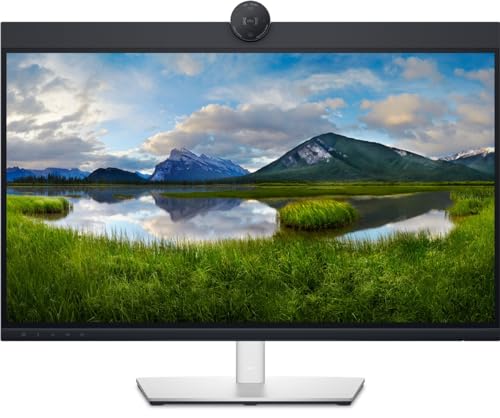
- 27-inch QHD display for sharper detail
- Built-in 2K webcam with Sony Starvis sensor
- USB hub plus height and tilt adjustment
Best For: Office users who want sharper video calls and multitasking
USB-C All-in-One Choice
LG 24BP75CP-B Conference Monitor

- Built-in webcam, microphone, and speakers
- USB-C with up to 65W charging
- IPS panel with Flicker Safe and Reader Mode
Best For: Compact offices that want USB-C and built-in meeting tools
Fast Refresh Meeting Display
ASUS 24" Video Conferencing Monitor

- Built-in webcam, mic array, and speakers
- 100Hz IPS panel with 99% sRGB
- Tilt, swivel, pivot, and height adjustment
Best For: Compact workspaces that want a smoother 100Hz conferencing display
Premium All-in-One Video Meeting Pick
ViewSonic 24" IPS Webcam Monitor

- 5MP webcam, mic, and speakers built in
- Windows Hello IR camera for secure sign-in
- USB-C, HDMI, and DisplayPort connectivity
Best For: office users who want an all-in-one conferencing monitor
Ergonomic Budget-Friendly Conferencing Display
Acer 24" FHD IPS Conferencing Monitor

- Webcam, microphone arrays, and speakers included
- Height, swivel, and tilt adjustments for comfort
- HDMI, VGA, DisplayPort, and USB expansion
Best For: teams and home office users who want core built-in meeting tools
Business Conference-Ready Classic
ASUS BE24EQK 24" IPS Webcam Monitor

- Adjustable 2MP Full HD webcam built in
- Beamforming and echo cancellation improve voice clarity
- Flicker-free and low blue light Eye Care support
Best For: remote workers and business users who want clear audio and eye-care features
Premium Ultrawide Meeting Hub
Philips 34E1C5600HE 34" Curved USB-C Webcam Monitor

- 34-inch 3440 x 1440 ultrawide panel
- 5MP webcam with Windows Hello and mic
- USB-C docking with 65W power delivery
Best For: Remote workers who want an all-in-one ultrawide conferencing display
Budget Conference Display
SKitphrati 27" Business Webcam Monitor

- 27-inch IPS panel with 1080p resolution
- Built-in 3MP webcam, mic array, and speakers
- HDMI, DisplayPort, VGA, and USB 2.0 inputs
Best For: Small teams needing a simple conferencing monitor
QHD Video Call Workstation

- 5MP 2K webcam plus stereo mic and speakers
- 2560 x 1440 QHD panel with 99% sRGB
- Fully adjustable stand with pivot and swivel
Best For: QHD-focused users who want an ergonomic conferencing monitor
Meeting Room Ready – ASUS 27" Video Conference Monitor
If you want a commercial display monitor for video conferencing that keeps everything simple, this ASUS 27-inch model builds the camera, mic array, and speakers right into the screen. The Full HD IPS panel, wide viewing angles, and height-adjustable stand make it a practical pick for busy offices, shared desks, and online meetings.
Best For: Teams that want an all-in-one 27-inch conferencing display with flexible connections and ergonomic adjustments.
Pros:
- Built-in Full HD adjustable webcam, mic array, and stereo speakers for meetings and online learning
- 27-inch frameless IPS panel with 1920 x 1080 resolution and 178-degree viewing angles
- Strong connectivity with DisplayPort, HDMI, VGA, USB upstream, audio in, and earphone jack
- Ergonomic stand supports tilt, swivel, pivot, and 150mm height adjustment
Cons:
- 1080p resolution may feel basic if you want more screen detail from a 27-inch display
- Only one HDMI port is listed
- Built-in USB support appears limited to one upstream USB connection
This is a straightforward conferencing monitor for businesses that value convenience and adjustability over extra resolution. It covers the core essentials well and adds ASUS Eye Care features for a more comfortable workday.
High-Res Collaboration Pick – Dell 27 P27 Video Conference Monitor
This commercial display monitor for video conferencing is aimed at desks that need a sharper image and integrated meeting hardware. The Dell 27 P27 uses a 27-inch QHD panel, built-in webcam, and USB hub to support office calls, telework, and everyday productivity on a single screen.
Best For: Buyers who want a 27-inch QHD conferencing monitor with built-in webcam and USB hub support.
Pros:
- 2560 x 1440 QHD resolution for more screen detail than standard Full HD models
- Built-in 2K QHD webcam with Sony Starvis sensor
- USB hub with three USB ports for connecting accessories
- Height and tilt adjustment help fit different desk setups
Cons:
- 8 ms response time is slower than some business monitors
- Only one HDMI port is listed
- No built-in speakers or microphone are mentioned in the supplied details
For teams that want a cleaner, higher-resolution workspace, this Dell stands out with QHD sharpness and a capable webcam. It is a solid office choice when conferencing and multitasking both matter.
USB-C All-in-One Choice – LG 24BP75CP-B Conference Monitor
If your priority is a compact commercial display monitor for video conferencing, the LG 24BP75CP-B packs a webcam, microphone, speakers, and USB-C connectivity into a 24-inch business-friendly design. Its IPS panel, Flicker Safe support, and adjustable stand make it a practical fit for daily office calls and shared productivity work.
Best For: Small workstations and business users who want USB-C convenience with built-in conferencing tools.
Pros:
- Built-in full-HD pop-up webcam with enhanced security and integrated microphone
- USB-C supports video, data, and up to 65W charging through one cable
- IPS panel with consistent color and wide viewing angles
- Flicker Safe and Reader Mode help reduce eye strain during long work sessions
Cons:
- 24-inch 1080p screen may be smaller than some conference-focused desk setups
- Brightness is listed at 250, which is modest for bright rooms
- The monitor is optimized for business use rather than higher-end display needs
This LG is a tidy all-in-one option for people who want fewer cables and built-in meeting hardware. It is especially appealing if USB-C charging and a compact footprint are high on the checklist.
Fast Refresh Meeting Display – ASUS 24" Video Conferencing Monitor
This commercial display monitor for video conferencing combines the essentials of an office screen with a smoother 100Hz refresh rate. The ASUS BE249QFK includes an integrated Full HD webcam, mic array, and stereo speakers, plus an IPS panel and ergonomic stand for everyday business use.
Best For: Users who want a compact conferencing monitor with a smoother 100Hz panel and built-in meeting hardware.
Pros:
- Integrated Full HD webcam, mic array, and stereo speakers for meetings
- 100Hz refresh rate can make motion feel smoother than typical 60Hz business displays
- 24-inch frameless IPS panel with 99% sRGB and wide viewing angles
- Strong ergonomics with tilt, swivel, pivot, and 130mm height adjustment
Cons:
- 1080p resolution is standard for the size and not ideal if you want extra workspace
- Only one HDMI port is listed in the supplied details
- USB connectivity appears limited to one USB port and one USB 2.0 connection
As a conferencing monitor, this ASUS is a good fit when you want an easy all-in-one setup but also prefer a smoother-feeling screen. It balances video call hardware, color coverage, and ergonomics in a compact footprint.
Premium All-in-One Video Meeting Pick – ViewSonic 24" IPS Webcam Monitor
If you want a commercial display monitor for video conferencing that keeps the desk uncluttered, the ViewSonic VG2441V combines a 24-inch 1080p IPS panel with a built-in 5MP webcam, microphone, and speakers. It also adds Windows Hello support, so it suits teams that want a straightforward meeting setup with fewer separate peripherals.
Best For: Office users who want an all-in-one conferencing monitor with facial login, a webcam, and flexible connectivity.
Pros:
- Built-in 5MP webcam, microphone, and speakers simplify video calls
- Windows Hello-certified IR camera supports password-free sign-on
- Advanced ergonomics with tilt, swivel, rotate, and height adjustment
- USB-C, HDMI, and DisplayPort inputs make it easy to connect multiple systems
Cons:
- 1080p resolution may feel basic for users who prefer higher-detail displays
- 250 brightness is adequate, but not especially strong for very bright rooms
- Best suited to business conferencing rather than content-heavy creative work
The VG2441V is a practical choice if your priority is reducing setup time and getting a cleaner video meeting station. Its combination of webcam features, ergonomics, and broad input support makes it a solid fit for everyday office conferencing.
Ergonomic Budget-Friendly Conferencing Display – Acer 24" FHD IPS Conferencing Monitor
The Acer 24-inch FHD IPS model is a straightforward commercial display monitor for video conferencing when you want the essentials without overcomplicating the setup. It includes a webcam, microphone arrays, speakers, and a flexible stand, making it a practical option for everyday meetings and shared workspaces.
Best For: Teams and home office users who want an ergonomic conferencing monitor with core built-in meeting tools.
Pros:
- Built-in webcam, microphone arrays, and speakers support video calls out of the box
- Tilt, swivel, and height adjustment help improve viewing comfort
- IPS FHD panel offers 178° wide viewing angles for collaborative use
- Includes HDMI, VGA, and DisplayPort plus a USB port expander
Cons:
- 75Hz refresh rate is fine for office use, but not a standout spec
- Brightness is listed at 250 nits, so it may be less ideal in very bright rooms
- Speaker and webcam specs are functional rather than premium
For buyers focused on comfort and meeting basics, this Acer monitor covers the essentials well. It’s a sensible choice if you want a dependable conferencing display with enough adjustability and connectivity for day-to-day office work.
Business Conference-Ready Classic – ASUS BE24EQK 24" IPS Webcam Monitor
The ASUS BE24EQK is built for buyers who want a commercial display monitor for video conferencing with a strong focus on communication quality. Its integrated adjustable Full HD webcam, mic array, and stereo speakers make it well suited to telecommuting, online learning, and routine business calls.
Best For: Remote workers and business users who want a reliable conferencing monitor with clear audio and eye-care features.
Pros:
- Integrated adjustable 2MP Full HD webcam keeps video meetings simple
- Beamforming and echo cancellation help reduce ambient noise and keyboard clicks
- 300 cd/m² brightness is higher than many office-focused displays
- Eye Care technology with flicker-free and low blue light support reduces fatigue
Cons:
- The built-in webcam is 2MP, so it is less advanced than some higher-megapixel options
- Not as feature-heavy on connectivity as some newer USB-C-focused monitors
- Frameless business design prioritizes work use over entertainment extras
This ASUS model is a strong fit if your priority is dependable conferencing with better audio cleanup and eye comfort. It brings together the basics that matter most for daily business communication in a clean, office-friendly package.
Premium Ultrawide Meeting Hub – Philips 34E1C5600HE 34" Curved USB-C Webcam Monitor
If you want a commercial display monitor for video conferencing that also handles everyday productivity, this Philips 34-inch ultrawide brings a lot to the desk. The built-in 5MP Windows Hello webcam, noise-canceling mic, speakers, and USB-C docking make it easy to keep meetings tidy with fewer accessories and one-cable laptop connection.
Best For: Remote teams and hybrid workers who want an all-in-one ultrawide monitor with integrated meeting hardware.
Pros:
- Built-in 5MP webcam with Windows Hello facial recognition
- Noise-canceling microphone and integrated speakers for calls
- USB-C docking with up to 65W power delivery
- 34-inch 3440 x 1440 ultrawide workspace with height adjustment
Cons:
- Ultrawide 21:9 format may not suit every conference room setup
- Glossy screen finish may reflect more light than matte panels
- Designed more for desk use than shared-room display installations
This is a strong choice if you want a polished video conferencing setup without bolting on separate peripherals. The monitor combines meeting-friendly hardware with a broad work surface, making it practical for users who split time between calls, multitasking, and general office work.
Budget Conference Display – SKitphrati 27" Business Webcam Monitor
This commercial display monitor for video conferencing is built for straightforward business use. The 27-inch IPS panel, integrated adjustable 3MP webcam, mic array, and speakers make it a simple plug-in choice for offices that want a dedicated meeting screen without extra accessories.
Best For: Small offices and teams that need a basic all-in-one conferencing monitor at 1080p.
Pros:
- Built-in adjustable 3MP webcam with microphone array
- Integrated stereo speakers for conference calls
- 120Hz IPS display with 178-degree viewing angle
- HDMI, DisplayPort, VGA, and USB 2.0 inputs
Cons:
- 1080p resolution is modest for a 27-inch business display
- USB connectivity is limited compared with dock-style monitors
- Only a 2-year manufacturer warranty
Overall, this model focuses on essentials rather than premium extras. It makes sense when you need a dependable video-call monitor with integrated camera and audio, and when broad input compatibility matters more than higher resolution.
QHD Video Call Workstation – CUNPU 27" 2K Webcam Monitor
For buyers seeking a commercial display monitor for video conferencing with sharper visuals, this CUNPU 27-inch model stands out. It pairs a built-in 5MP 2K webcam, stereo mic, and speakers with a 2560 x 1440 QHD panel, so it works well as a meeting screen and a daily productivity monitor.
Best For: Users who want a QHD conferencing monitor with flexible ergonomics and integrated camera hardware.
Pros:
- Built-in 5MP 2K webcam with mic and speakers
- QHD 2560 x 1440 resolution with 99% sRGB coverage
- 120Hz refresh rate with FreeSync and G-Sync compatibility
- Highly adjustable stand with height, swivel, pivot, and tilt
Cons:
- 10ms response time is not as fast as some premium monitors
- Pop-up camera design may not appeal to every workspace
- One-year warranty is shorter than some alternatives
This is a balanced option if you want more detail than 1080p without giving up the convenience of a built-in conferencing setup. Its adjustable stand and QHD panel make it especially practical for desks that also serve as long-hour workstations.
How We Picked the Best Commercial Display Monitor for Video Conferencing
We looked for a Commercial Display Monitor for Video Conferencing that balances image quality, conferencing hardware, and practical office features. Priority went to monitors with built-in webcams, mic arrays, decent speakers, adjustable stands, VESA support, and connectivity that suits modern workstations.
We also considered screen size, resolution, panel type, and extras such as Windows Hello, USB-C docking, and eye-care features. The goal was to highlight monitors that reduce desk clutter while still delivering a professional meeting experience.
Quick Comparison
Smaller 24-inch Full HD models are a smart fit for standard desks and tight workspaces. They are usually the most affordable and easiest to position. Twenty-seven-inch options offer more screen space for multitasking, while ultrawide models are ideal if you want room for calls, documents, and side-by-side apps.
If your meetings depend on better framing and sharper facial detail, look for higher-resolution cameras and stronger audio pickup. If your priority is daily office work plus conferencing, a balanced Full HD IPS monitor is often the best value.
Key Buying Factors for a Commercial Display Monitor for Video Conferencing
Camera Quality
Webcam resolution matters, but so does placement, autofocus, and low-light performance. A built-in 2MP camera is fine for basic meetings, while 5MP and 2K options can offer a clearer, more polished look.
Microphones and Audio
Mic arrays help reduce dependence on a headset for quick calls. Built-in speakers are convenient, but if your office is noisy or privacy is important, external audio may still be better.
Display Size and Resolution
For most users, 24-inch and 27-inch Full HD displays are the sweet spot. Choose ultrawide or QHD if you regularly juggle video calls and multiple windows at once.
Stand Adjustability and Mounting
Height, tilt, swivel, and pivot adjustments make it easier to maintain good posture and camera framing. VESA compatibility is useful for arms and wall mounts.
Connectivity and Docking
USB-C is especially helpful for reducing cable clutter on a Commercial Display Monitor for Video Conferencing. HDMI and DisplayPort remain important for broader compatibility.
Who Should Buy Which Commercial Display Monitor for Video Conferencing?
Choose a 24-inch Full HD monitor if you want a compact, practical setup for everyday meetings. Pick a 27-inch model if you need more room for multitasking and a larger workspace. Go ultrawide if your workflow includes frequent collaboration, spreadsheets, or split-screen use.
If security and sign-in convenience matter, look for Windows Hello support. If you want the cleanest desk possible, prioritize USB-C docking and a built-in webcam so one monitor can handle both work and meetings.