Digitizing a box of family prints, scanning negatives, or creating searchable documents is easier with the right photo scanner for Windows. The best choice depends on whether you value speed, image detail, flexible media support, or a compact design.
We’ve compared 10 standout scanners across flatbed, sheet-fed, and photo-focused categories to help you choose the right balance of quality, workflow, and budget for your archive.
Best 10 Photo Scanners for Windows Picks for 2026
Best High-Volume Pick

- Scans up to 36 photos per batch
- Duplexes photos and handwritten backs
- Wi-Fi, enhancement tools, and cloud backup
Best For: Large photo collections and family archives
Best Compact Flatbed

- 2400 x 2400 dpi optical resolution
- Auto Scan Mode detects scan types
- Handles photos, receipts, cards, and paper
Best For: Occasional home photo and document scans
Best Photo-Focused Value

- Scans 4 x 6 photos in about two seconds
- Supports common photo sizes through 8 x 10
- Includes enhancement tools for faded images
Best For: Home photo digitizing with simple one-at-a-time feeding
Best for Photos and Documents

- 50-sheet feeder for document stacks
- Duplex scanning and OCR support
- Cloud sharing and automatic file naming
Best For: Home offices with heavy document workloads and occasional photos
Best for Photo Detail

- 4800 dpi optical resolution
- One-click restoration for faded photos
- Compact USB-powered flatbed design
Best For: Detailed scans of individual photos and artwork
Best for Comfort

- 4800 x 4800 dpi scanning resolution
- USB Type-C carries power and data
- Photo restoration and PDF shortcut buttons
Best For: Small workspaces and occasional photo scanning
Best Film-and-Photo Detail

- 6400 x 9600 dpi resolution
- Built-in 35mm and medium-format holders
- Digital ICE and faded-photo restoration
Best For: Digitizing film, slides, negatives, and high-resolution prints
Best Pro-Level Film Scanning
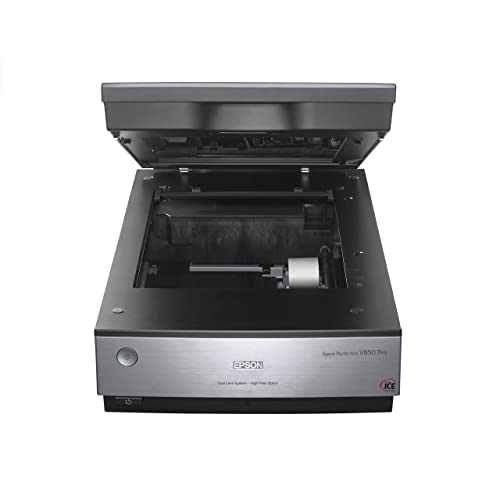
- 6400 dpi scanning resolution
- 4.0 Dmax for tonal detail
- Dual-lens system for optimized results
Best For: Dedicated photo scanning and archival-quality work
Best Compact Everyday Scanner

- 4800 dpi optical resolution
- Compact, USB-powered flatbed design
- Easy Photo Fix for faded images
Best For: Everyday home scanning of photos, artwork, and documents
Best High-Volume Pick – Epson FastFoto FF-680W
For anyone comparing photo scanners for windows, the Epson FastFoto FF-680W stands out for quickly digitizing large photo collections. It can batch-scan up to 36 photos, scan at up to one photo per second at 300 dpi, and connect by Wi-Fi or USB.
Best For: Families and archivists scanning thousands of mixed-size photos, documents, and snapshots.
Pros:
- High-speed scanning with a 36-photo batch capacity
- Duplex scanning captures photos and handwritten notes on the back
- Includes enhancement features such as color restoration, red-eye reduction, cropping, and rotation
- Supports wireless uploads and backup through Dropbox and Google Drive
Cons:
- Bulkier and heavier than basic flatbed photo scanners
- Its fastest workflow is designed for larger batches rather than single-item scanning
The FF-680W is the most capable choice here for high-volume photo preservation, especially when automation, batch feeding, and wireless sharing matter more than a compact footprint.
Best Compact Flatbed – Canon CanoScan LiDE 300
The Canon CanoScan LiDE 300 is a straightforward option among photo scanners for windows. Its USB connection, Auto Scan Mode, and 2400 x 2400 dpi optical resolution make it useful for occasional photos, documents, receipts, and business cards.
Best For: Windows users who want a simple USB flatbed scanner for individual photos and documents.
Pros:
- High listed optical resolution of 2400 x 2400 dpi
- Auto Scan Mode detects what is being scanned
- Supports photos, receipts, business cards, and paper documents
- Compact 1.7-inch height suits limited desk space
Cons:
- Single-sheet capacity is less suited to large photo collections
- USB-only connectivity does not provide wireless placement flexibility
The LiDE 300 favors simplicity and detailed flatbed scans over speed or batch processing, making it a practical fit for smaller scanning projects.
Best Photo-Focused Value – Plustek ePhoto Z300
The Plustek ePhoto Z300 is designed specifically for straightforward photo digitizing, making it a strong candidate among photo scanners for windows. It scans a 4 x 6 photo in about two seconds at 300 dpi and accepts several common photo sizes, plus letter and A4 paper.
Best For: Home users who want a dedicated, easy-to-use photo scanner for medium-sized collections.
Pros:
- Scans 4 x 6 photos in about two seconds at 300 dpi
- Supports 3 x 5, 4 x 6, 5 x 7, and 8 x 10 photos
- Offers 300 dpi and 600 dpi settings
- Includes image enhancement features for faded photos
Cons:
- USB connectivity requires a wired setup
- Photos are inserted one at a time
- Does not offer the Epson FF-680W’s duplex or wireless features
The ePhoto Z300 provides a focused balance of speed and simplicity for home photo projects, particularly when one-at-a-time feeding is acceptable.
Best for Photos and Documents – Epson WorkForce ES-400 II
Although it is primarily a document scanner, the Epson WorkForce ES-400 II can complement photo scanners for windows when your workload includes substantial paperwork. Its 50-sheet Auto Document Feeder, duplex scanning, and OCR tools are built for organized home-office scanning.
Best For: Windows-compatible home offices that need fast document workflows alongside occasional image scanning.
Pros:
- 50-sheet Auto Document Feeder speeds through document stacks
- Duplex scanning captures both sides in one pass
- OCR creates searchable PDFs and editable Word or Excel files
- ScanSmart supports cloud uploads, email, and automatic file naming
Cons:
- It is a document-focused model rather than a dedicated photo scanner
- USB connectivity limits placement compared with wireless models
- Its listed resolution is 300 dpi
The ES-400 II is the sensible choice when photo scanning is only part of a broader digitization routine and document productivity is the main priority.
Best for Easy Setup – Canon imageFORMULA RS40
For shoppers comparing photo scanners for Windows, the Canon imageFORMULA RS40 stands out when speed and batch handling matter. Its automatic feeder holds up to 60 sheets and can scan both sides of photos or documents at up to 40 items per minute.
Best For: Families and home offices digitizing large collections of mixed-size photos and documents.
Pros:
- Automatic feeder supports batches of up to 60 items.
- Duplex scanning handles both sides in one pass.
- Works with Windows and Mac and includes a TWAIN driver.
- Bundled software offers photo enhancement, red-eye correction, and face smoothing.
Cons:
- Uses a USB connection rather than wireless scanning.
- Its automatic-feed design may be less suited to delicate originals that need flatbed scanning.
The RS40 is a practical Windows photo scanner for users who value throughput and flexibility over a compact flatbed design. It also accommodates Polaroids, receipts, cards, IDs, and tax documents, making it useful beyond photo archiving.
Best for Photo Detail – Epson Perfection V19 II
The Epson Perfection V19 II is a strong option for Windows users who prioritize detailed scans of individual photos, artwork, and documents. Its flatbed design provides 4800 dpi optical resolution, while USB power keeps the compact scanner simple to set up.
Best For: Preserving individual photos, artwork, and faded prints with high-resolution detail.
Pros:
- 4800 dpi optical resolution supports detailed enlargements.
- Easy Photo Fix restores color to faded photos with one click.
- One-touch buttons simplify routine scanning.
- Removable high-rise lid accommodates thicker pages and books.
Cons:
- Flatbed scanning accommodates one sheet at a time.
- It is designed for USB use rather than wireless connectivity.
With Windows 7 support and a slim 1.5-inch profile, the V19 II fits well in a home workspace. It is better suited to careful, individual scans than to rapidly processing a large stack of photos.
Best for Comfort – Canon CanoScan LiDE 400
Canon CanoScan LiDE 400 Slim Scanner, 7.7" x 14.5" x 0.4", Document & Photo Scanner, Black
Check Price On AmazonFor a slim, straightforward choice among photo scanners for Windows, the Canon CanoScan LiDE 400 combines 4800 x 4800 dpi resolution with one-cable USB Type-C data and power. Its flatbed design and enhancement tools make it suitable for scanning individual photos and documents.
Best For: Small desks and users who want high-resolution flatbed scanning with simple controls.
Pros:
- 4800 x 4800 dpi resolution captures detailed photos and images.
- Color restoration and dust removal help improve scanned photos.
- EZ Buttons and Auto Scan mode streamline operation.
- Built-in PDF buttons can create editable, searchable multipage PDFs.
Cons:
- Flatbed design scans one item at a time.
- Requires a USB connection and has a minimum requirement of Windows 7.
The LiDE 400 is a space-conscious Windows scanner for photos and letter-size documents, with a vertical stand for flexible placement. It is a better fit for occasional, quality-focused scanning than for batch digitization.
Best Film-and-Photo Detail – Epson Perfection V600
For shoppers comparing photo scanners for windows, the Epson Perfection V600 is a strong choice when film conversion and high-resolution enlargements matter. Its 6400 x 9600 dpi resolution, built-in Transparency Unit, and Digital ICE technology support detailed scans of prints, slides, and negatives.
Best For: Digitizing 35mm and medium-format film, slides, negatives, and photos at home.
Pros:
- Scans 35mm slides, negatives, medium-format film, photos, and documents.
- 6400 x 9600 dpi supports enlargements up to 17 x 22 inches.
- Digital ICE helps remove dust and scratches, while Easy Photo Fix restores faded images.
- ReadyScan LED technology avoids warm-up time and uses less power.
Cons:
- Uses wired Hi-Speed USB 2.0 connectivity.
- Its 19-inch depth may require substantial desk space.
- The supplied minimum system requirement is Windows 7.
The V600 is especially practical for family archives and film collections. Choose it over a simpler flatbed when built-in film holders, restoration tools, and large enlargements are priorities.
Best Pro-Level Film Scanning – Epson Perfection V850 Pro
Among photo scanners for windows, the Epson Perfection V850 Pro is aimed at users who want professional-oriented color and tonal detail. It combines 6400 dpi resolution with a 4.0 Dmax rating and a dual-lens system designed to select the appropriate lens for scanning results.
Best For: Serious photographers and archivists seeking refined scans with smooth gradations and shadow detail.
Pros:
- 6400 dpi resolution captures fine image detail.
- 4.0 Dmax supports smooth gradations and detailed shadows.
- Dual-lens system selects between lenses for optimized scanning.
- Supports a broad range of Windows versions as well as Mac OS X versions listed by Epson.
Cons:
- At 20.9 pounds, it is relatively heavy for a home scanner.
- Its 19.8-inch width requires a spacious setup.
- Connectivity is USB rather than wireless.
The V850 Pro makes the most sense when scan quality and tonal control outweigh portability. Its larger, heavier design is easier to justify for dedicated photo work than occasional document scanning.
Best Compact Everyday Scanner – Epson Perfection V39 II
If you need photo scanners for windows that fit easily into a home office, the Epson Perfection V39 II offers a compact flatbed design with 4800 dpi optical resolution. It handles photos, artwork, books, and documents, while USB power and ScanSmart features make it convenient for everyday projects.
Best For: Home users who want a lightweight scanner for photos, documents, artwork, and faded-image restoration.
Pros:
- Compact, lightweight design measures 9.9 by 9.9 by 1.5 inches and weighs 3.1 pounds.
- 4800 dpi optical resolution supports clear, detailed photo scans.
- Easy Photo Fix restores color to faded photos with one click.
- USB-powered design, one-touch buttons, ScanSmart, and a removable high-rise lid improve convenience.
Cons:
- It is a flatbed photo and document scanner rather than a dedicated film scanner.
- Its standard sheet capacity is one page.
- The supplied minimum system requirement is Windows 7.
The V39 II is a practical pick for routine photo and document scanning when desk space is limited. Its restoration and stitching features add flexibility, but film-focused users should consider a model with dedicated film holders.
How We Picked the Best Photo Scanners for Windows
We focused on Windows-compatible scanners that suit common photo-digitizing and home-office tasks. Selection criteria included optical resolution, color accuracy, scanning speed, feeding options, software support, connectivity, and the ability to handle different print sizes. We also included both flatbed and automatic document feeder designs because they serve different workflows.
A high-resolution flatbed is generally preferable for treasured prints, artwork, and film, while a sheet-fed model can save substantial time when processing large batches of standard-size photos or documents.
Quick Comparison
| Best For | Recommended Type | What to Prioritize |
|---|---|---|
| Large photo archives | Sheet-fed photo scanner | Automatic feeding, speed, batch handling |
| Family prints and occasional documents | Flatbed scanner | Image quality, ease of use, gentle handling |
| Enlargements and restoration | High-resolution flatbed | Optical resolution, color depth, Digital ICE |
| Mixed home-office use | Duplex document scanner | Two-sided scanning, OCR, software workflow |
| Small desks or travel | Slim USB flatbed | Compact size, USB power, simple controls |
Key Buying Factors for Photo Scanners for Windows
Scanner Type and Workflow
Flatbed scanners require you to place each item on the glass, but they are versatile and typically safer for delicate or irregular materials. Sheet-fed scanners are much faster for stacks of loose prints and paperwork, though photos should be clean, flat, and suitable for feeding.
Optical Resolution
For ordinary prints, 300 to 600 dpi is often sufficient. Choose a model with higher true optical resolution if you plan to crop aggressively, enlarge small originals, scan artwork, or work with film. Avoid judging quality by interpolated resolution alone.
Speed and Automatic Feeding
Scan-per-minute ratings matter most when digitizing hundreds of items. An automatic document feeder can streamline batch work, while duplex scanning is useful for documents. For occasional photos, a slower flatbed may deliver better control without adding meaningful inconvenience.
Software and File Handling
Check that the scanner includes Windows drivers and software compatible with your operating system. Useful features include automatic cropping, dust and scratch reduction, color correction, OCR, PDF creation, and searchable file output. Save archival masters as TIFF when practical, then create JPEG or PDF copies for everyday sharing.
Who Should Buy Which Photo Scanners for Windows?
Choose a fast photo-focused feeder if you have boxes of standard prints and want the quickest path to a digital archive. Pick a compact flatbed for occasional scanning, school projects, receipts, and everyday photos. A high-resolution flatbed is the better investment for photographers, collectors, restoration work, and anyone who may enlarge or carefully retouch scans.
For a home office that handles both photos and paperwork, a duplex document scanner offers the most efficient all-purpose workflow. Before buying, confirm Windows compatibility, available desk space, USB requirements, and whether the included software supports the file formats and editing process you already use.