A rolling TV stand for video conferencing can turn almost any room into a flexible meeting space. The right cart makes it easier to position your display, camera, and peripherals at a comfortable viewing height.
Below, we focus on practical features that matter for hybrid work, classrooms, and mobile presentation setups: stability, adjustability, device support, and cable management.
Best 10 Rolling TV Stand for Video Conferencing Picks for 2026
Portable Meeting-Ready Rolling Cart
ONKRON 32-75 Inch Mobile TV Stand

- 32-75 inch TV support with VESA 200x200-600x400
- Adjustable AV shelf and upper webcam shelf
- Locking rubberized wheels for easy mobility
Best For: Hybrid meeting rooms and shared spaces with conferencing gear
Conference-Centric Mobile Cart

- Built for Logitech conferencing hardware
- Includes camera shelf, tray, and accessory panel
- Cable management and lockable 4-inch wheels
Best For: Logitech-based conference rooms and collaboration carts
Heavy-Duty Flexible Display Cart
Perlegear 32-85 Inch Rolling TV Stand

- Supports 32-85 inch TVs up to 132 lbs
- Metal AV tray and lockable swivel casters
- Height-adjustable design with X-shaped base
Best For: Large displays in flexible spaces that need a sturdy mobile cart
Professional Presentation Cart
Displays2go Rolling TV Stand with Camera Tray

- Fits 37-70 inch screens with VESA up to 600x400
- Includes AV shelf, camera tray, and cable channels
- Locking wheels support mobile presentation setups
Best For: Offices, classrooms, and trade shows needing a tidy conferencing cart
Power-Ready Mobile Cart
Perlegear 32–75" Mobile TV Stand with Power Outlet
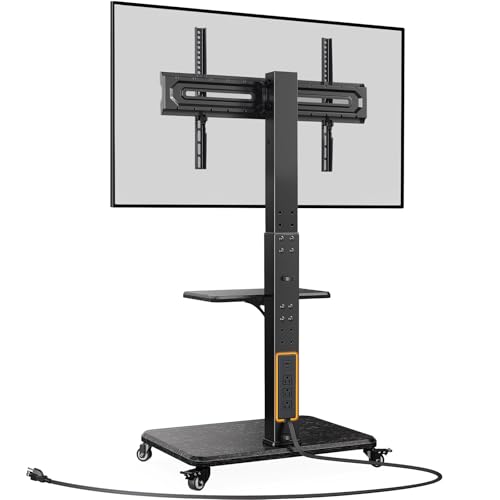
- Built-in AC outlets and USB ports
- 12 height settings with shelf
- Swivel and tilt for viewing flexibility
Best For: mobile conferencing setups with onboard power
Conferencing-Ready Display Cart
Kanto MTM70PL Rolling TV Stand for Meetings
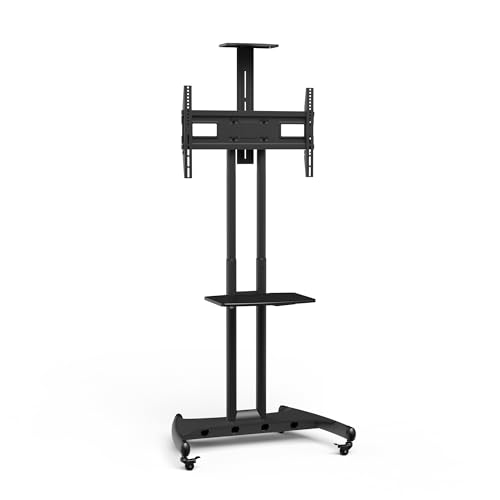
- Camera shelf and device tray included
- Over 16 inches of height adjustment
- Cable management routed through columns
Best For: conference rooms needing camera and laptop support
Large-Screen Mobile Cart
Perlegear 32–84" Heavy-Duty Rolling TV Cart

- Supports 32–84 inch TVs
- Heavy-duty base with 360° wheels
- 11 height levels with AV shelf
Best For: large-screen mobile conference and presentation setups
Portable Meeting Cart
Mount-It! Mobile TV Stand for 32 to 70 Inch TVs
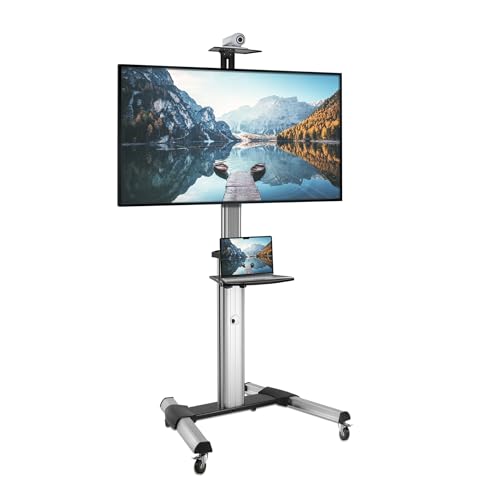
- Fits 32 to 70 inch TVs
- Top camera shelf and lower AV tray
- Swivel wheels with cable management
Best For: offices, classrooms, and events needing a simple mobile conferencing setup
Heavy-Duty Conference Cart
ONKRON Mobile TV Stand for 50 to 100 Inch Screens
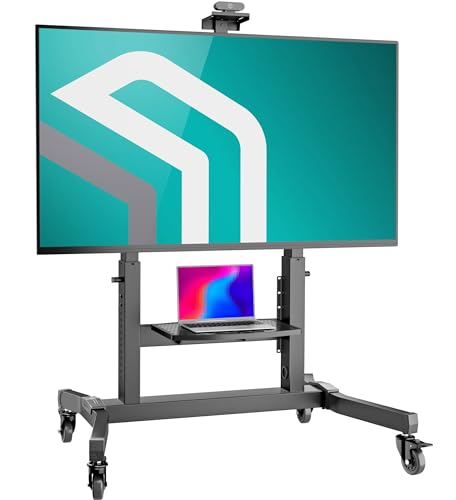
- Supports up to 265 lbs
- Height-adjustable with webcam and AV shelves
- Lockable casters and cable channels
Best For: large conference rooms and event spaces with big displays
Low-Profile Confidence Cart
Rolling TV Stand for 32 to 75 Inch Displays
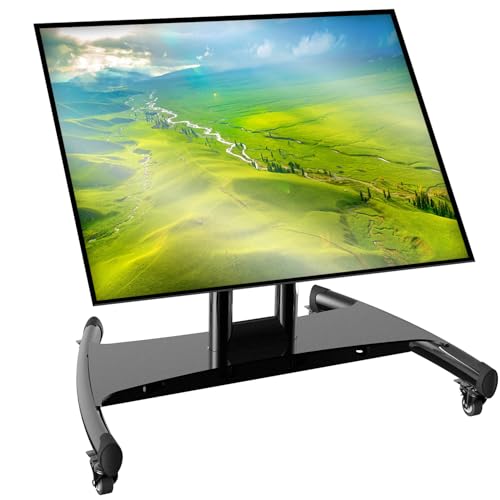
- Supports 32 to 75 inch screens
- Four height stops and 90° angle adjustment
- 360° wheels with brake pads
Best For: presentation, streaming, and confidence-monitor setups
Portable Meeting-Ready Rolling Cart – ONKRON 32-75 Inch Mobile TV Stand
If you need a rolling tv stand for video conferencing that can move between rooms and keep a camera at the right height, this ONKRON cart is built for that kind of workflow. It supports 32 to 75 inch displays, includes both an adjustable AV shelf and an upper webcam shelf, and uses lockable wheels for easy repositioning in offices, classrooms, or meeting spaces.
Best For: Shared spaces that need a mobile display cart with a dedicated webcam shelf for hybrid meetings and presentations.
Pros:
- Fits 32-75 inch TVs and supports VESA 200×200 to 600×400.
- Height adjusts from 39.3″ to 57.6″ for more comfortable meeting setups.
- Includes an adjustable steel shelf plus an upper webcam shelf for conferencing gear.
- Locking rubberized wheels make it easier to move and secure in place.
Cons:
- AV shelf capacity is limited to 11 lbs, so heavier gear may not fit.
- Maximum screen support tops out at 75 inches.
Overall, this is a practical choice if video calls are part of a flexible room setup and you want a simple, purpose-built way to position both the screen and camera.
Conference-Centric Mobile Cart – Kanto MPC77 Rolling TV Stand
This rolling tv stand for video conferencing is aimed at setups that use dedicated collaboration hardware. The Kanto MPC77 works with Logitech conference cameras and Rally Bar systems, adds a camera shelf and accessory panel, and includes cable management to keep a meeting cart organized while moving between rooms.
Best For: Conference rooms and collaboration spaces using Logitech video meeting hardware.
Pros:
- Optimized for Logitech Rally Bar, Rally Bar Mini, and Tap Touch Controller use.
- Includes a camera shelf, tray, and accessory panel for AV integration.
- Built-in cable management helps prevent snags during transport.
- 4-inch lockable wheels and height-adjustable handles improve maneuverability.
Cons:
- Supports 37-77 inch displays, so smaller TVs are not covered.
- Best suited to Logitech-centered setups rather than generic light-use carts.
If your meeting space already relies on Logitech conferencing devices, this cart is a strong match because it is designed around those components rather than treating them as an afterthought.
Heavy-Duty Flexible Display Cart – Perlegear 32-85 Inch Rolling TV Stand
For shoppers comparing a rolling tv stand for video conferencing with broader everyday use, the Perlegear cart offers a wide size range and a high weight limit. It fits 32 to 85 inch TVs, supports VESA up to 600x400mm, and adds a metal AV shelf plus lockable wheels for moving a display between rooms without drilling.
Best For: Large TVs and multipurpose spaces that need a stable mobile cart with an AV shelf.
Pros:
- Fits a wide 32-85 inch range with up to 132 lbs load capacity.
- Height adjusts to help set the screen for better viewing.
- Metal AV tray supports devices up to 22 lbs.
- X-shaped base and swivel casters are designed for stable, smooth movement.
Cons:
- It does not include a dedicated camera shelf for conferencing.
- Assembly is required, even though hardware and guidance are included.
This is a good all-purpose option if you want strong size compatibility and mobility, but it is less specialized for video calls than carts that include a separate webcam shelf.
Professional Presentation Cart – Displays2go Rolling TV Stand with Camera Tray
If you want a rolling tv stand for video conferencing with a polished look and built-in gear support, this Displays2go model is worth considering. It fits 37 to 70 inch screens, includes an AV shelf and camera tray, and adds cable management plus locking wheels for a cleaner presentation setup in offices, classrooms, or trade shows.
Best For: Professional environments that need a mobile display stand with integrated camera and cable management.
Pros:
- Supports 37-70 inch displays with VESA patterns up to 600×400.
- Includes both an AV shelf and a camera tray for conferencing use.
- Built-in cable channels help keep wiring hidden and organized.
- Locking wheels make it easy to move and secure the stand.
Cons:
- Lower size limit starts at 37 inches, so smaller screens are not compatible.
- The AV shelf capacity is listed at 10 lbs, which may be modest for some setups.
Its strength is the integrated, professional presentation-friendly design, making it a solid fit when appearance and organization matter as much as mobility.
Power-Ready Mobile Cart – Perlegear 32–75" Mobile TV Stand with Power Outlet
If you need a rolling tv stand for video conferencing that can keep equipment organized, this Perlegear model is built around convenience. The built-in power outlet, USB ports, and adjustable screen positioning make it a practical pick for meeting rooms, classrooms, and shared workspaces.
Best For: Teams that want a mobile conferencing setup with onboard power and flexible screen positioning.
Pros:
- Built-in power outlet with 2 USB ports and 3 AC outlets helps reduce cable clutter.
- Fits 32–75 inch TVs with VESA up to 600x400mm.
- 12 height adjustment levels and a shelf for AV gear add setup flexibility.
- Swivel and tilt functions help angle the screen for better viewing.
Cons:
- Maximum screen size is 75 inches, so it is not for larger displays.
- Media shelf capacity is limited to 22 lbs.
- Assembly and adjustment may take some time due to the multiple height settings.
This is a strong all-around option if your priority is a tidy, mobile presentation cart with built-in power. It suits conferencing setups where you want fewer cords and easy repositioning.
Conferencing-Ready Display Cart – Kanto MTM70PL Rolling TV Stand for Meetings
For a rolling tv stand for video conferencing, the Kanto MTM70PL is designed with meeting-room needs in mind. It offers a height-adjustable camera shelf, a device tray, and integrated cable management, making it easier to keep the display area clean and functional.
Best For: Conference rooms and collaboration spaces that need a stable cart with camera and laptop support.
Pros:
- Supports 40–70 inch screens with up to 100 lb capacity.
- Camera shelf and device tray support up to 10 lbs for conferencing gear.
- Over 16 inches of height adjustment helps place the screen appropriately.
- Integrated cable management keeps wiring neat through the columns and base.
Cons:
- Only fits TVs from 40 to 70 inches.
- No built-in power outlet is included.
- Heavier steel construction may be less convenient to move than lighter carts.
This cart stands out when conferencing hardware matters as much as the display itself. If you want a stable, professional-looking rolling stand with a dedicated place for camera and laptop gear, it is a solid match.
Large-Screen Mobile Cart – Perlegear 32–84" Heavy-Duty Rolling TV Cart
If you want a rolling tv stand for video conferencing that can also handle larger screens, this Perlegear cart offers broad compatibility and a sturdy base. It is built for flexible indoor or outdoor use, with height adjustment, cable management, and enough capacity for heavier displays.
Best For: Buyers who need a large-screen mobile TV cart with a stable base and flexible placement.
Pros:
- Fits 32–84 inch TVs with VESA up to 600x400mm.
- Heavy-duty base and 360° rubber wheels support smooth movement and stability.
- 11 height adjustment levels help set a comfortable viewing position.
- Built-in AV shelf and cable management help organize accessories.
Cons:
- No built-in power outlet is listed.
- Large base may take up more floor space.
- Assembly may be more involved than a basic stand.
This model is a good fit when you need size flexibility and a secure rolling platform for presentations or meetings. It is especially useful for spaces that move between conference use, shared media, and general-purpose display setups.
Portable Meeting Cart – Mount-It! Mobile TV Stand for 32 to 70 Inch TVs
This rolling tv stand for video conferencing is a practical pick if you need to move a display between rooms and keep a camera, laptop, and cables organized in one place. The height-adjustable bracket, top camera shelf, and lower AV tray make it easy to build a simple meeting setup without extra furniture.
Best For: Offices, classrooms, and event spaces that need a movable conference display with room for a camera and accessories.
Pros:
- Fits 32 to 70 inch TVs with VESA support up to 700×400 mm
- Includes a top shelf for a video conferencing camera and a lower shelf for AV gear
- Height adjustable and can tilt to help reduce glare
- Swivel caster wheels and cable management support easy repositioning
Cons:
- 110 lb capacity is lower than heavy-duty large-screen carts
- Designed for TVs, so it may be more than you need for smaller displays
Overall, this is a flexible mobile cart for smaller-to-mid-size conference setups where portability and basic AV organization matter more than maximum load capacity.
Heavy-Duty Conference Cart – ONKRON Mobile TV Stand for 50 to 100 Inch Screens
If you need a rolling tv stand for video conferencing with serious size and weight support, this ONKRON cart is built for large displays and interactive screens. It adds height adjustment, a webcam shelf, and cable channels, making it a strong fit for polished meeting-room or event use.
Best For: Large offices, conference rooms, and trade show setups that use big screens and need a stable mobile cart.
Pros:
- Supports 50 to 100 inch screens and up to 265 lbs
- Height adjusts from 48.6″ to 66.2″ for flexible viewing
- Includes an upper webcam platform and an adjustable AV shelf
- Lockable rubberized casters and integrated cable channels help keep setups tidy
Cons:
- Much larger than basic carts, so it may be overkill for smaller rooms
- The +5° to -5° tilt range is modest
This is the strongest option here for large, professional conferencing environments where stability, load capacity, and screen compatibility matter most.
Low-Profile Confidence Cart – Rolling TV Stand for 32 to 75 Inch Displays
This rolling tv stand for video conferencing is designed for setups that need a low-profile cart with a wide angle range. The adjustable height stops and 90-degree horizontal-to-vertical positioning make it a versatile choice for presenting, streaming, or using a confidence monitor.
Best For: Live presentations, training rooms, churches, and stage setups that need flexible screen positioning on wheels.
Pros:
- Supports 32 to 75 inch screens up to 100 lbs
- Offers four height stops and 90° horizontal-to-vertical angle adjustment
- 360° wheels with brake pads help move and lock the cart in place
- Thickened one-piece base is designed for added stability
Cons:
- No dedicated camera shelf is listed
- Best suited to confidence-monitor use rather than full AV storage
For teams that care more about positioning flexibility than accessories, this cart gives you a stable, adjustable platform for conferencing and presentation-style viewing.
How We Picked the Best Rolling TV Stand for Video Conferencing
We prioritized stands designed for real conferencing use, not just basic TV transport. That means looking for stable bases, useful height adjustment, compatibility with common screen sizes, and space for a camera, speaker, laptop, or AV gear.
We also favored models with clear weight limits, VESA support that fits mainstream displays, and practical details like shelves, trays, power integration, and tilt or swivel where those features help align the camera and screen.
Quick Comparison
For most buyers, the best Rolling TV Stand for Video Conferencing depends on room size and equipment load. Lighter-duty carts work well for small meeting rooms and mobile classrooms, while heavy-duty options are better for larger displays and more demanding setups. If you need frequent repositioning, prioritize smooth casters and an easy height-adjustment range.
Key Buying Factors for a Rolling TV Stand for Video Conferencing
Screen Size, Weight, and VESA Fit
Start with your display’s size, weight, and VESA pattern. A stand may list a wide screen range, but the real limiter is whether it safely supports your monitor’s weight and mounting pattern. Leave some capacity headroom for cameras, soundbars, and accessories.
Height and Camera Alignment
For conferencing, the screen height should place the camera near eye level as often as possible. Height-adjustable carts are especially useful in multipurpose rooms where users alternate between seated meetings, standing presentations, and whiteboard demos.
Shelves, Trays, and Accessory Storage
A dedicated camera shelf, AV tray, or keyboard tray can simplify setup and reduce clutter. This matters if you use a laptop, conferencing bar, codec, or document camera. The more integrated the storage, the faster the room is to deploy and reset.
Mobility and Stability
Wheels should roll easily, but the base should still feel planted once locked. In active spaces, stability matters more than speed. Wider bases and heavy-duty frames are usually better for larger displays and frequent movement between rooms.
Cable Management and Power
Built-in cable routing or an onboard power outlet can make a big difference in a clean, professional setup. If your cart will be moved often, tidy cable paths also reduce wear and accidental unplugging.
Who Should Buy Which Rolling TV Stand for Video Conferencing?
If you need a simple mobile meeting display, choose a midrange cart with height adjustment and a camera shelf. If your setup includes a keyboard, laptop, or multiple AV components, look for extra trays and stronger cable management. For larger conference rooms or heavier screens, prioritize high load capacity, wider VESA compatibility, and a more robust frame. Buyers using a Rolling TV Stand for Video Conferencing in classrooms or shared spaces should also value quick setup and easy locking casters over decorative extras.
In short, the best choice is the one that fits your screen safely, supports your camera at the right height, and keeps the rest of your conferencing gear organized and ready to move.