The best webcams for conference rooms make hybrid meetings easier by keeping everyone visible, voices intelligible, and setup time to a minimum. The right choice depends on room size, seating layout, video quality, and the conferencing platform your team uses.
We compared 10 conference cameras ranging from compact huddle-room systems to 360-degree, AI-powered models with built-in microphones and speakers. Use the guide below to narrow the options by room type, features, and budget.
Best 10 Webcams for Conference Rooms Picks for 2026
Best for Immersive Hybrid Meetings

- 360° 1080p room capture
- AI speaker tracking
- 18-foot audio pickup
Best For: Hybrid meetings needing room-wide visibility and automatic speaker focus
Best 4K Camera for Huddle Rooms
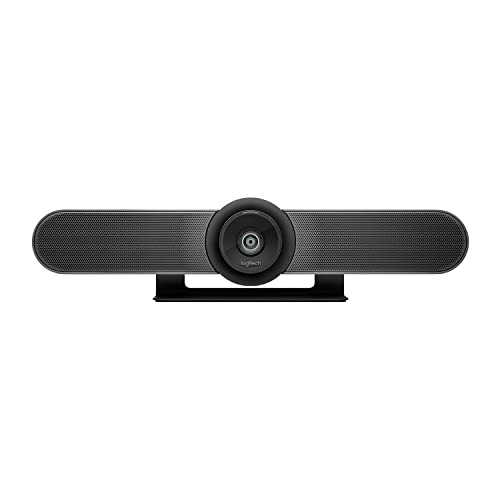
- 4K video with 120° FOV
- Motorized pan/tilt and 5x HD zoom
- Beamforming microphones
Best For: Small rooms needing sharp video and flexible installation
Best Compact 360-Degree Value
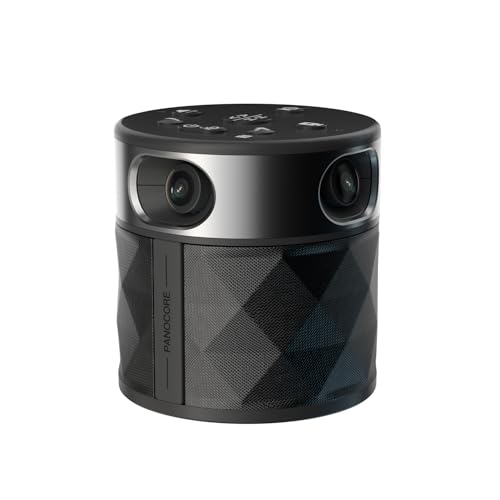
- 360° and dual 180° modes
- Integrated speaker and 3-mic array
- MicroSD local recording
Best For: Small to medium rooms needing an all-in-one USB system
Best AI Framing for Small Rooms

- 4K video with 120° FOV
- AI group framing and presenter tracking
- Noise-canceling microphones
Best For: Small rooms and presentations needing automated framing
Best PTZ Conference Room System
TONGVEO 4K AI-Tracking Camera Kit
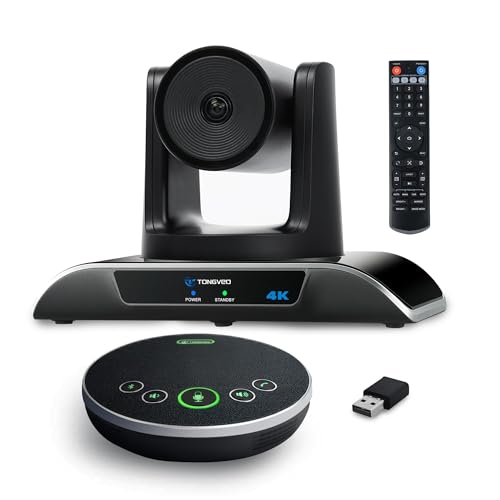
- 4K video with a 120° wide-angle view
- AI tracking, gestures, PTZ movement, and 5x digital zoom
- Separate speakerphone with 5 m pickup range
Best For: Flexible small and medium-sized meeting rooms
Best All-in-One Conference Camera

- 4K video with a 120° field of view
- 8-microphone array with 5 m pickup range
- AI framing, speaker tracking, and electric privacy shutter
Best For: Huddle rooms using Teams, Zoom, Windows, or macOS
Best Compact 3-in-1 Webcam
TONGVEO 4K Auto-Framing Camera
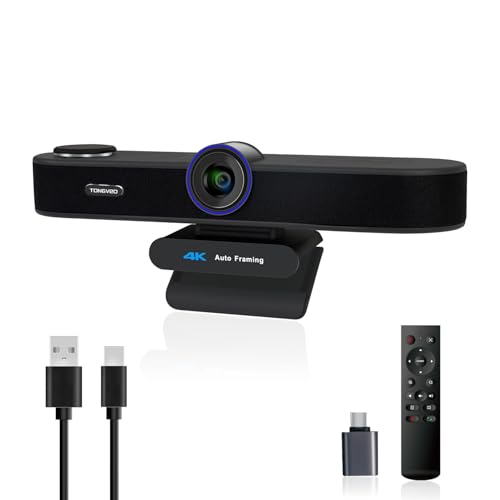
- 4K video with three adjustable viewing angles
- Built-in microphones and 3W speaker
- AI framing, voice tracking, remote, and privacy cover
Best For: Small rooms and simple USB meeting setups
Best All-in-One PTZ System
AI-Tracking 1080p Conference Camera

- AI face and humanoid tracking
- 1080p/60fps video with 3x optical zoom
- Wireless speakerphone with 16.4-foot pickup
Best For: Small-to-medium rooms with active presenters
Best 360-Degree Coverage
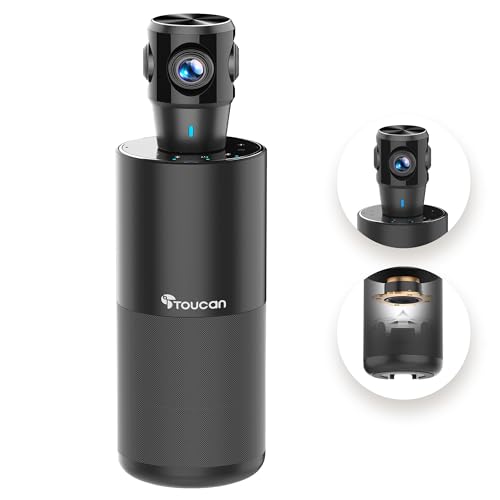
- 360-degree room capture
- 1080p video with four microphones
- Built-in speaker and plug-and-play USB
Best For: Round-table meetings and multi-directional seating
Best 4K Image Quality
AI Auto-Framing Conference Camera

- 4K video with 94° wide-angle view
- AI auto-framing and presenter tracking
- Integrated speakers, microphones, and remote
Best For: Teams wanting high-resolution video with automated framing
Best for Immersive Hybrid Meetings – Meeting Owl 3
If you need webcams for conference rooms that help remote attendees follow an active discussion, the Meeting Owl 3 combines 360-degree 1080p video with speaker tracking and room-wide audio. Its plug-and-play USB setup makes it a practical choice for teams using Zoom, Microsoft Teams, Google Meet, or similar platforms.
Best For: Small to large hybrid meeting spaces where showing the room and automatically highlighting in-room speakers are priorities.
Pros:
- Captures a 360-degree room view in 1080p HD.
- Automatically focuses on active in-room speakers using visual and audio cues.
- Offers up to 18 feet of audio pickup and supports ecosystem expansion.
- Can be managed in bulk through Owl Labs’ Nest management tool.
Cons:
- Expansion accessories or additional Owl devices may be needed for larger rooms.
- Its 1080p output is lower resolution than some dedicated 4K conference cameras.
The Meeting Owl 3 stands out when natural, room-wide participation matters more than a conventional front-facing camera view. It is especially useful for hybrid teams that want simple deployment with room to expand.
Best 4K Camera for Huddle Rooms – Logitech MeetUp
The Logitech MeetUp is one of the more conventional webcams for conference rooms, pairing a 4K sensor with a 120-degree field of view and integrated microphones. It is designed for small and huddle rooms, with USB BYOD connectivity and compatibility with room deployments for Microsoft Teams Rooms, Zoom Rooms, and Google Meet.
Best For: Small conference rooms and huddle spaces that need sharp video, wide coverage, and flexible mounting.
Pros:
- Uses an Ultra HD 4K sensor with a 120-degree field of view.
- Provides 5x HD zoom and motorized pan/tilt capabilities.
- Integrated beamforming microphones pick up voices from up to 4 meters.
- Supports wall, credenza, and optional display mounting.
Cons:
- The expansion microphone is sold separately.
- Its stated microphone range is more suited to small rooms than larger spaces.
MeetUp is a strong fit for organizations standardizing small-room video systems. Its 4K imaging, mounting flexibility, and room-platform support make it a practical upgrade from basic desktop webcams.
Best Compact 360-Degree Value – PANOCORE360
For buyers comparing webcams for conference rooms, the PANOCORE360 offers an all-in-one approach with 360-degree capture, an integrated speaker, and a three-microphone array. It supports auto-speaker focus or dual 180-degree views, while USB plug-and-play operation works with Zoom, Teams, Webex, and Google Meet.
Best For: Small to medium rooms with up to 12 participants that need a compact, platform-independent meeting camera.
Pros:
- Combines four cameras, microphones, and a speaker in one compact unit.
- Provides 360-degree and dual 180-degree viewing modes.
- Includes AI voice processing and up to 10 feet of microphone pickup.
- Supports local recording to a MicroSD card.
Cons:
- Outputs video at 1080p despite using 4K 360-degree capture internally.
- Its stated coverage is intended for small to medium rooms rather than large spaces.
The PANOCORE360 is appealing when you want room coverage and integrated audio without assembling multiple devices. Its recording feature and driver-free compatibility add flexibility for smaller meeting environments.
Best AI Framing for Small Rooms – WYRESTORM Focus 210
The WYRESTORM Focus 210 is a straightforward option among webcams for conference rooms, combining 4K video, a 120-degree lens, and AI-assisted framing. Its dual noise-canceling microphones, presenter tracking, USB setup, and physical privacy cover are suited to small-room meetings and presentations.
Best For: Small conference rooms, presentations, and hybrid meetings where automatic group framing and speaker tracking are useful.
Pros:
- Records and streams in 4K resolution with a 120-degree viewing angle.
- Automatically frames groups and tracks the presenter.
- Dual AI noise-canceling microphones capture voices up to 5 meters away.
- Includes a physical lens cover for added office privacy.
Cons:
- Designed specifically for small meeting spaces.
- Uses USB connectivity and does not list integrated room-management features.
Focus 210 is a practical pick for teams that want higher-resolution video and automated framing without a complicated room system. The privacy cover is a useful addition for shared offices and unattended meeting spaces.
Best PTZ Conference Room System – TONGVEO 4K AI-Tracking Camera Kit
For teams comparing webcams for conference rooms, this TONGVEO system combines a 4K PTZ camera with a separate speakerphone. Its 120° wide-angle view, AI tracking, gesture controls, and remote-operated pan, tilt, and zoom make it suited to flexible meeting setups.
Best For: Small and medium-sized conference rooms that need a wide view, speakerphone audio, and PTZ control.
Pros:
- 4K video at 30fps with a 120° wide-angle field of view.
- AI auto-tracking, gesture control, remote control, and up to 5x digital zoom.
- Included speakerphone has dual noise-reducing microphones, a 5 m pickup range, and a 2,400 mAh battery.
- Supports USB 3.0 plug-and-play use plus RS232 and RS485 joystick control.
Cons:
- The 5x zoom is digital rather than optical.
- The system requires compatible hardware and software to use 4K resolution.
- Some remote focus buttons do not apply to this camera version.
This is a feature-rich option when room coverage and camera movement matter more than a compact all-in-one design. The separate speakerphone also gives meeting participants a portable audio component.
Best All-in-One Conference Camera – Yealink UVC34 4K System
The Yealink UVC34 is an all-in-one choice among webcams for conference rooms, pairing 4K video with an 8-microphone array and built-in intelligent framing features. Its wide field of view and automatic privacy shutter are useful for shared meeting spaces.
Best For: Huddle rooms and Teams or Zoom users seeking integrated video, audio, and privacy features.
Pros:
- 4K video from an 8MP, 1/2.8-inch CMOS sensor with a 120° field of view.
- AI auto framing, speaker tracking, and face enhancement adjust the meeting view automatically.
- Eight microphones provide a stated 5 m far-field pickup range.
- Automatic electric privacy shutter closes when meetings end and includes Teams and Zoom certification.
Cons:
- The listed model is the UVC34 without a meeting-room operating system.
- Its 5x zoom is digital.
- It is designed for USB connection to a personal computer rather than a standalone room system.
Yealink’s strongest advantage is integration: one device handles the camera, microphones, tracking, and privacy shutter. It is a practical fit for rooms built around a connected Windows or macOS computer.
Best Compact 3-in-1 Webcam – TONGVEO 4K Auto-Framing Camera
For buyers who want compact webcams for conference rooms, this TONGVEO model combines a 4K camera, microphones, and a 3W speaker in one USB-powered unit. It adds AI auto framing, voice tracking, a remote control, and three selectable viewing angles.
Best For: Small meeting spaces, solo presentations, remote workstations, and users who want built-in audio without extra equipment.
Pros:
- 4K video at 30fps with selectable 118°, 100°, and 88° fields of view.
- AI auto framing and voice tracking help center groups and active speakers.
- Built-in dual microphones offer noise cancellation and up to a 16.4 ft pickup range.
- USB plug-and-play setup, integrated 3W speaker, remote control, and privacy cover.
Cons:
- The 5x zoom is digital.
- It uses USB power and does not include a separate room speakerphone.
- Its compact design is better suited to smaller setups than larger-room coverage.
This model is a convenient middle ground between a standard webcam and a full conference-room system. The adjustable field of view and built-in speaker simplify setup, while the privacy cover adds a basic physical lens safeguard.
Best All-in-One PTZ System – AI-Tracking 1080p Conference Camera
For teams comparing webcams for conference rooms, this TONGVEO system combines a PTZ camera and Bluetooth speakerphone in one setup. It offers 1080p video at up to 60fps, AI subject tracking, and flexible USB 3.0 or HDMI connectivity for small-to-medium meeting spaces.
Best For: Small-to-medium conference rooms with presenter movement and groups of up to 8–12 people.
Pros:
- AI face and humanoid tracking helps keep speakers in view.
- 1080p video at 60fps with 3x optical zoom and a 114° field of view.
- Full-duplex Bluetooth speakerphone offers echo cancellation and pickup within 16.4 feet.
- Supports USB 3.0, HDMI, Bluetooth, and wireless-dongle connections.
Cons:
- The PTZ camera is wired, while the speakerphone is wireless.
- The system may be more equipment than needed for very small meetings.
This is a strong choice when both camera coverage and room audio matter. Its separate wired camera and wireless speakerphone provide flexibility, while the AI tracking is useful for presentations and active discussions.
Best 360-Degree Coverage – TOUCAN 360° Conference Camera
If your meetings involve people seated around a table, this TOUCAN model is among the webcams for conference rooms designed to provide a broad view. Its 360-degree capture, 1080p video, integrated speaker, and four noise-reduction microphones support more inclusive group conversations.
Best For: Round-table meetings and rooms where participants need coverage from multiple directions.
Pros:
- 360-degree viewing helps capture participants around the room.
- 1080p video is suited to meetings, presentations, and slideshows.
- Four microphones and a built-in Bluetooth speaker support two-way communication.
- Plug-and-play USB setup includes a Type-C male-to-USB-A female adapter.
Cons:
- The listed video resolution is 1080p rather than 4K.
- Its broad 360-degree design may be unnecessary for a front-facing conference setup.
The TOUCAN is a practical option when seating arrangements change or participants sit on multiple sides of a table. Its plug-and-play design also keeps installation straightforward across PCs, Macs, tablets, and common conferencing platforms.
Best 4K Image Quality – AI Auto-Framing Conference Camera
For buyers prioritizing sharp video and simple room control, this RayBit system combines a 4K camera, speakers, noise-cancelling microphones, and a remote. Among webcams for conference rooms, it stands out for AI auto-framing, presenter tracking, and a 94° viewing angle.
Best For: Teams that want 4K video, automatic framing, and remote-controlled meeting functions.
Pros:
- 4K camera delivers higher-resolution video than standard 1080p models.
- AI auto-framing adjusts the view based on the number of participants.
- Presenter tracking can follow the person speaking.
- Integrated noise-cancelling microphones, high-fidelity speaker, and remote control simplify meetings.
Cons:
- The remote’s batteries are not included.
- The 94° viewing angle is narrower than a 360-degree conference camera.
- Its 5x zoom is digital rather than optical.
This is a well-rounded choice for offices that want premium image resolution without separate audio hardware. Auto-framing and presenter following reduce manual adjustments, while broad compatibility makes it suitable for common meeting platforms and displays.
How We Picked the Best Webcams for Conference Rooms
We focused on the features that have the greatest effect on real-world meetings: image clarity, microphone coverage, speaker quality, field of view, tracking performance, connection options, and compatibility with common platforms such as Microsoft Teams, Zoom, Google Meet, and Webex. We also considered whether each model suits a small huddle room, a medium conference room, or a larger space.
Integrated systems received attention for their simpler installation, while modular or PTZ-style cameras may be better for organizations that need more control over framing, zoom, or audio placement.
Quick Comparison
| Best For | Look For | Recommended Type |
|---|---|---|
| Small huddle rooms | Wide-angle video and simple USB setup | Compact all-in-one camera |
| Medium conference rooms | Multiple microphones and speaker tracking | AI-tracking or 360-degree system |
| Larger rooms | Extended pickup, zoom, and flexible mounting | PTZ camera with separate or expandable audio |
| Premium presentation quality | 4K video and accurate framing | 4K AI-powered conference camera |
Key Buying Factors for Webcams for Conference Rooms
Room Size and Field of View
A wide-angle or 360-degree camera can capture participants around a table, while a conventional front-facing webcam may produce a more natural view in a narrow room. Measure the distance between the camera and the farthest seat before choosing.
Audio Pickup
Microphone range matters as much as resolution. Look for noise reduction, echo cancellation, beamforming, and a pickup distance suited to your room. Built-in speakers simplify installation, but larger rooms may benefit from dedicated audio hardware.
Tracking and Framing
AI speaker tracking can automatically frame whoever is talking, reducing the need for manual camera control. It is especially useful for collaborative meetings, though fixed framing may be preferable for presentations or rooms with frequent movement.
Resolution and Connectivity
1080p is usually sufficient for everyday calls, while 4K can provide sharper faces and more flexibility when cropping or digitally zooming. Check for USB compatibility, HDMI output, Bluetooth, and support for the operating systems and meeting apps your organization uses.
Who Should Buy Which Webcams for Conference Rooms?
Choose a 360-degree model if participants sit around a table and you want an inclusive view with minimal setup. Pick a compact all-in-one webcam for a small room or occasional meetings. For medium rooms, an AI-tracking camera with a microphone and speaker array offers a strong balance of coverage and convenience. Larger rooms should prioritize microphone reach, optical zoom, mounting flexibility, and expansion options over resolution alone.
If your organization standardizes on Microsoft Teams or Zoom, favor models with stated certification or documented compatibility. For frequent client presentations and executive meetings, a 4K camera with reliable framing and high-quality audio is worth considering; for routine internal calls, a dependable 1080p system may deliver better value.