Choosing among the best webcams under $300 is less about spending the maximum and more about matching the camera to your calls, streams, and workspace. This lineup includes 4K models, AI-tracking PTZ cameras, high-frame-rate options, and dependable Full HD webcams.
Use the comparisons below to narrow your choices by image quality, framing, audio, privacy, and ease of setup before deciding which model fits your setup.
Best 10 Webcams Under 300 Picks for 2026
Best 4K Value

- 4K video with 1080p at 60 fps
- Autofocus and low-light support
- Privacy cover and USB-C connection
Best For: 4K calls, streaming, and remote work
Best for Smart Framing

- 4K at 30 fps and 1080p at 60 fps
- AI tracking with customizable areas
- PTZ presets and gesture controls
Best For: Presentations, teaching, and flexible streaming
Best All-in-One Audio

- 1080p video with four microphones and two speakers
- Noise and echo cancellation for calls
- Adjustable 60°–98° viewing angle
Best For: Home offices and conference calls
Best for High-Frame-Rate Streaming

- 1080p video up to 100 fps
- AI framing for individuals and groups
- Autofocus, gestures, and low-light features
Best For: Streamers and gaming creators
Best for Straightforward Meetings
Logitech Brio 301 1080p Webcam

- Full HD 1080p video for natural image quality
- Automatic light correction and noise reduction
- Built-in privacy shutter
Best For: Remote work and everyday video calls
Best Ring-Light Webcam
Angetube 1080p Streaming Webcam
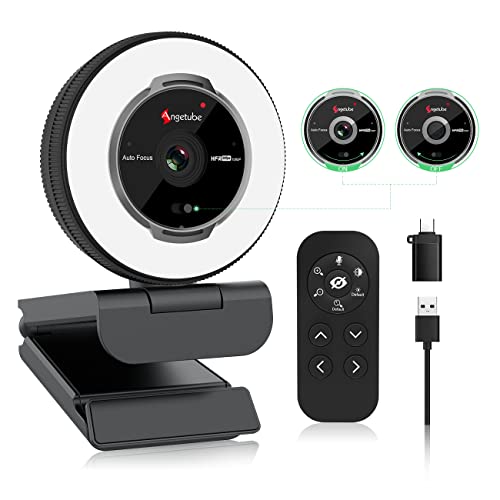
- Built-in three-color ring light with adjustable brightness
- 1080p video at up to 60 fps with autofocus
- Remote, privacy shutter, dual mics, and USB-A/USB-C support
Best For: Streamers and callers who need built-in lighting
Best for Streaming
Logitech C922 Pro Stream Webcam

- Full HD 1080p video with autofocus
- Low-light adjustment for dim or backlit rooms
- Built-in stereo microphone for clear audio
Best For: Budget-conscious streamers and vloggers
Best Simple Full HD Pick

- 1080p video with automatic light balancing
- Integrated sliding privacy cover and microphone
- Plug-and-play USB-A setup for common calling platforms
Best For: Remote work, classes, and everyday video calls
Best 4K Value – Logitech MX Brio
The renewed Logitech MX Brio is a strong choice for shoppers comparing webcams under 300 who want sharp 4K video, high frame rates, and broad meeting and streaming compatibility. Its USB-C connection, autofocus, low-light feature, and built-in privacy cover make it versatile for work calls and content creation.
Best For: 4K video calls, streaming, remote work, and online learning.
Pros:
- Captures up to 4K video and supports 1080p at 60 fps.
- Includes autofocus, automatic exposure, auto white balance, and a low-light feature.
- Works with Microsoft Teams, Zoom, Google Meet, YouTube, and Twitch.
- Built-in privacy cover and USB-C connectivity add convenience.
Cons:
- This is a renewed product with a listed 90-day limited warranty.
- It uses a wired connection and is not water resistant.
The MX Brio offers an appealing blend of resolution and flexibility for buyers seeking a feature-rich webcam under 300, though the renewed condition and shorter listed warranty deserve consideration.
Best AI Tracking – EMEET PIXY Dual-Camera PTZ
For shoppers evaluating webcams under 300, the EMEET PIXY stands out with dual-camera AI tracking, PTZ movement, and a 4K imaging camera. It is designed for presenters, streamers, teachers, and creators who move around during recordings or live sessions.
Best For: Dynamic presentations, fitness content, product demos, podcasts, and live streaming.
Pros:
- Combines a 4K main camera with a 1/2.55-inch Sony sensor and PDAF autofocus.
- AI tracking supports 310° pan and 180° tilt, with gesture control.
- Triple-mic array offers live, noise-canceling, and original sound modes.
- EMEET STUDIO provides presets, whiteboard mode, privacy mode, and framing controls.
Cons:
- Tripod is sold separately.
- Some functions, including certain field-of-view settings, vary by resolution and frame rate.
- Its feature set may be more than needed for basic stationary calls.
The PIXY is a specialized option for buyers who need intelligent framing and camera movement rather than a simple fixed webcam. Its tracking, PTZ control, and audio modes support more production-focused setups.
Best Simple Meeting Webcam – Logitech Brio 300
The Logitech Brio 300 is a practical pick among webcams under 300 for everyday video calls. It delivers 1080p video, automatic light correction, a noise-reducing mono microphone, and a physical privacy shutter in a compact USB-C design.
Best For: Video meetings, remote work, online classes, and straightforward streaming.
Pros:
- Full HD 1080p resolution provides natural-looking video.
- RightLight 2 automatically compensates for poor lighting.
- Noise reduction helps suppress background sound during calls.
- Privacy shutter, Logi Tune controls, and compatibility with Zoom, Teams, and Meet add convenience.
Cons:
- Uses fixed focus rather than autofocus.
- Its 53.13° viewing angle is narrower than many wide-angle webcams.
- It does not offer 4K video.
The Brio 300 keeps the focus on reliable meetings and easy privacy protection. Choose it if you value simplicity and compact design more than advanced resolution or tracking features.
Best for Smart Framing – OBSBOT Tiny 2 Lite 4K
The OBSBOT Tiny 2 Lite is a compelling option for webcams under 300 if you want 4K clarity with automated tracking. Its PTZ design supports upper-body and hand tracking, customizable tracking areas, gesture controls, and multiple shooting orientations for meetings, teaching, and streaming.
Best For: Business presentations, teaching, streaming, and creators who need flexible framing.
Pros:
- Supports 4K at 30 fps and 1080p at 60 fps with a 1/2-inch CMOS sensor.
- Offers upper-body and hand tracking plus customizable tracking and non-tracking areas.
- Preset positions can store separate parameters and AI tracking modes.
- Supports landscape, portrait, and upside-down shooting with gesture control.
Cons:
- Whiteboard mode and voice control are omitted from this Lite version.
- Advanced customization uses SDK, OSC, Stream Deck, or global hotkey support rather than only basic plug-and-play controls.
- Requires Windows 10 or later or macOS 11 or later.
The Tiny 2 Lite balances professional-looking 4K output with easier operation and intelligent framing. It is particularly useful when you need the camera to follow a presenter without constant manual repositioning.
Best All-in-One Audio – EMEET C980 Pro 1080p Webcam
For shoppers comparing webcams under 300, the EMEET C980 Pro is a practical choice when video, speakers, and microphones need to be combined in one USB device. It records in Full HD 1080p and includes four microphones, two speakers, adjustable viewing angles, and automatic low-light correction.
Best For: Home offices, team meetings, and users who want built-in conference audio.
Pros:
- Combines a 1080p camera with four microphones and two speakers.
- Active noise cancellation and automatic echo cancellation help manage distracting audio.
- Adjustable 60°–98° field of view can accommodate individuals, teams, and whiteboards.
- Plug-and-play compatibility works with Windows, macOS, and popular video-calling applications.
Cons:
- Fixed focus may be less flexible than autofocus for changing distances.
- The manufacturer advises against using it with a USB hub because of insufficient current.
- The built-in speakers and microphones make it larger than a basic webcam.
The C980 Pro stands out for minimizing desk clutter with integrated audio. Choose it when clear conference sound and a wider adjustable frame matter more than advanced tracking features.
Best for High-Frame-Rate Streaming – OBSBOT Meet SE 1080p Webcam
Among webcams under 300, the OBSBOT Meet SE is aimed at streamers and creators who want unusually high frame rates from a compact USB-C camera. It supports 1080p at up to 100 fps, AI framing, autofocus, low-light features, and gesture-based controls through its software.
Best For: Streaming, gaming content, and meetings where automatic framing and smooth motion are priorities.
Pros:
- Supports 1080p at 100 fps, 1080p at 60 fps, and 720p at 150 fps.
- AI framing can recognize individuals or groups and adjust composition in real time.
- Autofocus, manual focus, digital zoom, and gesture controls provide flexible operation.
- Stacked CMOS, Dual Native ISO, HDR, and a 12-bit dynamic color range support low-light performance.
Cons:
- Access to 100 fps recording requires enabling “More Output Options” in OBSBOT software.
- Advanced controls and beauty adjustments depend on the accompanying software.
- Its USB-C connection may require an adapter on devices without USB-C ports.
The Meet SE is the most feature-focused option here for creators who value smooth video and automated composition. It is a strong fit for streaming setups, though buyers should confirm their computer supports the connection and desired output settings.
Best for Straightforward Meetings – Logitech Brio 301 1080p Webcam
For buyers searching webcams under 300 for everyday calls, the Logitech Brio 301 keeps the setup simple with Full HD 1080p video, automatic light correction, a noise-reducing mono microphone, and a physical privacy shutter. It is designed for common meeting platforms and supports Logi Tune customization.
Best For: Remote work, online meetings, interviews, and users who want an easy privacy control.
Pros:
- Full HD 1080p resolution provides natural-looking video.
- RightLight 2 automatically compensates for poor lighting conditions.
- Mono noise reduction microphone helps suppress background sound.
- Physical privacy shutter blocks the lens when the camera is not in use.
Cons:
- Fixed focus and fixed zoom offer less framing flexibility than advanced models.
- The 70° viewing angle is narrower than the EMEET C980 Pro’s adjustable range.
- It has a single microphone rather than a multi-microphone array.
The Brio 301 is a sensible pick when reliable meeting essentials matter more than streaming-focused features. Its privacy shutter and automatic light correction make it particularly convenient for a permanent home-office setup.
Best Ring-Light Webcam – Angetube 1080p Streaming Webcam
If you need webcams under 300 with built-in lighting, the Angetube 862Pro combines 1080p video at up to 60 fps with a built-in adjustable ring light. Its autofocus, privacy shutter, dual microphones, and USB-A-to-USB-C flexibility make it a versatile choice for streaming and video calls.
Best For: Streamers and remote workers who want integrated lighting, flexible controls, and broad device compatibility.
Pros:
- Three light colors with stepless brightness adjustment help improve the look of dim or uneven lighting.
- Supports 1080p video at 60 fps with autofocus and automatic low-light correction.
- Includes a remote, privacy cover, dual noise-canceling microphones, and USB-A/USB-C connectivity.
Cons:
- The 5x digital zoom works only at 720p and lower resolutions, not in 1080p mode.
- The included remote adds convenience but requires a CR2 battery.
The Angetube stands out when lighting is as important as image quality. Choose it if you want a feature-rich webcam that can work for streaming, meetings, and content creation without adding a separate light.
Best for Streaming – Logitech C922 Pro Stream Webcam
logitech C922 Pro Stream Webcam 1080P Camera for HD Video Streaming & Recording 960-001087(Renewed)
Check Price On AmazonAmong webcams under 300, the renewed Logitech C922 Pro Stream is a practical option for creators who prioritize clear Full HD video. It offers 1080p resolution, autofocus, low-light adjustment, and a built-in stereo microphone for streaming, recording, or conferencing.
Best For: Budget-conscious streamers, vloggers, and video-call users seeking a recognized streaming-focused model.
Pros:
- Captures Full HD 1080p video with autofocus for sharp streaming and recording.
- Low-light adjustment helps produce brighter, higher-contrast images in dim or backlit settings.
- Built-in stereo microphone provides clear, natural-sounding audio.
Cons:
- This is a renewed product with a listed 90-day limited warranty.
- The supplied notes do not mention a built-in privacy cover.
The C922 Pro makes sense for buyers who want established Logitech streaming features at a renewed-product price. Its low-light performance and stereo microphone are especially useful when you want a simple setup for broadcasts or calls.
Best Simple Full HD Pick – Logitech Brio 101 Webcam
For shoppers comparing webcams under 300 for everyday meetings, the Logitech Brio 101 keeps the setup straightforward with 1080p video, automatic light balancing, and plug-and-play USB-A connectivity. A sliding privacy cover and built-in microphone add useful features for home offices and casual streaming.
Best For: Remote workers, students, and everyday callers who want an uncomplicated Full HD webcam with privacy protection.
Pros:
- Full HD 1080p video works with popular platforms including Zoom, Microsoft Teams, and Google Meet.
- RightLight automatic balancing boosts brightness by up to 50% compared with previous-generation Logitech webcams, according to the supplied notes.
- Built-in privacy cover, microphone, USB-A cable, and Logi Options+ customization provide practical convenience.
Cons:
- The fixed-focus design offers less focusing flexibility than an autofocus webcam.
- It uses a built-in USB-A cable, which may require an adapter for USB-C-only devices.
- The 60-degree viewing angle is narrower than some wide-angle webcam designs.
The Brio 101 is a sensible everyday choice when ease of use and privacy matter more than advanced streaming controls. Its automatic light balancing and compact design suit typical video calls and home-office setups.
How We Picked the Best Webcams Under 300
We selected models across several practical use cases rather than ranking cameras on resolution alone. The lineup considers video quality, frame rates, autofocus or AI framing, microphone performance, field of view, privacy features, connection type, software support, and overall value. We also included options for streaming, video meetings, teaching, and casual everyday calls.
Because prices can change, compare the current deal and included features before buying. A lower-priced Full HD webcam may be the better choice for routine meetings, while a 4K or PTZ model can justify its cost for creators and presenters.
Quick Comparison
- Best premium image quality: Logitech MX Brio Ultra HD 4K.
- Best for AI movement and presentation: EMEET PIXY or OBSBOT Tiny 2 Lite.
- Best high-frame-rate option: OBSBOT Meet SE 1080p at 100 fps.
- Best all-in-one conference setup: EMEET C980 PRO with microphone and speaker.
- Best simple everyday choice: Logitech Brio 300 or Brio 301.
- Best budget streaming starter: Angetube with built-in ring light.
- Best value from a proven older design: Renewed Logitech C922 Pro Stream.
Key Buying Factors for Webcams Under 300
Resolution and Frame Rate
Full HD 1080p is sufficient for most meetings and streams, particularly when your internet connection or platform compresses video. Choose 4K if you want finer detail, plan to crop or reframe footage, or create content outside standard conference calls. Higher frame rates can make motion look smoother, but they may require more light and compatible software.
Framing, Tracking, and Field of View
AI tracking and PTZ movement are useful when you walk, teach, demonstrate products, or present to a group. For a fixed desk setup, automatic framing may matter less than a stable mount and a suitable field of view. A wider view helps show more of a room, while a narrower view keeps attention on your face.
Audio, Lighting, and Privacy
Built-in microphones are convenient, but a dedicated microphone remains preferable for polished streams and important calls. Auto light correction helps in changing conditions, while a ring light can improve a basic desk setup. A physical privacy shutter or webcam cover is valuable if the camera stays connected.
Compatibility and Setup
Check USB connector requirements, operating-system support, monitor mounting, and compatibility with Zoom, Microsoft Teams, Google Meet, or your streaming software. USB-C is convenient on newer computers, but an included adapter may be necessary for older ports.
Who Should Buy Which Webcams Under 300?
Remote workers and students should prioritize simple plug-and-play Full HD models with reliable autofocus, light correction, and privacy controls. Streamers and creators will benefit more from 4K detail, 60 fps or higher, strong framing controls, and software features. Presenters, instructors, and demonstrators should consider AI-tracking PTZ cameras that keep them visible while moving. Budget-conscious buyers can choose a basic 1080p webcam, especially if their laptop camera is poor, while conference-room users may prefer an all-in-one model with a wider view, microphone, and speaker.