A document camera with 4K output can make books, worksheets, lab samples, artwork, and physical demonstrations look sharper and easier to follow on a large display or video call. The right model depends on more than resolution, however: connectivity, autofocus, capture size, lighting, portability, and software support all affect everyday usability.
We’ve selected 10 models covering classroom instruction, hybrid meetings, remote tutoring, and professional presentations. Use the guide below to narrow the list by workflow, device compatibility, and the features you’re most likely to use.
Best 10 Document Camera with 4K Output Picks for 2026
Best Large-Format 4K Pick

- 13MP Sony sensor with 4K video up to 30fps
- Captures large A3 documents and artwork
- Includes lighting, autofocus, mic, and Documate tools
Best For: Professional classrooms, art instruction, and large-format presentations
Best Value Ultra-HD Option

- 8MP Sony sensor captures up to 3264 x 2448
- Up to 30fps in Full HD for smooth streaming
- Fast autofocus and broad computer compatibility
Best For: Everyday teaching, demonstrations, and web conferencing
Best Portable 4K Pick
INS-Flip 4 Foldable Document Camera

- 13MP Sony sensor with 4K at up to 30fps
- Folds down and weighs about 0.67 pounds
- Doubles as a document camera and webcam
Best For: Traveling teachers, hybrid instruction, and compact workspaces
Best Wireless Connectivity
IPEVO VZ-X Wireless Document Camera
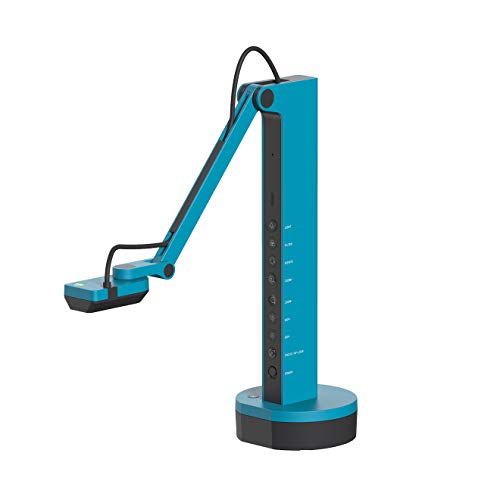
- Supports Wi-Fi, HDMI, and USB connections
- Near-4K capture is available in USB mode
- Up to 9–12 hours of battery life and 33-foot range
Best For: Wireless classrooms, mobile presentations, and HDMI setups
Best Portable 4K Presenter

- 4K at 30fps with one-push autofocus
- HDMI, RGB, and USB Type-C connectivity
- Foldable 1.2-pound design
Best For: Portable presentations and demonstrations
Best Versatile Zoom Camera

- 4K at 30fps from a 13MP sensor
- Direct HDMI/VGA output without a computer
- Autofocus with up to 100x digital zoom
Best For: Classrooms and direct-to-projector setups
Best for Hybrid Classrooms

- UHD capture with smooth 30fps streaming
- Low-light Sony Exmor R sensor needs no extra LED
- AI tracking and broad Mac, Windows, Chromebook, and iPad support
Best For: Interactive and hybrid classroom teaching
Wide-Angle Detail Pick

- 120° lens captures tabloid-size pages and larger objects
- 4K, 8MP Sony sensor, LED light, and autofocus
- USB plug-and-play with major operating systems and meeting apps
Best For: Wide documents, demonstrations, and video calls
Feature-Rich Classroom Pick

- 8MP/2448P video at 30fps with A3-size coverage
- Foldable multi-joint design with image reversal
- Three-level LED lighting and dual microphones
Best For: Classroom teaching and online demonstrations
Portable Teaching Value

- 8MP/2448P capture at 30fps with A3-size coverage
- Foldable multi-joint body with macro mode
- USB-C plug-and-play plus brightness and image controls
Best For: Portable classroom and distance-learning setups
Best Large-Format 4K Pick – INS-2 UHD 4K Document Camera
For buyers who need a document camera with 4K output for classrooms, artwork, or large pages, the INS-2 combines a 13MP Sony sensor with A3 capture support. Its adjustable arm, autofocus modes, LED, and presentation software make it suited to detailed demonstrations.
Best For: Professional educators, art instructors, and presenters showing large documents, artwork, or two-page spreads.
Pros:
- Captures 4K video at up to 30fps with a 13MP Sony sensor.
- Supports documents up to A3 size with a flexible multi-joint arm.
- Includes LED lighting, anti-glare sheet, autofocus, macro capability, and a built-in microphone.
- Works with Windows, Mac, iPad, Chromebook, Zoom, Microsoft Teams, and Google Meet.
Cons:
- At 2.3 pounds, it is less portable than the foldable option in this roundup.
- Its advanced software features require downloading Documate separately.
The INS-2 is a strong choice when image detail and generous capture area matter more than compact storage. It offers a particularly complete setup for professional instruction and large-screen presentations.
Best Value Ultra-HD Option – IPEVO V4K USB Document Camera
The IPEVO V4K is a straightforward USB document camera with ultra-high-definition capture and a high frame rate. It is a practical fit for live demonstrations, remote teaching, and web conferencing when fast focusing and broad software compatibility are priorities.
Best For: Teachers and presenters who want a simple USB camera for frequent live demonstrations and online meetings.
Pros:
- Uses an 8MP Sony CMOS sensor for images up to 3264 x 2448 pixels.
- Streams at up to 30fps in Full HD and up to 15fps at maximum resolution.
- Fast focusing helps reduce interruptions when switching between materials.
- Compatible with Mac, Windows, and Chromebook applications.
Cons:
- It does not provide native 4K resolution; its maximum listed output is 3264 x 2448.
- There is no zoom, and the included cable is attached to the camera.
The V4K makes sense for buyers who value responsive autofocus and reliable USB operation over true 4K output. It is a capable everyday option for standard classroom and conferencing workflows.
Best Portable 4K Pick – INS-Flip 4 Foldable Document Camera
If portability is important, the INS-Flip 4 delivers a document camera with 4K output in a lightweight foldable design. Its 13MP Sony sensor, 30fps streaming, adjustable arm, and webcam mode cover both desk demonstrations and online meetings.
Best For: Mobile educators, remote presenters, and anyone who needs a camera that packs into a small bag.
Pros:
- Captures 4K video at up to 30fps with a 13MP Sony sensor.
- Weighs about 0.67 pounds and folds to a pencil-case-sized profile.
- Works as both a document camera and a webcam.
- Supports documents larger than B4 and focuses on macro subjects from about 3.9 inches.
Cons:
- Its compact design provides less large-format coverage than the INS-2’s A3-oriented setup.
- The USB 2.0 connection may be less flexible than a wireless or HDMI-equipped camera.
The INS-Flip 4 is the most travel-friendly choice here for buyers who still want genuine 4K detail. Its foldable body and dual camera/webcam function make it especially convenient for hybrid teaching and frequent relocation.
Best Wireless Connectivity – IPEVO VZ-X Wireless Document Camera
The IPEVO VZ-X stands out for connection flexibility rather than maximum 4K performance. It offers Wi-Fi, HDMI, and USB modes, allowing presenters to work with computers, mobile devices, projectors, TVs, and monitors while moving around the room.
Best For: Teachers and presenters who need wireless freedom, direct HDMI connections, or compatibility with iOS and Android devices.
Pros:
- Provides Wi-Fi, HDMI, and USB connectivity for varied presentation setups.
- Offers near-4K-quality capture up to 3264 x 2448 in USB mode.
- Provides up to 9–12 hours of battery life and a wireless range of up to 33 feet.
- Includes an LED and a multi-jointed stand with a swiveling camera head.
Cons:
- It does not provide true 4K output; Wi-Fi and HDMI modes are listed at 1920 x 1080.
- Focus is manual, which may require more adjustment during demonstrations.
- At 2.6 pounds, it is relatively heavy for a portable document camera.
The VZ-X is a strong fit when connection options and cable-free movement matter more than native 4K resolution. Its USB mode offers near-4K detail, while Wi-Fi and HDMI make it adaptable to classrooms and presentation spaces.
Best Portable 4K Presenter – Elmo MX-P3
The Elmo MX-P3 is a strong choice if you need a document camera with 4k output for presentations, classrooms, or demonstrations. It combines 4K video at 30fps with one-push autofocus, multiple connection options, and a lightweight foldable design.
Best For: Portable presentations that require sharp detail and flexible HDMI, RGB, or USB connectivity.
Pros:
- Captures 4K Ultra HD video at 30fps for clear, detailed presentations.
- Supports HDMI, RGB, and USB Type-C connections for broad device compatibility.
- Lightweight 1.2-pound foldable design is easy to transport.
- One-push autofocus and a large 14.7 x 11.1-inch imaging area simplify demonstrations.
Cons:
- Its listed USB interface is USB 2.0, which may limit transfer speeds.
- It does not include wireless connectivity for cable-free presentation setups.
The MX-P3 stands out for users who value portability without giving up 4K clarity. Its versatile outputs and generous capture area make it practical for mobile teaching and professional presentations.
Best Versatile Zoom Camera – JOYUSING V500-4K
The JOYUSING V500-4K is designed for buyers seeking a document camera with 4k output for classrooms, web conferencing, and remote instruction. Its 13MP CMOS sensor supports 4K at 30fps, while direct HDMI and VGA output allows projection without a computer.
Best For: Teaching and presentation setups that need direct display output, strong zoom, and adjustable lighting.
Pros:
- Streams 4K at 30fps and 1080p at 60fps.
- Direct HDMI/VGA projection works with a TV, monitor, or projector without a computer.
- Autofocus and up to 100x digital zoom support close-up demonstrations.
- Three-level dimmable LED lighting helps in difficult lighting conditions.
Cons:
- At approximately 2 kg, it is less portable than lighter folding models.
- Software is downloaded separately from the manufacturer’s website.
With its high-resolution sensor, direct projection modes, and extensive digital zoom, the V500-4K is a flexible classroom tool. It is especially appealing when the setup must support both computer-based and standalone presentations.
Best for Hybrid Classrooms – OKIOCAM S2-4K
The OKIOCAM S2-4K is a practical document camera with 4k output for teachers, hybrid classrooms, and interactive displays. Its 8MP Sony Exmor R sensor is designed for low-light clarity, while the multi-joint arm captures areas up to near ledger size and supports 30fps streaming.
Best For: Educators who need low-light performance, iPad and computer compatibility, and interactive presentation tools.
Pros:
- Captures UHD images up to 3264 x 2448 at 30fps.
- Back-illuminated sensor improves clarity and reduces noise in low light without extra LEDs.
- 15.1 x 11.2-inch capture area accommodates letter-size and near-ledger documents.
- OKIOPoint AI tracking, annotation, recording, PIP, and broad platform support add teaching flexibility.
Cons:
- Its 4K-compatible maximum resolution is presented as an image size rather than a conventional 3840 x 2160 specification.
- Some iPad support requires iPadOS 17 or later.
The S2-4K is a feature-rich option for interactive teaching rather than a basic overhead camera. Its low-light sensor, durable articulated arm, and AI tracking make it well suited to engaging hybrid lessons.
Wide-Angle Detail Pick – IPEVO V4K PRO 120
If you need a document camera with 4k output for oversized pages, objects, or video calls, the IPEVO V4K PRO 120 stands out with its 120-degree lens and tabloid-size capture range. Its Sony CMOS sensor, autofocus, and built-in LED light are designed for clear, convenient USB presentations.
Best For: Presenters, teachers, and remote workers who need wide-angle coverage for large documents and objects.
Pros:
- 120-degree field of view supports tabloid-size documents and larger objects.
- 4K capture, an 8MP Sony CMOS sensor, LED light, and swift autofocus support detailed images.
- USB plug-and-play compatibility works with Windows, Mac, Chromebooks, Zoom, Google Meet, Skype, and Teams.
- AI noise reduction can help reduce ambient background noise during calls.
Cons:
- It does not include image stabilization.
- The 860-gram build is less lightweight than some compact alternatives.
The IPEVO is a strong choice when expansive framing matters as much as resolution. Its wide lens and broad software compatibility make it especially versatile for teaching, demonstrations, and conferencing.
Feature-Rich Classroom Pick – THUSTAR 8MP 4K Visualiser
The THUSTAR is a practical document camera with 4k output for classrooms and live demonstrations. It combines 8MP 2448P video at 30fps with a foldable multi-joint design, adjustable lighting, image reversal, and dual microphones.
Best For: Teachers and presenters who want flexible positioning, A3 coverage, and built-in audio for online instruction.
Pros:
- Captures A3-size areas and supports 8MP/2448P output at 30fps.
- Foldable, multi-joint construction allows multiple viewing angles and easier storage.
- Three-level LED lighting and manual brightness controls help with varied lighting conditions.
- Dual microphones include noise-reduction support, and the camera works with Windows, macOS, and Chrome OS.
Cons:
- It uses a USB 2.0 interface.
- The 4K capability is described alongside 2448P output rather than a stated 3840-by-2160 specification.
With image inversion controls, macro focus as close as 3.94 inches, and useful lighting adjustments, the THUSTAR is well suited to hands-on lessons. Its foldable design also makes it convenient for mobile teaching setups.
Portable Teaching Value – Kitchbai 4K USB Visualiser
For shoppers seeking a document camera with 4k output for teaching or web conferencing, the Kitchbai visualiser offers 8MP/2448P capture at 30fps in a foldable form. Its brightness controls, image inversion, macro mode, and USB-C connection emphasize practical classroom use.
Best For: Teachers and distance-learning users who need a foldable A3 visualiser with built-in microphones.
Pros:
- Supports A3-size coverage and 8MP/2448P live video at 30fps.
- Foldable, multi-joint construction helps with portability and flexible 2D or 3D demonstrations.
- Three brightness levels and manual image reversal provide useful presentation controls.
- USB-C plug-and-play operation works with Windows, Mac, Chromebooks, Zoom, Google Meet, Skype, and Teams.
Cons:
- The listed video resolution is 2448P, not a separately specified 3840-by-2160 output.
- The supplied specifications list manual zoom rather than a detailed optical zoom range.
The Kitchbai focuses on the controls educators use most: adjustable brightness, one-press autofocus, close-up capture, and image correction. It is a sensible option for compact teaching stations and remote demonstrations.
How We Picked the Best Document Camera with 4K Output
We focused on models that advertise 4K video or capture capability and evaluated them by practical classroom and presentation needs. The selection includes USB-only cameras, flexible models with HDMI or Wi-Fi, foldable designs, and visual presenters with larger capture areas. We also considered stated sensor resolution, autofocus, microphones, built-in lighting, compatibility with common operating systems, and features such as OCR or AI tracking.
Because “4K” can describe different output modes, buyers should confirm the supported resolution, frame rate, software requirements, and connection type before purchasing. A camera may capture high-resolution stills while using a lower resolution for live video.
Quick Comparison
- Best for straightforward USB teaching: IPEVO V4K and IPEVO V4K PRO 120.
- Best for flexible connections: IPEVO VZ-X or the V500-4K with VGA, HDMI, and USB.
- Best for portability: INS-Flip 4 and the foldable THUSTAR-style models.
- Best for premium presentation use: Elmo MX-P3.
- Best for tracking or classroom tools: OKIOCAM S2-4K.
Key Buying Factors for a Document Camera with 4K Output
Resolution and Live-Video Performance
Look beyond the headline resolution. Check whether 4K is available during live streaming, whether autofocus is quick and reliable, and whether the camera maintains readable text when you zoom or move objects. An 8MP or 13MP sensor can provide useful detail, but lens quality and lighting matter just as much.
Connections and Compatibility
USB is convenient for computers, Chromebooks, and video-conferencing apps. HDMI is useful when connecting directly to a projector or monitor, while Wi-Fi can reduce cable clutter. Verify operating-system support and whether a separate app or driver is required. For school-managed devices, plug-and-play compatibility can be especially important.
Capture Area, Lighting, and Audio
Choose an A3 or near-ledger capture area for textbooks, worksheets, and demonstrations. Built-in LEDs help with shadows, but adjustable brightness is preferable for glossy pages or reflective objects. Integrated microphones are useful for remote lessons, although a dedicated microphone may deliver better audio in larger rooms.
Size and Everyday Controls
Foldable arms and lighter bodies make transport easier, while sturdier visual presenters can be better for permanent classroom setups. Look for accessible controls for focus, exposure, image rotation, and LED brightness. OCR, image inversion, and AI tracking are helpful extras when they match your teaching workflow.
Who Should Buy Which Document Camera with 4K Output?
Choose a compact USB model if you mainly teach through a laptop and want the simplest setup. Pick a multi-output camera if you regularly switch between a computer, projector, and display. Teachers presenting large books or physical projects should prioritize a broad capture area and strong lighting. Remote instructors may benefit from a built-in microphone, autofocus, and a wide field of view, while frequent travelers should favor a lightweight foldable design. For lecture halls, training rooms, or demanding presentation work, prioritize reliable HDMI output, stable construction, and responsive controls over the lowest price.