The best document cameras with built-in lighting make pages, books, worksheets, objects, and handwritten notes easier to show on screen—even in rooms with uneven ambient light.
This roundup compares 10 options across resolution, connectivity, capture area, microphones, portability, and classroom-friendly features so you can choose the right fit for teaching, conferencing, or live demonstrations.
Best 10 Document Cameras with Built in Lighting Picks for 2026
Best Large-Format 4K Pick

- 4K video with a 13MP Sony sensor
- Captures documents up to A3 size
- Built-in LED and Documate software
Best For: Large documents, artwork, and professional presentations
Best High-Frame-Rate Value

- 8MP capture up to 3264 x 2448
- Up to 30 fps in Full HD
- Fast autofocus and USB compatibility
Best For: Live lessons and web conferencing
Best Compact Classroom Pick
INS-1 Classic USB Document Camera

- 8MP capture with 30 fps video
- Built-in LED and brightness controls
- Compact multi-joint design with autofocus
Best For: Everyday teaching and desktop presentations
Best Wireless Connectivity
IPEVO VZ-X Wireless Document Camera
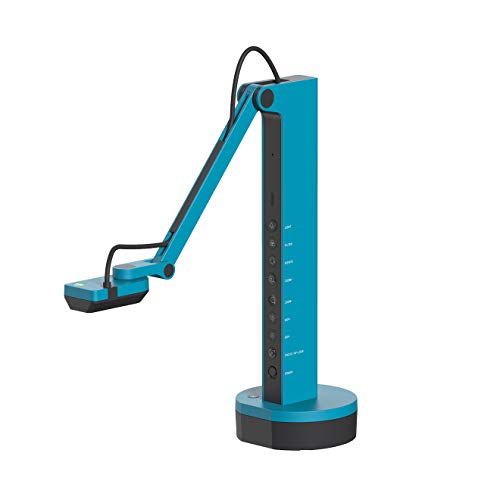
- Wi-Fi, HDMI, and USB connectivity
- Built-in LED with 9–12 hour battery
- Wireless range up to 33 feet
Best For: Mobile teaching and direct projector or TV connection
Premium 4K Choice
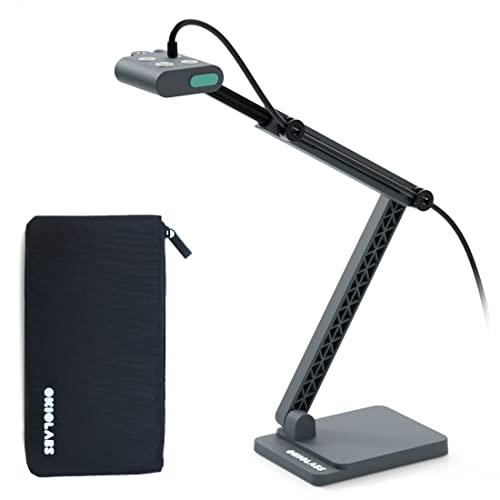
- 13MP sensor with 4K at 30 fps
- Integrated LED light and autofocus
- OKIOPoint and broad software compatibility
Best For: High-detail teaching and professional presentations
Reliable Full HD Presenter

- 1080p Full HD USB capture
- Built-in lighting and microphone
- Foldable design with one-push autofocus
Best For: Routine classroom and office presentations
Flexible Lighting Value

- 8MP output up to 2448p at 30 fps
- Three-level LED lighting with 14 beads
- Foldable A3-size capture area
Best For: Portable classroom demonstrations with adjustable lighting
Best Portable 1080p Pick

- 1080p video at 30fps
- Foldable, lightweight USB-C design
- Dual noise-reducing microphones
Best For: Portable teaching and remote lessons
Best High-Resolution Lighting Controls

- 8MP, 2448p output at 30fps
- Three-level LED brightness adjustment
- A3 coverage with foldable multi-joint arm
Best For: Detailed classroom demonstrations
Best Button-Based Adjustments

- 2448p resolution with 8MP sensor
- Three LED brightness levels and 10 exposure settings
- Foldable A3-capable arm with autofocus
Best For: Teachers wanting direct physical controls
Best Large-Format 4K Pick – INS-2 UHD 4K Document Camera
For shoppers comparing document cameras with built in lighting, the INS-2 stands out with 4K video, a 13MP Sony sensor, and an adjustable arm designed for documents up to A3 size. Its built-in LED, autofocus modes, and presentation software make it suited to detailed classroom and exhibition work.
Best For: Professional educators and art instructors presenting large documents, artwork, two-page spreads, or materials on a big screen.
Pros:
- Captures 4K video at 30 fps with a 13MP Sony sensor.
- Supports documents and artwork up to A3 size.
- Includes built-in LED lighting, brightness control, autofocus, macro capability, and an anti-glare sheet.
- Works with Windows, Mac, iPad, Chromebook, Zoom, Microsoft Teams, and Google Meet.
Cons:
- Its larger-format capabilities may be more than casual users need.
- USB connectivity requires a compatible port or adapter on some devices.
The INS-2 is a strong choice when image detail and coverage area matter most. It costs portability in exchange for professional presentation features, large-format capture, and useful Documate tools such as annotation, recording, scanning, and OCR.
Best High-Frame-Rate Value – IPEVO V4K 8MP Document Camera
The IPEVO V4K is a practical option among document cameras with built in lighting for live teaching, demonstrations, and web conferencing. Its 8MP Sony sensor, fast focusing, and high frame rates help keep moving presentations clear and responsive.
Best For: Teachers and presenters who want high-resolution USB capture with smooth streaming and broad computer compatibility.
Pros:
- Captures images up to 3264 x 2448 pixels with an 8MP camera.
- Streams at up to 30 fps in Full HD and up to 15 fps at maximum resolution.
- Fast focusing helps reduce interruptions when changing materials.
- Compatible with Mac, Windows, and Chromebook applications.
Cons:
- The supplied notes do not identify a dedicated built-in LED light.
- It has no zoom function.
- USB connection limits setup flexibility compared with wireless models.
The V4K is a straightforward USB camera for users who prioritize image resolution, focusing speed, and smooth live video. Consider another model if integrated lighting is a firm requirement, since the listed specifications emphasize sensor performance rather than a built-in lamp.
Best Compact Classroom Pick – INS-1 Classic USB Document Camera
The INS-1 is a compact choice for buyers seeking document cameras with built in lighting for everyday teaching and desktop presentations. It combines 8MP imaging, a built-in LED, autofocus, and a multi-joint design with a generous viewing area.
Best For: Teachers, remote instructors, and presenters who need a space-saving camera for documents, demonstrations, and online meetings.
Pros:
- 8MP Sony imaging supports capture up to 3264 x 2448 pixels.
- Built-in LED, anti-glare sheet, and seven-segment brightness control help with difficult lighting.
- Autofocus and macro capability support close-up objects as near as 3.9 inches.
- Includes a microphone and Documate tools for annotation, recording, snapshots, and image adjustments.
Cons:
- Uses USB-A connectivity, which may require an adapter with newer devices.
- Its 8MP resolution is below the 4K output offered by the INS-2.
For routine classroom use, the INS-1 offers a useful balance of lighting controls, close-up capability, and portability. It is a sensible fit when you want built-in illumination and software features without moving to a larger 4K model.
Best Wireless Connectivity – IPEVO VZ-X Wireless Document Camera
The IPEVO VZ-X is a flexible pick among document cameras with built in lighting, offering Wi-Fi, HDMI, and USB connections in one device. Its built-in LED, rechargeable battery, and wireless range make it useful when presenters need to move around a classroom or connect directly to a display.
Best For: Teachers and presenters who want wireless operation, direct HDMI output, or connectivity with computers, tablets, Apple TV, projectors, and monitors.
Pros:
- Offers Wi-Fi, HDMI, and USB connectivity.
- Built-in LED illuminates the viewing area.
- Battery life is rated at 9 to 12 hours, with wireless range up to 33 feet.
- Swiveling head and multi-jointed stand support different heights, angles, and orientations.
Cons:
- Wi-Fi and HDMI modes capture in HD, while near-4K capture requires USB mode.
- The listed specifications identify manual focus.
- At 2.6 pounds, it is heavier than the IPEVO V4K.
The VZ-X is the most connection-flexible option in this group. Choose it when wireless mobility or direct display output matters more than having the simplest USB-only setup, and use USB mode when you want its highest listed capture resolution.
Premium 4K Choice – OKIOCAM S2 Pro
The OKIOCAM S2 Pro is a strong option for shoppers seeking document cameras with built in lighting and high-resolution output. Its 13MP sensor captures 4K video at 30 fps, while autofocus, an integrated LED light, and broad computer compatibility support polished lessons, demonstrations, and online meetings.
Best For: Teachers, presenters, and remote professionals who want detailed 4K image quality and presentation-focused software.
Pros:
- Captures 4K video at 30 fps with a maximum viewing area of 13.6 x 10.6 inches.
- Integrated LED light helps capture materials in dim locations.
- Includes OKIOPoint smart pointer features and OKIOCAM software for annotating and recording.
- Works with Windows, Mac, Chromebook, Zoom, Teams, Google Meet, and Canvas.
Cons:
- Its 4K capabilities may be more than needed for basic document sharing.
- It requires a USB connection rather than standalone operation.
The S2 Pro stands out when image detail, smooth 30-fps streaming, and interactive presentation tools matter. Its weighted metal base and reinforced arm also make it a more substantial choice for frequent use.
Reliable Full HD Presenter – ELMO OX-1
The ELMO OX-1 is a straightforward visual presenter for buyers comparing document cameras with built in lighting. It delivers 1080p Full HD over USB, includes one-push autofocus and a built-in microphone, and folds down for easier storage between classroom or presentation sessions.
Best For: Classrooms and offices that need dependable Full HD document viewing with a foldable design.
Pros:
- Captures 1080p Full HD at up to 15 fps and 720p at up to 30 fps.
- Built-in camera lighting supports presenting under varying room conditions.
- One-push autofocus and up to 8x software digital zoom simplify demonstrations.
- Folded dimensions are approximately 11.4 x 3.2 x 0.9 inches for storage.
Cons:
- 1080p is less detailed than the 4K output offered by some alternatives.
- Full HD capture is limited to 15 fps according to the supplied specifications.
- Compatibility details list personal computers rather than a broader range of platforms.
The OX-1 favors ease of use over maximum resolution. Its autofocus, microphone, built-in lighting, and foldable form make it a practical choice for routine document presentation.
Flexible Lighting Value – THUSTAR 8MP Document Camera
The THUSTAR 8MP model combines 4K-capable output, a large A3 capture area, and adjustable built-in lighting in a foldable USB design. For shoppers seeking document cameras with built in lighting, its 14 LED beads and three brightness levels provide practical control when room lighting is uneven.
Best For: Teachers and presenters who need a portable A3-size camera with adjustable illumination and microphones.
Pros:
- Provides 8MP, 2448p output at up to 30 fps and supports 4K video capture.
- Fourteen LED beads offer three brightness levels for darker or brighter environments.
- Captures an A3-size area and folds for easier transport and storage.
- Includes dual microphones and compatibility with Windows, macOS, Chrome OS, Zoom, Teams, and other listed apps.
Cons:
- The supplied specifications list USB 2.0 connectivity.
- Its 8MP sensor does not match the 13MP resolution of the OKIOCAM S2 Pro.
- Autofocus is activated with a focus button rather than continuously tracking moving objects.
The THUSTAR is appealing for flexible classroom use, especially when A3 coverage, portability, and lighting control are priorities. Manual brightness and image-reversal buttons add useful hands-on control.
Best Portable 1080p Pick – Gawervan USB Document Camera
If you need document cameras with built in lighting for teaching, remote lessons, or video calls, the Gawervan offers a compact 1080p setup with a foldable design, manual focus, and a 360-degree lens. Its USB-C connection works with Windows, Mac, and Chromebook computers.
Best For: Teachers, homeschool sessions, and remote collaboration where portability and clear manual-focused images matter.
Pros:
- Captures 1080p video at 30 frames per second.
- Foldable hose and compact 0.53 kg design make it easy to carry.
- Dual built-in microphones help reduce background noise.
- Compatible with Windows, Mac, Chromebook, Zoom, Teams, and Skype.
Cons:
- Uses manual focus rather than autofocus.
- No built-in flash is listed, so lighting performance may depend on the surroundings.
The Gawervan is a practical choice for users who prioritize a lightweight, flexible document camera and do not mind adjusting focus manually. It is especially suitable for everyday demonstrations and online instruction.
Best High-Resolution Lighting Controls – Kitchbai 4K USB Visualiser
The Kitchbai combines an 8MP sensor, 2448p output, and three-level LED lighting, making it one of the more feature-rich document cameras with built in lighting for classroom demonstrations. Its foldable arm covers up to A3-size material and supports multiple viewing angles.
Best For: Teachers and presenters who need a large capture area, adjustable illumination, and detailed 2D or 3D demonstrations.
Pros:
- Provides 2448p output from an 8MP sensor at 30fps.
- Three brightness levels help compensate for challenging lighting.
- Supports A3-size coverage and multi-angle positioning.
- Includes dual microphones and compatibility with Windows, macOS, and Chrome OS.
Cons:
- The listed maximum coverage and dimensions may require a relatively clear desk area.
- It connects through USB rather than offering HDMI output.
With its higher-resolution output, adjustable LED illumination, and A3 coverage, the Kitchbai is well suited to classrooms that regularly show worksheets, objects, or experiments. The foldable construction also helps with storage between lessons.
Best Button-Based Adjustments – PAKOTOO 8MP Document Camera
The PAKOTOO is a USB document camera with built in lighting designed for A3 and A4 classroom materials. It combines 2448p resolution, autofocus activated by a button, three brightness levels, and physical image-reversal controls for teaching and video calls.
Best For: Classroom users who want adjustable LED fill lighting and direct controls for focus, exposure, and image orientation.
Pros:
- Offers 2448p resolution with an 8MP camera.
- Three brightness levels and 10 exposure adjustments support different lighting conditions.
- Foldable, multi-joint design supports flexible positioning and A3 coverage.
- Autofocus can capture objects as close as 3.94 inches.
Cons:
- It is not fully plug-and-play; users must select USB Camera in the computer system.
- Does not support zoom or HDMI, and it is not compatible with iPad.
- Uses a USB 2.0 connection.
The PAKOTOO stands out for hands-on adjustment through its physical buttons, including image inversion and lighting controls. It is a capable classroom option, provided your setup supports USB and you do not need HDMI, zoom, or iPad connectivity.
How We Picked the Best Document Cameras with Built in Lighting
We focused on models that combine a document-camera design with integrated illumination, rather than relying on a separate desk lamp. The selection covers 1080p and 4K-capable cameras, 8MP and 13MP sensors, USB and wireless connectivity, flexible stands, built-in microphones, and support for common platforms and operating systems.
We also considered practical details that affect daily use: whether the camera can cover A3 or A4 pages, how easily it folds or adjusts, whether its lighting output is adjustable, and how suitable it is for classrooms, remote instruction, presentations, and video calls.
Quick Comparison
- Best for maximum detail: Choose a 13MP or 4K-capable model for fine print, diagrams, artwork, and close-up demonstrations.
- Best for broad compatibility: USB models that support Windows, macOS, and ChromeOS are usually the simplest choice for classrooms and home offices.
- Best for flexible setups: Wireless, HDMI, and USB connectivity can reduce cable clutter and support displays, laptops, and conferencing systems.
- Best for larger materials: Look for an A3 capture area if you regularly show textbooks, worksheets, maps, or craft projects.
Key Buying Factors for Document Cameras with Built-In Lighting
Resolution and Image Quality
Higher resolution preserves small text and fine lines when you zoom in. A 1080p camera can work well for ordinary worksheets and demonstrations, while 4K-capable or higher-megapixel models are more useful for detailed documents and close-up objects.
Lighting and Controls
Built-in LEDs help reduce shadows and improve consistency under mixed lighting. Adjustable brightness or multiple light levels are valuable when glossy pages, white paper, or reflective objects cause glare. A flexible camera head or image-rotation control can also make positioning easier.
Connectivity and Software
USB is generally the most straightforward option for video meetings and classroom apps. HDMI can connect directly to a display, while Wi-Fi offers more freedom from cables. Confirm compatibility with your computer, conferencing software, and presentation setup before buying.
Size, Focus, and Audio
Autofocus is convenient for switching between pages and objects. A generous A3-size viewing area provides more flexibility, while a foldable stand is useful for storage and travel. Built-in microphones can simplify remote lessons, but a dedicated microphone may still sound better in noisy rooms.
Who Should Buy Which Document Cameras with Built in Lighting?
Teachers and classroom presenters should prioritize reliable USB connectivity, adjustable lighting, autofocus, and an A3 capture area. Remote tutors and meeting hosts may prefer a compact webcam-style model with a built-in microphone and broad operating-system support. Art, science, and technical instructors benefit from higher resolution, flexible positioning, and image controls for close-up work. Traveling presenters should look for a foldable design, while buyers connecting directly to a monitor or projector may want HDMI support. If you frequently change between laptops, displays, and wireless setups, a multi-connection model offers the most flexibility.