The right conference-room TV mount does more than hold a screen. It helps position displays for clear viewing, supports reliable installation, and keeps valuable equipment secure in busy meeting spaces.
This roundup compares 10 options across large-screen support, low-profile designs, full-motion adjustment, corner installation, and Logitech Rally Bar compatibility.
Best 10 TV Wall Mounts for Conference Rooms Picks for 2026
Heavy-Duty XXL Pick
monTEK 60-120-Inch Full-Motion Mount

- Supports up to 120-inch TVs and 265 pounds
- 27.7-inch extension with ±60-degree swivel
- Preassembled with quick-release hardware
Best For: Extra-large conference-room displays and commercial installations
Low-Profile Fixed Pick

- Supports 37-86-inch TVs up to 132 pounds
- Sits 1.28 inches from the wall
- Quick-release straps and 16-24-inch stud support
Best For: Stationary conference-room displays and lobbies
Maximum-Reach Pick
Mount-It! The Beast 60-110-Inch Mount

- Holds TVs up to 110 inches and 275 pounds
- Extends up to 39 inches with full articulation
- Includes cable management and lifetime warranty
Best For: Large conference rooms needing extensive viewing-angle adjustment
Space-Saving Motion Pick
USX Mount 37-90-Inch Slim Bracket

- Supports 37-90-inch TVs up to 120 pounds
- 1.45-inch profile with 11.92-inch extension
- Offers ±10-degree tilt and up to ±45-degree swivel
Best For: Conference rooms needing a slim mount with moderate adjustment
Best Rally Bar Fit

- Dedicated fit for Rally Bar and Rally Bar Mini
- Above- or below-display installation
- Cable routing and 10° tilt adapter
Best For: Conference rooms with Logitech Rally Bar systems
Best Large-Display Choice
Mount-It! 100 Inch Full-Motion Mount

- Supports 60-120-inch TVs up to 264 pounds
- VESA range up to 900 x 600mm
- 120° swivel with 27.7-inch extension
Best For: Large conference-room displays and professional AV setups
Best Low-Profile Flexibility

- Retracts to a space-saving 1.38 inches
- Supports 37-90-inch TVs up to 143 pounds
- ±30° swivel and tool-free tilt adjustment
Best For: Small to medium conference rooms needing a slim installation
Long-Reach Flexibility
BONTEC Long Arm Full Motion Mount
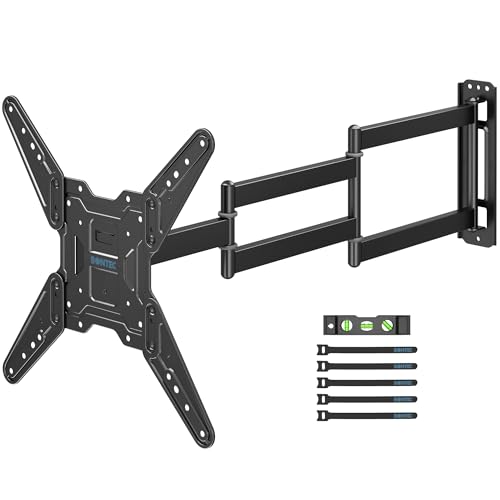
- Extends 37.4 inches for corner or side-wall viewing
- Fits 26–65-inch TVs up to 77 pounds
- Provides swivel, tilt, and post-install leveling
Best For: Small conference rooms and corner-mounted displays
Large-Display Strength

- Supports 37–90-inch TVs up to 132 pounds
- Fits VESA patterns through 600x400mm
- Includes tilt, swivel, leveling, and cable management
Best For: Large conference rooms and commercial display installations
Corner-Focused Reach
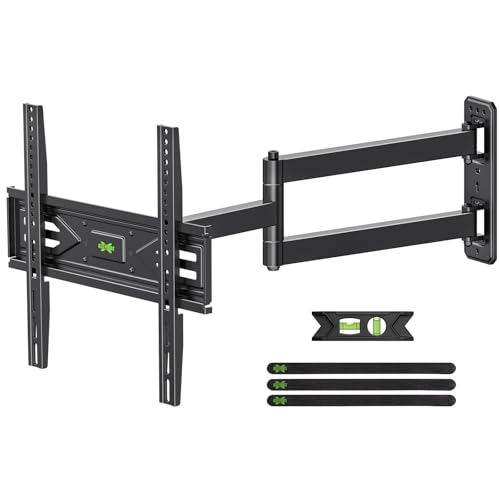
- Purpose-built for corner placement
- Extends 31.22 inches and retracts to 2.52 inches
- Supports 26–65-inch TVs up to 80 pounds
Best For: Compact conference rooms with corner-mounted screens
Heavy-Duty XXL Pick – monTEK 60-120-Inch Full-Motion Mount
For conference rooms using exceptionally large displays, this monTEK mount is built for screens from 60 to 120 inches and up to 265 pounds. Its broad VESA range, long extension, and dual-arm construction make it a strong choice when tv wall mounts for conference rooms need both stability and viewing flexibility.
Best For: Extra-large conference-room displays, commercial spaces, and installations requiring wide-angle adjustment.
Pros:
- Supports TVs up to 120 inches and 265 pounds.
- Extends 27.7 inches and swivels ±60 degrees.
- Preassembled design includes quick lock and release, hardware, template, and bubble level.
- Fits wood studs, concrete, or brick and includes lifetime customer support.
Cons:
- Its 34.6-pound construction may require two-person installation.
- Full-motion clearance can be excessive for rooms needing a fixed, flush installation.
Choose this model when a conference display is unusually large or needs to be viewed from multiple seating areas. Verify the TV’s VESA pattern and wall structure before installation.
Low-Profile Fixed Pick – USX STAR 37-86-Inch TV Mount
This fixed USX STAR bracket is a practical option for conference rooms that need a clean, space-saving display installation rather than adjustable positioning. It supports compatible 37- to 86-inch TVs up to 132 pounds and sits just 1.28 inches from the wall.
Best For: Conference rooms, lobbies, waiting rooms, and other spaces where the screen can remain flush and stationary.
Pros:
- Low-profile design saves floor space and places the TV 1.28 inches from the wall.
- Supports TVs from 37 to 86 inches and up to 132 pounds.
- Fits 16-, 18-, and 24-inch wood-stud spacing.
- Quick-release pull straps simplify TV removal for service.
Cons:
- This is a fixed mount with no tilt or swivel adjustment.
- Compatibility depends on confirming the TV’s VESA pattern and stud spacing.
For a straightforward conference-room display mounted at a predictable viewing angle, this bracket keeps the installation close to the wall and avoids the complexity of articulating hardware. It is less suitable where glare or seating angles require adjustment.
Maximum-Reach Pick – Mount-It! The Beast 60-110-Inch Mount
Mount-It! The Beast is designed for large-format conference displays from 60 to 110 inches, with a 275-pound capacity and up to 39 inches of extension. Among tv wall mounts for conference rooms, it stands out when a very large screen must be angled toward seating positioned across a deep or flexible room.
Best For: Large conference rooms, commercial installations, and 98- to 100-inch displays needing extensive reach.
Pros:
- Supports screens up to 110 inches and 275 pounds.
- Dual articulating arms extend up to 39 inches.
- Provides tilt, swivel, and 360-degree rotation for viewing adjustment.
- Includes a sliding wall plate, cable management, lock clips, and lifetime warranty.
Cons:
- Requires wood studs or solid concrete; it is not intended for drywall-only walls.
- At 43.7 pounds, the mount is relatively heavy to handle during installation.
This is a strong fit when reach and positioning matter more than a minimal wall footprint. Because large extension arms create substantial installation demands, confirm the wall construction, stud alignment, TV weight, and VESA pattern first.
Space-Saving Motion Pick – USX Mount 37-90-Inch Slim Bracket
This USX Mount combines a slim wall profile with basic articulation for conference rooms that need occasional angle changes without a long, heavy-duty extension. It supports compatible 37- to 90-inch TVs up to 120 pounds and retracts to 1.45 inches from the wall.
Best For: Medium and large conference-room TVs where slim installation, glare reduction, and moderate adjustment are priorities.
Pros:
- Supports 37- to 90-inch TVs weighing up to 120 pounds.
- Extends 11.92 inches, tilts ±10 degrees, and swivels up to ±45 degrees.
- Fits wood studs up to 24 inches plus concrete and brick walls.
- Includes a bubble level, cable ties, and standard mounting hardware.
Cons:
- Its 120-pound capacity and 90-inch maximum are below the largest commercial-display options.
- Maximum swivel depends on the TV, so actual movement may vary.
- VESA, TV weight, and stud spacing must be checked before purchase.
For a conference display that benefits from modest adjustment while staying close to the wall, this mount offers a balanced approach. It is best suited to installations that do not require the extreme reach or capacity of an XXL articulating mount.
Best Rally Bar Fit – Logitech Rally Bar Wall Mount
For conference rooms using Logitech Rally Bar or Rally Bar Mini equipment, this dedicated wall mount offers a tidy way to position the camera system above or below the display. Its 200 x 50mm VESA compatibility, cable routing, and included 10° tilt adapter make it a practical choice among TV wall mounts for conference rooms.
Best For: Conference rooms, offices, classrooms, and home offices using Logitech Rally Bar or Rally Bar Mini setups.
Pros:
- Designed specifically for Logitech Rally Bar and Rally Bar Mini systems.
- Supports above- or below-display installation and includes a 10° tilt adapter.
- Integrated cable routing helps create a cleaner installation.
- Heavy-duty metal construction and included installation hardware support a stable setup.
Cons:
- Compatibility is focused on Logitech Rally Bar and Rally Bar Mini configurations.
- The 200 x 50mm VESA pattern may not suit other equipment.
This is a specialized solution rather than a universal television bracket. If your conference system matches the specified Logitech setup, its adjustable positioning and cable management make it a focused, installation-friendly option.
Best Large-Display Choice – Mount-It! 100 Inch Full-Motion Mount
Large conference-room displays need a mount with broad VESA coverage and substantial load capacity. This Mount-It! full-motion bracket supports 60- to 120-inch TVs up to 264 pounds, making it a strong candidate among TV wall mounts for conference rooms with very large screens.
Best For: Large conference rooms, dedicated AV installations, hospitality spaces, and displays mounted to suitable wood-stud or concrete walls.
Pros:
- Supports displays from 60 to 120 inches and up to 264 pounds.
- Wide VESA range from 200 x 200 to 900 x 600mm accommodates many large screens.
- Full-motion design extends 27.7 inches, swivels 120°, and tilts from +5° to -15°.
- Includes a level adjustment, installation template, bubble level, and lifetime warranty.
Cons:
- Not intended for metal studs or drywall-only walls.
- The heavy steel construction makes a two-person lift advisable.
- Its large extension range may be more than smaller conference rooms require.
For oversized displays and rooms where viewing angles change, this mount offers unusually broad adjustment and load support. Verify the TV’s VESA pattern, weight, and wall construction before installation.
Best Low-Profile Flexibility – monTEK Ultra Slim TV Mount
When a conference room benefits from a clean, close-to-wall installation without giving up basic viewing adjustment, the monTEK ultra-slim mount is worth considering. It retracts to 1.38 inches, supports TVs up to 90 inches and 143 pounds, and covers common VESA patterns for TV wall mounts for conference rooms.
Best For: Small to medium conference rooms using 37- to 90-inch displays on compatible wood-stud, concrete, or brick walls.
Pros:
- Low-profile design retracts to just 1.38 inches from the wall.
- Supports TVs up to 143 pounds with VESA compatibility from 200 x 200 to 600 x 400mm.
- Offers ±30° swivel and +3°/-15° tool-free tilt adjustment.
- Includes pre-labeled hardware, drill template, bubble level, instructions, and cable clips.
Cons:
- It extends only 10.2 inches, providing less reach than a larger full-motion mount.
- It should not be installed on drywall alone.
- Compatibility tops out at 90-inch displays and 143 pounds.
This mount balances a streamlined appearance with useful angle adjustment. It is a sensible fit where the display size and wall construction fall within its stated limits, especially when keeping the screen close to the wall matters.
Long-Reach Flexibility – BONTEC Long Arm Full Motion Mount
For conference rooms that need flexible screen placement, this BONTEC model is one of the more adaptable tv wall mounts for conference rooms. Its 37.4-inch extension can bring a display into view from a corner or side wall, while the compact 2.9-inch retracted depth keeps the installation tidy.
Best For: Small conference rooms, corner installations, and 26–65-inch displays.
Pros:
- Extends up to 37.4 inches and retracts to 2.9 inches.
- Supports 26–65-inch TVs, up to 77 pounds, with VESA patterns through 400x400mm.
- Offers ±90° swivel, +5°/−10° tilt, and ±4° leveling adjustment.
- Includes mounting hardware, cable ties, a bubble level, and installation guidance.
Cons:
- Not intended for drywall-only installation.
- Its 65-inch maximum may not suit larger conference-room displays.
The unusually long reach makes this a practical choice when seating angles or room geometry require more positioning freedom. Confirm the wall construction, TV weight, and VESA pattern before installation.
Large-Display Strength – USX STAR Full Motion TV Mount
Designed for larger screens, this USX STAR bracket is a strong candidate among tv wall mounts for conference rooms where viewers may be seated across a wide area. It supports TVs from 37 to 90 inches and offers full-motion adjustment for reducing glare and improving sightlines.
Best For: Large conference rooms, lobbies, showrooms, and commercial spaces using oversized displays.
Pros:
- Supports TVs up to 90 inches and 132 pounds.
- Offers VESA compatibility through 600x400mm.
- Provides +5°/−15° tilt, up to ±45° swivel, and ±4° leveling.
- Includes a drilling template, bubble level, labeled hardware, and ten-year product support.
Cons:
- Concrete anchors are available by request rather than noted as standard included hardware.
- The maximum swivel angle can vary with screen size.
- Extends 16.61 inches, less than the long-arm alternatives here.
This model prioritizes high capacity and broad TV compatibility over extreme reach. It is a sensible fit when the display is large and the mounting wall is wood stud, solid brick, or concrete.
Corner-Focused Reach – USX MOUNT 31.22-Inch Long Arm
This USX MOUNT bracket is built specifically for corner placement, making it a useful option when comparing tv wall mounts for conference rooms with limited wall space. The arm extends 31.22 inches to reach surrounding seating areas and retracts to 2.52 inches when the display is not in use.
Best For: Corner-mounted 26–65-inch TVs in compact conference rooms and shared spaces.
Pros:
- Designed for corners with 31.22 inches of extension.
- Supports 26–65-inch TVs up to 80 pounds.
- Offers ±90° swivel, −12°/+5° tilt, and ±4° post-install leveling.
- Fits VESA patterns from 75x75mm through 400x400mm and includes pre-labeled hardware.
Cons:
- Maximum screen size is 65 inches.
- Concrete anchors or M8x50 screws may require contacting the manufacturer.
- Its two-year warranty is shorter than the ten-year product support listed for the USX STAR model.
With its corner-specific design and substantial extension, this mount can help direct a shared display toward multiple seating positions. Verify the wall material and required hardware before scheduling installation.
How We Picked the Best TV Wall Mounts for Conference Rooms
We focused on the installation and usability requirements that matter most in meeting rooms: supported screen size and weight, VESA compatibility, movement range, profile from the wall, stud compatibility, and ease of leveling. The selection includes fixed mounts for straightforward installations, articulating models for rooms with multiple viewing angles, long-arm designs for corner or recessed placement, and a dedicated Rally Bar wall mount.
Because conference-room displays are often larger and used by many people, we gave particular attention to load capacity, construction, locking or safety features, and mounting flexibility. Always confirm the mount’s specifications against the exact TV model and the wall structure before purchase.
Quick Comparison
| Mount type | Best suited for | Main advantage |
|---|---|---|
| Fixed, low-profile | Dedicated presentation walls | Clean appearance and minimal projection |
| Full motion | Rooms with varied seating | Tilt, swivel, and viewing-angle adjustment |
| Heavy-duty large-screen | Large conference displays | Higher capacity for oversized TVs |
| Long-arm or corner mount | Corner, recessed, or offset installations | Greater extension and positioning flexibility |
| Rally Bar wall mount | Logitech video-conferencing systems | Purpose-built camera and soundbar placement |
Key Buying Factors for TV Wall Mounts for Conference Rooms
Screen Size, Weight, and VESA Pattern
Check all three specifications rather than relying on screen size alone. A mount may fit a TV diagonally but lack the required weight rating or VESA hole spacing. Large commercial displays can also require stronger hardware than a similarly sized consumer television.
Wall Construction and Stud Spacing
Identify whether the installation surface is wood stud, concrete, brick, or metal stud. Some mounts support common 16-, 18-, and 24-inch stud spacing, while others need different anchors or reinforcement. Do not attach a heavy display to drywall alone.
Fixed Versus Full Motion
A fixed mount is usually the simplest choice when seats face one wall directly. Full-motion models are more useful when the screen must serve side seating, avoid glare, or be pulled forward for service access. Remember that articulating arms need clearance behind and beside the TV.
Clearance, Cable Access, and Safety
Low-profile mounts look tidy but can make cable routing and device access more difficult. For public or frequently used rooms, prioritize secure attachment, a reliable locking mechanism, smooth adjustment, and enough clearance to prevent strain on HDMI, power, and network cables.
Who Should Buy Which TV Wall Mounts for Conference Rooms?
- Choose a fixed low-profile mount for a clean, permanent presentation wall with one primary viewing direction.
- Choose a full-motion mount when seating is spread across the room or the display needs regular angle adjustment.
- Choose a heavy-duty model for 85-inch-and-larger TVs or unusually heavy commercial displays, provided the wall can support the combined load.
- Choose a long-arm or corner mount when the TV must project around furniture, fit beside a doorway, or reach from a corner.
- Choose the Rally Bar mount when your room uses a compatible Logitech Rally Bar or Rally Bar Mini and the video bar needs dedicated placement.
Before installation, verify the TV’s dimensions, weight, VESA pattern, wall type, viewing height, and cable requirements. For especially large displays or uncertain wall construction, professional installation is the safer choice.