The best document cameras for conference rooms make it easier to share printed documents, product samples, handwritten notes, and physical demonstrations with both in-room and remote attendees.
This roundup compares 10 options across image quality, connectivity, flexibility, microphone features, and ease of setup so you can choose a camera that fits your meeting space and presentation style.
Best 10 Document Cameras for Conference Rooms Picks for 2026
Premium 4K Pick
AVer F50+ 4K Versatile Document Camera

- 4K video with a 13MP sensor
- 10x optical zoom and multiple shooting modes
- HDMI and USB connectivity
Best For: Professional conference rooms and detailed demonstrations
Meeting Room Value
SDP-860 Session Lab Document Camera

- Includes DVI, VGA, USB, and power accessories
- 6x optical and 8x digital zoom
- 30fps capture with SD card slot
Best For: Basic cable-ready meeting-room presentations
Portable USB Choice
AVer U50 Document Camera for Remote Conferencing

- 1080p video at 30fps
- Foldable arm with built-in microphone and LED
- Compatible with Windows, Mac, and Chromebook
Best For: Hybrid meetings and portable USB presentations
Flexible Visualiser
Kitchbai KB-700 4K USB Document Camera

- 8MP, 2448P capture at 30fps
- A3-size coverage with a foldable multi-joint arm
- Adjustable LED lighting and dual microphones
Best For: Large-document and 2D/3D object demonstrations
Premium 4K Conference Presenter
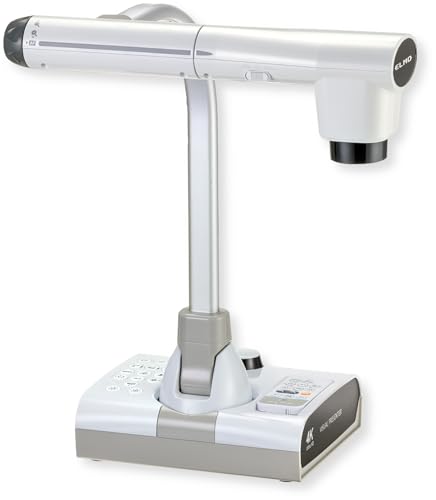
- 4K video with a 12MP sensor and 192x total zoom
- HDMI, USB, and VGA outputs
- Flexible arm, LED lighting, and SD recording
Best For: High-detail conference-room demonstrations with varied display connections
Compact USB Conference Camera

- Up to 2448P video at 30fps
- Foldable, multi-joint design with A3 coverage
- Dual microphones and three-level LED lighting
Best For: USB video meetings and portable hybrid conference setups
High-Resolution HDMI Presenter

- 15MP sensor with 4K at 15Hz
- HDMI and USB connectivity across major operating systems
- A3 coverage, LED light, and TF-card storage
Best For: HDMI-equipped rooms needing detailed document and object presentations
Best Ultra HD Pick

- 8MP capture up to 3264 × 2448
- Up to 30 fps at Full HD
- Fast autofocus with a multi-jointed stand
Best For: High-detail presentations using Mac, Windows, or Chromebook computers
Best Flexible Framing

- Covers documents up to A3 size
- Adjustable brightness and exposure controls
- Foldable multi-joint design with image reversal
Best For: A3 document demonstrations and adjustable tabletop setups
Best Webcam Hybrid

- Combines document camera and webcam functions
- 1080P video at 30 fps with a 360° lens
- Built-in dual microphones and USB-C
Best For: Portable hybrid meetings combining demonstrations and video calls
Premium 4K Pick – AVer F50+ 4K Versatile Document Camera
For conference rooms that need sharp overhead visuals, the AVer F50+ is a feature-rich choice among document cameras for conference rooms. It combines 4K video, 10x optical zoom, HDMI and USB connectivity, and multiple shooting modes for documents, motion, microscopes, and close-up subjects.
Best For: Professional conference rooms, presentations, and detailed document or object demonstrations.
Pros:
- 4K video capture with a 13MP sensor
- 10x optical zoom plus digital zoom for detailed views
- HDMI and USB connectivity with one-touch software
- Five-year manufacturer warranty
Cons:
- At 8.9 pounds, it is less portable than compact USB models
- Color information is not specified in the supplied details
The F50+ stands out when image clarity and flexible connections matter more than portability. Its optical zoom and broad shooting modes make it especially suitable for large-room demonstrations and close-up detail work.
Meeting Room Value – SDP-860 Session Lab Document Camera
The SDP-860 is a practical option for buyers seeking document cameras for conference rooms with straightforward display connectivity. This bundle includes power and display cables, while the camera offers 6x optical zoom, up to 48x total zoom, 30fps capture, an SD card slot, and a built-in microphone.
Best For: Basic meeting-room presentations where included cables and flexible zoom are priorities.
Pros:
- Includes AC/DC adapter, DVI, VGA, and USB cables
- 6x optical zoom and 8x digital zoom
- 30fps maximum frame rate
- Built-in microphone and SD card slot
Cons:
- Warranty is limited to 30 days
- Supplied details list VGA file format and do not specify a higher-resolution video mode
- USB is the listed connectivity technology
The SDP-860 makes sense for a cable-ready conference setup that does not require 4K capture. Its included accessories and optical zoom can simplify installation, but the short warranty deserves careful consideration.
Portable USB Choice – AVer U50 Document Camera for Remote Conferencing
The AVer U50 is a compact USB option for conference rooms that also support remote meetings. It captures 1080p video at 30fps, works with PCs, Macs, and Chromebooks, and can function as either a webcam or an overhead document camera for Zoom and other compatible applications.
Best For: Hybrid meetings, mobile presenters, and teams needing a foldable USB camera with broad computer compatibility.
Pros:
- 1080p HD capture with 30fps performance
- Foldable arm for portable storage and travel
- Built-in microphone and switchable LED light
- Works with Windows, Mac, and Chromebook systems
Cons:
- Uses digital zoom rather than a listed optical zoom
- USB is the listed connectivity method
- 5MP resolution is lower than the supplied 4K model
The U50 is a sensible pick when easy USB setup and hybrid conferencing matter more than premium optical zoom. Its foldable design and autofocus button are useful for shared meeting spaces and traveling presenters.
Flexible Visualiser – Kitchbai KB-700 4K USB Document Camera
The Kitchbai KB-700 is a flexible choice for conference rooms that need large-area document coverage and easy computer-based conferencing. Its 8MP sensor captures up to 2448P video at 30fps, while the foldable multi-joint design, adjustable brightness, image reversal, and dual microphones support live demonstrations.
Best For: Teams presenting A3-size documents, 2D or 3D objects, and live demonstrations through USB conferencing software.
Pros:
- 8MP capture up to 2448P at 30fps
- Covers documents up to A3 size according to the supplied notes
- Foldable multi-joint arm with adjustable positioning
- Three-level LED brightness and dual microphones
Cons:
- USB is the listed connectivity method
- Supplied details describe manual zoom rather than optical zoom
- Compatibility is limited to the listed Windows, macOS, and Chrome OS versions
The KB-700 offers useful presentation controls for rooms that regularly show oversized pages or physical objects. Its foldable construction helps with storage, while brightness and image-reversal controls can simplify challenging demonstrations.
Premium 4K Conference Presenter – Elmo TT-12G
For teams comparing document cameras for conference rooms, the Elmo TT-12G stands out for its 4K video, broad connectivity, and flexible positioning. Its 12MP CMOS sensor, autofocus, integrated lighting, and large capture area support detailed presentations of documents and physical objects.
Best For: Conference rooms that need high-detail demonstrations, HDMI/VGA compatibility, and flexible presentation workflows.
Pros:
- 4K capture with a 12MP sensor and up to 192x total zoom.
- HDMI, USB, and VGA outputs support both modern and legacy displays.
- Multi-angle arm, 18.5-by-10.2-inch capture area, autofocus, and built-in LED lighting.
- Can record audio and video to an SD card and supports Miracast-compatible wireless sharing.
Cons:
- At 6.6 pounds, it is less portable than compact USB models.
- Its larger 17-by-13.7-by-14.8-inch footprint may require dedicated table space.
The TT-12G is a strong fit when image clarity and connection flexibility matter more than portability. Its multiple outputs make it especially practical for mixed conference-room equipment.
Compact USB Conference Camera – THUSTAR 8MP 4K
The THUSTAR is a practical option for buyers seeking document cameras for conference rooms that connect directly to computers. It provides 4K output at up to 30fps, A3-size coverage, adjustable lighting, and compatibility with common meeting platforms on Windows, macOS, and Chrome OS.
Best For: USB-based meetings, remote collaboration, and teams that need a foldable camera with built-in microphones.
Pros:
- 8MP camera delivers up to 2448P video at 30fps.
- Foldable design and multi-joint arm help with storage and multi-angle shooting.
- Three-level LED lighting and manual brightness controls assist in uneven lighting.
- Built-in dual microphones support video calls and can reduce noise.
Cons:
- Uses USB 2.0 rather than HDMI for direct display connectivity.
- Its listed capture area is A3-sized, so larger materials may not fit fully.
Choose the THUSTAR when simple computer connectivity and portability are priorities. Its foldable body and integrated microphones make it convenient for smaller meeting setups and hybrid calls.
High-Resolution HDMI Presenter – TreasLin 15MP
The TreasLin 15MP model is designed for conference rooms that need a direct HDMI connection as well as USB computer support. It captures up to 4K at 15Hz, offers A3-size coverage, includes an LED light, and stores images on a TF card when connected through HDMI.
Best For: Presenters who want high-resolution document and object views with HDMI display connectivity and broad operating-system support.
Pros:
- 15MP CMOS sensor supports 4K at 15Hz and 1080p at 30Hz.
- HDMI and USB connectivity work with displays, computers, and conference software.
- Supports Windows, macOS, Chrome OS, and Linux, with no driver required according to the supplied notes.
- A3 capture area, multi-angle adjustment, LED lighting, and TF-card image storage.
Cons:
- 4K capture is limited to 15Hz rather than 30Hz.
- Mac USB use requires a USB-C adapter.
- The supplied notes do not specify an integrated microphone.
The TreasLin is a compelling choice for rooms equipped with HDMI monitors, TVs, or projectors. Its high-resolution sensor and broad OS compatibility make it versatile, while the 4K frame-rate limit is worth considering for motion-heavy demonstrations.
Best Ultra HD Pick – IPEVO V4K
For conference rooms that need detailed live views of documents, objects, or demonstrations, the IPEVO V4K is a strong option among document cameras for conference rooms. Its 8MP sensor captures up to 3264 × 2448 resolution, while autofocus and high frame rates support smooth switching during presentations.
Best For: Teams that prioritize high-resolution image quality and broad Mac, Windows, and Chromebook compatibility.
Pros:
- 8MP Ultra HD capture with a maximum 3264 × 2448 resolution
- Up to 30 fps at Full HD for responsive live streaming
- Fast autofocus and a Sony CMOS sensor designed for reduced noise and improved color reproduction
- Multi-jointed stand and compatibility with Mac, PC, and Chromebook software
Cons:
- Requires a USB connection and a computer; no HDMI output is listed
- Full-resolution 3264 × 2448 capture is limited to up to 15 fps
- Listed system requirements may be demanding for older computers
The V4K stands out when clarity is more important than standalone connectivity. Its high-resolution sensor, quick focusing, and adjustable stand make it well suited to detailed conference-room demonstrations, provided the host computer meets the recommended requirements.
Best Flexible Framing – PAKOTOO KB700
The PAKOTOO KB700 offers useful hands-on controls for conference rooms that regularly display A3 documents, objects, or demonstrations. This USB document camera covers up to 16.5 × 11.6 inches, includes image-reversal buttons, and provides adjustable lighting and exposure.
Best For: Meeting spaces that need broad document coverage, flexible positioning, and hardware-based image adjustments.
Pros:
- 2448P resolution with autofocus activated by a dedicated focus button
- Captures areas up to A3 size, measuring 16.5 × 11.6 inches
- Foldable, multi-joint design supports multiple viewing angles
- Three brightness levels, 10 exposure levels, and direct horizontal or vertical image reversal
Cons:
- USB 2.0 connection does not support HDMI or zoom
- Not compatible with iPad according to the supplied notes
- Requires selecting “USB Camera” in the computer system and is not plug and play
The KB700 is practical for teams that want physical controls instead of relying entirely on meeting software. Its wide A3 coverage and folding arm are especially useful for shared conference-room tables, although setup requires manually selecting the camera source.
Best Webcam Hybrid – Gawervan 1080P Doc Camera
The Gawervan combines a document camera, webcam, and visualizer in a compact USB design, making it a versatile choice for conference rooms used for both presentations and video meetings. Its 360-degree lens, manual focus, built-in microphones, and 1080P capture support demonstrations and calls.
Best For: Hybrid meeting spaces that need one portable camera for document sharing, webcam use, and voice-enabled collaboration.
Pros:
- Three-in-one design functions as a document camera, webcam, and visualizer
- 1080P video at up to 30 fps with a 360-degree adjustable lens
- Dual built-in microphones are designed to reduce background noise
- Foldable construction and USB-C connectivity work with Windows, Mac, and Chromebook systems
Cons:
- Manual focus requires adjustment when changing subjects or distances
- 1080P resolution is lower than the 2448P and 3264 × 2448 options in this lineup
- Supplied notes do not list HDMI connectivity
The Gawervan is a sensible fit when meeting flexibility matters more than maximum document resolution. Its foldable build and integrated microphones simplify mixed presentation and video-call setups, while manual focus gives the operator direct control over image sharpness.
How We Picked the Best Document Cameras for Conference Rooms
We focused on the features that matter most in meeting environments: image resolution, autofocus performance, capture-area size, arm flexibility, lighting, microphone support, and connection options. Models with HDMI, VGA, or USB connectivity can suit different room setups, while foldable designs are easier to store and transport.
We also considered compatibility with common conferencing platforms and operating systems, including Windows, macOS, ChromeOS, Zoom, and browser-based meeting tools. Because conference rooms vary widely, this list includes both professional presentation cameras and more affordable USB visualisers.
Quick Comparison
| Best For | Recommended Type | Features to Prioritize |
|---|---|---|
| Boardrooms and large displays | Professional 4K camera | HDMI output, strong autofocus, flexible arm |
| Hybrid meetings | USB document camera | Plug-and-play compatibility, clear image, built-in microphone |
| Full-page documents and objects | A3-size visualiser | Large capture area, adjustable lighting, image rotation |
| Portable presentations | Foldable USB model | Compact design, USB power, easy storage |
Key Buying Factors for Document Cameras for Conference Rooms
Resolution and Image Clarity
Choose 4K or a high-quality 8MP sensor when attendees need to read fine print, inspect product details, or view diagrams. Full HD can be sufficient for basic documents and standard video calls, particularly on smaller displays.
Connectivity and Compatibility
USB is convenient for laptops and video-conferencing software, while HDMI and VGA can connect directly to room displays or presentation systems. Check connector types, included cables, and operating-system compatibility before buying.
Capture Area and Positioning
An A3-capable camera provides more room for maps, drawings, books, and physical objects. Look for a multi-angle arm, image rotation or inversion, and a stable base so presenters can reposition the camera without interrupting the meeting.
Lighting and Audio
Built-in LED lighting helps prevent shadows in dim rooms. A camera with an integrated microphone may simplify small hybrid meetings, but larger conference rooms will usually benefit from a dedicated microphone or room audio system.
Who Should Buy Which Document Cameras for Conference Rooms?
Choose a professional 4K model such as the AVer F50+ or Elmo TT-12G when image quality, direct display connectivity, and frequent in-room presentations are priorities. These are better suited to permanent conference-room installations and demanding demonstrations.
For laptop-led hybrid meetings, the AVer U50, IPEVO V4K, Gawervan, and similar USB models offer a simpler setup. They are practical for teams that share documents through Zoom or other conferencing software and want broad computer compatibility.
If you regularly show oversized pages, prototypes, artwork, or classroom-style materials, select an A3-size model with adjustable LEDs and a flexible arm. Budget USB visualisers can deliver strong value for occasional use, provided you confirm autofocus quality, software support, and the required connection type before purchase.